
Motor gives power to your MCU. Ya power to do physical works, for example move your robot. So it is essential to know how to control a DC motor effectively with a MCU. We can control a DC motor easily with microcontrollers. We can start it, stop it or make it go either in clockwise or anti clock wise direction. We can also control its speed but it will be covered in latter tutorials.
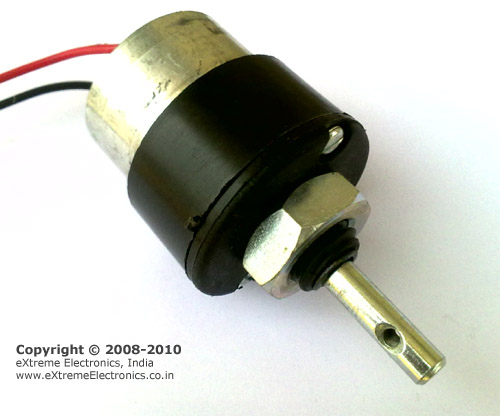 |
A Geared DC Motor. |
DC Motor
A DC motor is electromechanical device that converts electrical energy into mechanical energy that can be used to do many useful works. It can produce mechanical movement like moving the tray of CD/DVD drive in and out (you may like to try it out Go to My Computer, right click the drive icon and click “Eject”). This shows how software controls a motor. DC motors comes in various ratings like 6V and 12V. It has two wires or pins. When connected with power supply the shaft rotates. You can reverse the direction of rotation by reversing the polarity of input.Control with AVR MCUs
As the MCUs PORT are not powerful enough to drive DC motors directly so we need some kind of drivers. A very easy and safe is to use popular L293D chips. It is a 16 PIN chip. The pin configuration is as follows.|
|
L293D Dual DC Motor Controller. |
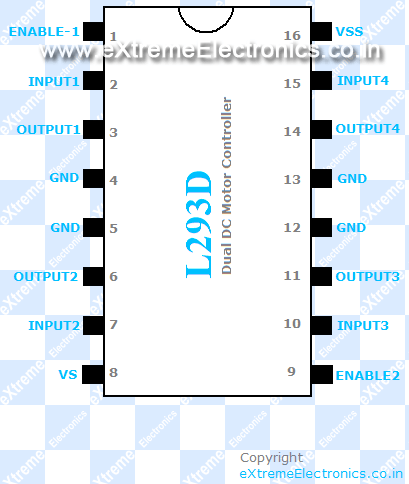
This chip is designed to control 2 DC motors. There are 2 INPUT and 2 OUTPUT PINs for each motors. The connections is as follows.
|
|
Fig: Motor Controller Using L293d chip. |
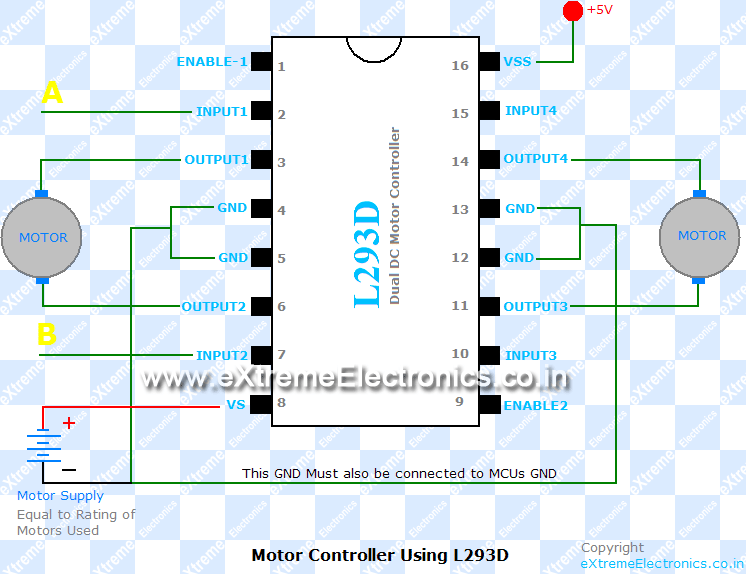
The behavior of motor for various input conditions are as follows
|
A |
B |
|
| Stop |
Low |
Low |
| Clockwise |
Low |
High |
| Anticlockwise |
High |
Low |
| Stop |
High |
High |
So you saw that you just need to set appropriate levels at two PINs of the microcontroller to control the motor. Since this chip controls two DC motors there are two more output pins (output3 and output4) and two more input pins(input3 and input4). The INPUT3 and INPUT4 controls second motor in the same way as listed above for input A and B. There are also two ENABLE pins they must be high(+5v) for operation, if they are pulled low(GND) motors will stop.The following program starts the motor runs it one direction for some time and then reverses the direction.
#include <avr/io.h>
#include <util/delay.h>

void Wait()
{
   char i;
   for (i=0;i<100;i++)
      _delay_loop_2(0);
}

void main()
{
   //Setup port D pin 0,1 as output.
   DDRD=(1<<PD0)|(1<<PD1);

   while(1)
   {
      //Clock wise
      PORTD=0B00000001;
      Wait();

      //Anti clock wise
      PORTD=0B00000010;
      Wait();

      //Stop
      PORTD=0;
      Wait();
   }
}
Assembling.
You will need a Motor Driver Board, Low Cost 28 PIN AVR Development Board and a 150RPM DC Motor to carry out this experiment.
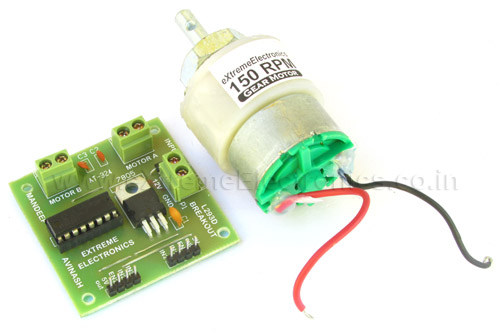 |
Fig. Connecting a Motor. |
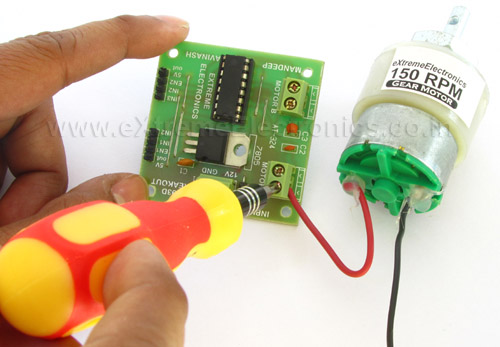 |
Fig. Connecting a Motor. |
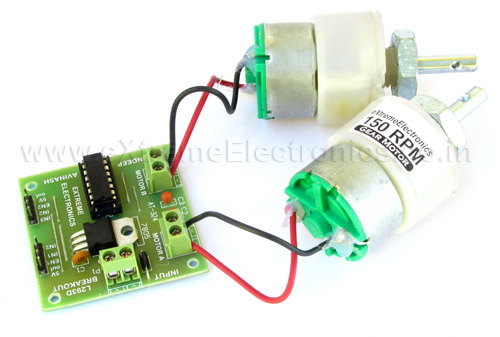 |
Fig. Connecting a Motor. |
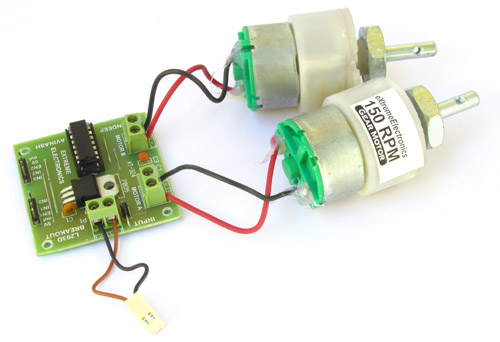 |
Fig. Power Supply for Motors 12V 600ma. |
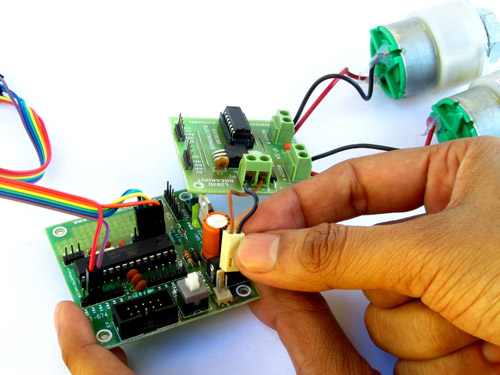 |
Fig. 12V Out from Dev Board. |
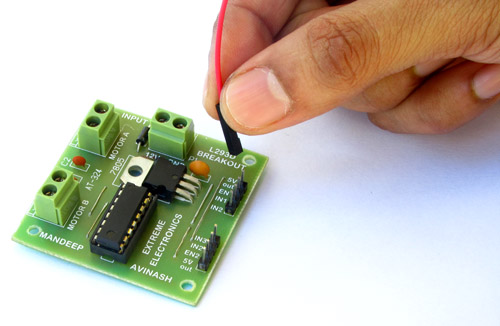 |
Fig. Interface with Dev Board. |
Connections.
| Motor Driver Board | AVR Dev Board | |
| 1 5v out | Not Connected | |
| 2 EN1 | PB1 | |
| 3 IN1 | PD0 | |
| 4 IN2 | PD1 | |
| 5 IN3 | PD2 | |
| 6 IN4 | PD3 | |
| 7 EN2 | PB2 | |
| 8 5V out | Not Connected |
Downloads
Speed Control
The speed of DC motor can also be controlled with MCU. PWM or pulse width modulation technique is used to digitally control speed of DC motors. I will show you how that is done in later tutorials after I introduce you with internal TIMERS of AVR because PWM is generated using timers.
| What’s Next |
| Next I will show you how to interface a 16×2 character LCD Modules. |

Hello Sir,
I have heard of Stepper motors -they are specially used for such control- and also heard that DC motors do not give a good response.Is it true?
hey..i wantd to know that if im gona use PWM to control the speed of the motor….how do interface the PWM o/p pin of the microcontroller to the motor driver IC..
Hello Varun,
Connect PWM o/p to ENABLE PIN (PIN1).
See PWM tutorial here
https://extremeelectronics.co.in/avr-tutorials/pwm-signal-generation-by-using-avr-timers-part-ii/
Hi Avinash,
thanks for the Avr tutorial. i’m trying out this interfacing of dc motor circuit but there is no current flowing inside the circuit… kindly help me
If you have questions about what kind of motor to choose for your DIY project here is a summary presentation of different types of motors. You will see here how they work and in what kind of projects you can use them wisely: http://www.microdiy.com/index.php?/tutorials/motor-tutorial-for-diy-electronics-project.html
@AVINASH
NICE WORK !!!
Pingback: Letters · First Test Setup of OpenThermo Project
Battery symbol should be inverted in Fig: Motor Controller Using L293d chip
Hello Avinash Sir,
I want to ask one simple question…
Why cann’t we use ULN2803 in place of L293D to drive DC motor??…ULN 2803 has also current specification of 600mApms…Is anything special in L293D?
Plz do reply.
Thanks
@Ravi
ULN2803 is darlinton array while L293 is a push pull driver. ULN can only sink current cannot source it, so it cannot be used in bi-directional control of motor. By the way this site is for engineers not KG students
Oh I see!!!!
But one becomes an engineer after passing through KG and
not directly by jumping the KG class…..
Pingback: dasar robotika | selaganderas
hi Avinash,
i wrote a program using your tutorial basic for DC motor control.check this out
/* DC Motor,L293D connectionPC0->Motor1 input pin 1
PC1->Motor1 input pin2
Enable->Vcc
LCD connection
Data-> PB0-PB7 as D4-D7 LCD
LCD Control->
PD5->RS
PD6->RW
PD7->EN
Switch connection
CW Rotation-> PD0
CCW Rotation->PD1
*/
#include
#include
#include"lcd.h"
#define F_CPU 8000000UL
void wait()
{
uint8_t i;
for(i=0;i<80;i++)
_delay_loop_2(0);
}
int main()
{
InitLCD(LS_BLINK|LS_ULINE);
LCDClear();
//PD0 and PD1 as input
DDRD&=~(0x011);
//PCO and PC1 as output
DDRC|=((1<<PC0)|(1<<PC1));
while(1)
{
if(!(PIND&(1<<PD0))) //if key pressed
{
//CW Motion
LCDWriteStringXY(0,0,"Motor Rotates");
LCDWriteStringXY(0,1,"Clockwise");
PORTC|=(1<<PC0);
PORTC&=(~(1<<PC1));
wait();
}
else if(!(PIND&(1<<PD1)))//if key pressed
{
//CCW Motion
LCDWriteStringXY(0,0,"Motor Rotates");
LCDWriteStringXY(0,1,"Anti-Clockwise");
PORTC&=(~(1<<PC0));
PORTC|=(1<<PC1);
wait();
}
else
{ //Motor STOP
LCDClear();
LCDWriteString("Motor Rotation");
LCDWriteStringXY(0,1,"STOP");
PORTC&=(~(1<<PC0));
PORTC&=(~(1<<PC1));
wait();
}
}
}
dude,i must say you are awesome man.ur tutorial really helps me out.hey, one more thing.when ur r start writing about the tutorial of dot matrix interfacing and programming?????dude, i m thankfully waiting for ur next tutorial about dot-matrix.
Hey Avinash , Great tutorial I must say , but I wanted to ask that what would the program ( C ) look like if I had to control 2 motors using the L293D using the same logic.? ( And I mean controlling the motors simultaneously) What ports should I use for the second motor?
thank you avinash sir,this is a great website for beginners,hope you keep coming up with such helpful and self contained tutorials .god bless you sir.sir, can you please suggest online website to become perfect in c programming.i will be greatful to you
its great
i have xboard v2.0 with me. can i control the speed of 12v dc motor 150 rpm by changing the adapter of 12v to 9v or 6v ?
hey thanks for tutorial. but i need AVR C code and circuit diagram for DC motor speed control using Atmega32 and motor should stop when it senses IR signal. its too urgent please send soon
And how to control motor DC like Dynamo motor 12V/3A?
are this series can be fixed the problem?
hai avinash…
am doing project with pic16f877a interfacing motor driver L293D…. i worked some programs on my own, and simulated in proteus software… but i cant get it output… plz refer me some tutorials….
nice article but i need the tutorial about DC motor speed control
@Dweep,
Thank you.
See this for seep control https://extremeelectronics.co.in/lfrm8/Help/Motor2.htm
thank you sir its a nice tutorial . now am trying to do obstracle avoiding robot. by referring yours tutorial .In that the xboard contains l298 driver . is that works in l293d?
@Akhil, what is your Order number for the purchase of xBoard v2.0?
sorry sir am not purchased the x board . I am trying to mount my self.
am referred the schematics of x board from this site
Why its being tough to download any file? The download link hardly appears…
@Shihab, you have to share the given link on Facebook, in order to make the download link appear !:-)
we have checked your FB profile and found out that you have not shared the link so we are stopping your account 🙂
Hi Avinash
Great site, really motivated me to get back into programming. i would like to get the code for
the SMS project, but i dont have Facebook (sorry, im too old). any chance i might be able to get the code?
Also, are the SIM300 modules still available?
@Arif, Yes, SIM300 are easily available.
HI
I need some circuitry to wire two motors like you have only i need them to polarize and reverse. What do i need to add to this that you have done already with the dual motor layout?