When I started using USBasp
(a great programmer for AVRs), I soon realized that the avrdude (the software
for driving USBasp) is not much usable. Sometimes it irritates me a lots because
of its command line interface. Also the avrdude-gui is not
much helpful as it was just calling the avrdude in background. It cannot write/read
the fuse bytes easily and reading the chip content was impossible. I made many
changes to the software to make it more useful but Finally I decided to write
a fresh new software from scratch and eXtreme Burner – AVR
was born!
The eXtreme
Burner- AVR has full graphical user interface (GUI) and can be
used much more easily.
Screen shots
Fig.: GUI Software for USBasp
Fig.: GUI Software for USBasp – Burn Progress.
Fig.: GUI Software for USBasp – Task Complete !
Easy AVR Clock Source Configuration
AVR series of MCU supports several types of clock sources for various applications. For example a cheap RC Oscillator or a perfect high speed crystal oscillator. You can select from the following clock sources easily using a drop down menu.
External Clock.
Calibrated Internal RC Oscillator. (DEFAULT)
External RC Oscillator.
External Low Frequency Crystal.
External Crystal/Ceramic Resonator.
Fig.: Selecting AVR Clock Source
Fig.: Selecting Clock Option
Linux Version !
Finally the much awaited Linux Port is here ! Now you can use eXtreme
Burner – AVR on Linux too!
Please send feedbacks, responses and screen shots to my email avinash[AT]extremeelectronicsXYZ[DOT]co.in
(Remove XYZ and replace [AT] with @ and [DOT] with .
Start terminal and log in as root using su
root command and enter the root password.(In Ubunto type sudo
su and then your user password)
Go to the folder where you place eXtreme Burner – AVR
type ./avrprog to start the
app.
Now you can use the graphical interface to work with AVR chips. The interface
is exactly same as MS Windows version of eXtreme Burner.
Be generous, Please donate
If you use eXtreme Burner – AVR and find it useful, please donate. We would be very thankful to you.
Download
Download eXtreme Burner – AVR v1.4.3 for Microsoft® Windows®
XP®, Vista®, 7 (both 32 and 64 bit versions). This version has the drivers built into the installer.
Note for Windows 8 and above users
These OS does not allow installation of unsigned drivers. Please see the following video on how to disable this. Only after disabling this feature install the software.
Feedback
This is first public release so please send your suggestions and bug reports.
Please don’t hesitate to leave your comment here.
Testimonials
I’m happy you like the donation. I am ex Atmel engineer. I really like your software. Please keep writing. Don’t stop for a minute! -Frank 🙂
Translators
Peoples interested in translating the app may get more information on this page.
Hi Avinash!
I use Eclipse with AVR plugin, and avrdude, and it’s very userfriendly.
You can read/write fusebits, compile a project with one buton and write to MCU with another buton.
You can do more things, which I don’t know yet.:)
Hi Avinash I am trying to flash Atmega328P-PU for a project I have an AVRASP and I have downloaded as recommended by a friend your Extreme Burner but the version I have does not support the Atmega 328P where can I download the version that supports this chip without having to have a facebook account which I do not have or update the version I have.
Best regards, Ian.
Hi Avinash,
Thank you for this really nice and good software. My student already built the hardware (USBasp) and installed the eXtreme Burner software (I will also do it very soon), but managed to run it only under WinXP. He did not have success with Vista in his notebook. Is there a way to install it under Vista? Something like a special driver? BTW, allow me to suggest you the inclusion of a “fuse calculator”, like the SinaProg.
Best Regards,
Ailson
Hi,
is it possible to pass hex file through command line? Reason I’m asking this is because bascom has no support for avrdude and can’t pass mcu type through command line only filname with {FILE} command. I saw that eXtreme Burner automatically recognizes mcu type and if file could be opened with command line option it would be great.
I was searching for an alternative to AVRdude, which is, as you say, not very “user-friendly”, and found your comment on another site, which led me here. eXtreme Burner is very nice, but I’d like to request a missing feature for V1.1, namely a way to VERIFY (independent of programming) the contents of a chip against a given file. AVR studio has this feature, which is very useful for checking if an “unknown” chip has the code in it that you think it does. An even better feature would be a way to list the differences (often marked by an internal date stamp). YAF (yet another feature) would be an ASCII interpretation of the FLASH (and/or EEPROM) contents in addition to the hex values (with a “.” or “-” for non-ASCII chars). I’m sure you’ve seen this format – it’s pretty common in the “business”.
That said, V1.0 is Very Nice, although I would rather that the “read” (or “write) buttons on a given “page” limit their actions to that page, with the “all” function being on the menu bar. I did have to “hide” the libusb files (per your suggestion). Thanks again for a major advance in AVR programming!
hello avinash,
Can you suggest me which firmware and hardware should use out of many firmware and hardware shown in http://www.fischl.de/usbasp/ this site.Or suitable firmware and hardware for Extream-burner software.
Thanks in advance.
it is working properly with great speed.
one more thing,i played with fuse setting, and i lost one mega 8 device. can you suggest me how to recover same device.
Thanks in advance.
Kunal
Great job on the program.
I saw that verifying the Flash Memory takes a lot of time (especially in slow SCK). Does it verify the entire memory or just the written one? If its not the entire memory I can’t explain why it takes so much time and I think you should include an option to disable flash verification.
Hi Kunal,
If the Mega8 is not fried, one relatively easy way to recover it is to build a Dontronics DT006 parallel port SPI programmer (very easy to build, even in a protoboard, with just a couple or 330 Ohms resistors and a cap). As you have messed up with the fuses, it is very important that you use an external clock source tied to XTAL1 pin. The frequency is not critical, one to two MHz will do fine (I use 2MHz). You can nake one with a 555 timer. For the download software, you can use avrdude ou get the CodeVisionAVR (the free eval version) from http://www.hpinfotech.ro. Setup as the programmer DT006. Setup carefully the fuse bits to fit your needs.
Hope I have helped, and good luck
Ailson
Initially I got this “No Supported Programmer Found” problem. But when I deleted “libusb0.dll” and “libusb0.sys” (as told above in installation steps), it worked great.
I loaded the hex file an verified it as well..!!
For screenshot, visit the forum ‘installation Problem’ under AVR Microcontrollers.
Salaamz….
I m using ur gui software for burning my avrs… n its being wrking gr8! But it dint have the chip ATMEGA644P (I hv a couple of those in addition to ATMEGA164P)
Though i can program it using this software by not considering the chip… can u plz add up this device in the next version of the software…
Its a great job indeed… Thnxxx…
Regards
I will be adding support for ATMEGA644P and please help me by testing the support. I will be sending you the XML file(with ATmega644p support) and instruction shortly.
I have made an updated Windows driver for USBasp AVR programmer for use with avrdude and eXtreme Burner (Tested on Windows XP 64-bit Edition). Based on libusb-win32-device-bin-0.1.12.2.tar.gz.
MY USBASP CAN USE AVRDUDEGUI (YUKI_LAB V.1.0.5) NO PROBLEMS, BUT EXTREME Burner 1.0 MATTERS. Exit “mismatch LOCATION AT 0X00000000”, THEN “Task Retry Failed PLEASE” .. WHAT NEED DISETTING
Hi!
Thanks for good project. Please read my feedback.
I’ll be very glad if you will solve some problems.
1.Slow reading(maybe it seems so for me only?)
2.Help doesn’t work.
3.add settings menu. e.g. disable verifying(sometimes it is not needed)
4.add autoreload
5.add a button for writing FLASH only
6.add fuses description
A very thanks to you!
1.Slow reading(maybe it seems so for me only?)
Solution: Please disable slow SCK by removing jumper (see USBasp page for details)
I will implement the following in next release.
2.Help doesn’t work.
3.add settings menu. e.g. disable verifying(sometimes it is not needed)
4.add autoreload
5.add a button for writing FLASH only
6.add fuses description
A very thanks to you!
Thanks! Much more faster! I thank that normal position is connected and simply soldered it to ground.
Some timeout takes a place before programming/reading. It appears with all software programmers. What’s the cause?
Very thanks and respect!
Sifun, AVR beginner.
In windows vista you cant write the calibration fuses
and maybe its a tip to make da delay between writing and verifying cause my m16 gives errors with full sck but with slow sck is works perfect.
hi,
i wanted to ask when would be the next version with new features available here…
n Can u plz add up the usb pic programmer gui software….?
regards…
It would be nice to have ASCII option in flash/eeprom data windows.
Looks very nice. Will try it out as soon as my programmer arrives.
Fuse settings are a bit sparse… could have a drop down table as per AVR Studio
Hi. Very good software!
Will you develop multilingual version?
If so, then I can help with the translation program for Russian and Ukrainian languages.
Hi Avinash
You can count with me to translate eXtreme Burner to Brazilian Portuguese, too! BTW, the USBasp driver was not being recognized in VISTA just because I didn’t include the two 3V6 zener diodes in the D+ and D- lines (as some USBasp hardware schematics around the Internet don’t). I relied on the two 68 Ohms resistors to protect the USB lines, dropping the microcontroller port voltage from 5V to around 3.6V. Once I included them, Vista immediately recognized the driver and eXtreme Burner worked beautifully. So, the bottom line is: THE 3V6 ZENER DIODES ARE EXTREMELY IMPORTANT, REGARDLESS OF WHICH O.S. YOU WORK WITH, INCLUDING LINUX!
Regards, Ailson
Extreme Burner is a great alternative for avrdude gui. It’s much more user friendly and easy to work with it. Many thanks for You Avinash. I have only one suggestion: it could be a little bit faster (for coding I use AVR Studio), now the time of writing the flash is 1 minute…
hi
do u have any tutorials on making a bootloader for mega8,
i want the program and also a circuit or hardware interface to connect the MCU to the PC.
i am also interested in using AVR GCC in ubuntu could u help me out
PS: the location of this comment may be irrelevant please don’t mind.
hey avinash,
do u have any link or step by step on how make ur own programmer(usb)
please correct me if i m wrong
1 download the firmware and other files
2 then program the atmega8 with the firmware
3 install all hardware(pcb)
4 then program other avr uC using that programmer using ur software of extreme burner
please tell the correct method if i m wrong.thnx in advance
regards,
-gaurav parida
@GAurav- that’s correct, but I think Avinash sells one ‘ready to go’, if you’re only making a one off….
I have made one exactly as you describe and it works perfectly.I have incorporated it all into an old product that worked via RS232, now it works via USB.
Hi guys, Sorry for the newbie question: I just hooked up a ATTINY13-20PU to an USPASP programmer. I can read what’s on the chip, i can erase whats on the chip, but i write something on attiny from a hex file, after writing the verifying goes wrong. Mismatch at location 0x000000000, task failed. please retry. This problem is very reproducable: ive tried this with several attinies, all of them fail this way. When performing a read to see whats on the ATTINY, the first, second, sixth, seventh, and so on lines are full of free bytes (FFFFs)
Have anyone had the same problem? Is this a connection problem, a problem with the programmer, or the extremeburner?
@martin.
thanks martin
but y its not an easy to work with manchestor code
i hav gone through wiki. i know it well.
but my question was can u help in writing the code.
i use Atmega 88
Martin, Avinash Here, I thank you a lot for helping Vikram (for his pointless question.) But I have to delete these comments as they are not relavant to the page. Sorry.
Can’t help with writing the code, that’s down to you. It can’t be that hard, it’s self clocking.I guess this is a homework/coursework question, in which even more reason why I don’t help/write the code for you…..
Hi again, Ive tested it on an Atmega8 and it works flawless. I think my problem with partial writing of the hex code on attiny13s is because i use attiny13 and the program only supports attiny13A.
Tiny 13A should work ok….They both have the same signature bytes… 1E 90 07.
Avinash…. how about adiing ‘user defined’ sig bytes ???? this would allow programming of new devices automatically… allow 128K of flash buffer and 8k of eeprom buffer…. up to user not to overflow the buffers…. 🙂
Hi, Avinash
I needed to program a Atmega168P part, but just found an entry for Atmega168 in the “Chip” menu. I realized that you keep the parts database in the “Data” sub-folder in the XML file chips.xml. As the only differences between the 168 and 168P are the name itself and the chip signature (which identifies it), I copied the 168 entry and pasted it right below, changing the tags (to place the suffix “P”) and (to change the 168 signature 0x0006941E into 168P sig 0x000B941E, found in the datasheet), as below:
When I ran eXtremeBurner AVR, I found the Atmega168P listed just below the Atmega168, and the part was programmed successfully. I detailed this information here for your knowledge (so you can safely include in the next release), and for all users. I take the liberty to ask other users to try other ATtiny/ATmega parts (at their own risk), copying the closest part and modifying the tags accordingly (not forgetting to change the tag). All the needed information can be found in the respective datasheet. If it works fine, the user might wish to post here to let you and the users to know.
Windows users: As an advice, it is more convenient to right-click the chips.xml file and click the “Edit” entry so it will be opened in Notepad, otherwise if the user double-click the file it will be opened in Internet Explorer.
BTW, isn’t time for a new Windows release?
Best regards and a fruitful 2010,
Ailson
eXtreme Burner – AVR (Linux version) does not work on popular Linux distribution Ubuntu 9.04.
Error message:
Mismatch between the program and library build versions detected.
The library used 2.8 (no debug,Unicode,compiler with C++ ABI 1002,wx containers,compatible with 2.6),
and your program used 2.8 (no debug,Unicode,compiler with C++ ABI 1002,wx containers,compatible with 2.4,compatible with 2.6).
There are probably problems with Python wxLibs on Ubuntu. On Fedora eXtreme Burner – AVR run normally.
Sir as u have mentioned if “no programmer found” statement is coming the delete sum files from the folder where u have installed the software. SIR i have done that also but my pc doesn’t recognize the device my USB cable is also right.
and when i install the driver it says that the current software is better than what u r installing
SIR what should i do now?
PLS SIR help me out I am in a great trouble…
pla sir help me out
Hi Atul,
Please, tell us what Operating System you are using. If you can, tell which USB driver version you installed (0.1.10.1 or 0.1.12.1). Did you build your oun USBAsp programmer? If so, can you post the link to the page you got the schematic from? Does your programmer have the two protecting 3.6V Zener diodes in the USB D+ and D- lines? I had the same problem as yours just because I did not solder those diodes (Windows Vista). When you installed the driver, you did it as Administrator?
Waiting for your response,
Regards,
Ailson
I am using WIN Xp SP2.
The USB port to which i am connecting the programmer have the driver
C:\WINDOWS\system32\drivers\libusbd0.sys
My USB driver version 0.1.10.1
I have connected two 3.6V zener diodes in the USB D+ and D-
I have taken the circiut diagram and all the neccessary details from the site given below http://robolabz.multiply.com/journal/item/57/USB_Programmer_for_AVR
The picture of the USB programmer which you will see that is made my be on a genral purpose pcb.
SIR when I connectthe USB cable my pc says that the usb device is not recognized and i have tried all the methods of updating the driver and even i have formatted my pc foe that.
SIR i am really freaking out pls help me out SIR
YOu will be very lucky to get that working if it is built on a ‘veroboard’.
Firstly, there are no caps on the crystal…..
For a few $$ you can buy one ready made…
Atul Singh,
Martin is right in that you *MUST* put two ceramic caps (22pF or 27pF should be fine) from each crystal terminal to GND. With respect to the ‘veroboard’, it should work fine if you got careful with the connections. Mine even worked on a ‘protoboard’ when I first built it for testing. After soldering the caps, post if still doesn’t work so that we can proceed. To speed-up things, if you have a voltmeter around, measure the Zener voltage from a removed device (or use one of the same type, if you bought extras) with a 680 Ohms resistor and a 5V supply. It should be around 3.6V. This is because as one is usually not sure which Zener diode he got (especially the ones glass-encapsulated), there is a possibility that the zener voltage rating is not the correct one.
Hi, Martin. Based on your name, you might be from a developed, first world, country. If this is the case, please, take into account that people from “the rest of the world” might not have that few $$ to spend on a ready made programmer. Best regards.
THANK YOU SO MUCH SIR
My programmer started working when i connected caps across the X-TAL.
Sir i want to ask that why we have to connect the caps across the X-TAL?
I am using SuseLinux 11.0 / Kernel 2.6.25.20-0.5.
While starting ./avrprog I get following error:
Fatal Error: Mismatch between the program and library build versions detected. The library used 2.8 (no debug,Unicode,compiler with C++ ABI 1002,wx containers, compatible with 2.6), and your program used 2.8 (no debug,Unicode,compiler with C++ ABI 1002,wx contai ners,compatible with 2.4,compatible with 2.6).
Abgebrochen
I need help I can’t download the hex file to the avr chip.
USBasp detected but can’t communicate with the target chip. However, when I used USBISP and AVRstudio it run well.is there any setting for extreme burner before I download the file??
First burning
Into a new, empty chip *. hex file to be written correctly.
Next burning
I set the configuration bits. I wanted to burn an *.hex file, but there was a warning message.
SBasp detected but cant communicate with the target chip.
Chip is good. When using simply serial programmer all works normally.
Hi dragos,
Look at my post #89 above. It deals with just that: How to add an Atmel chip (ATiny, ATmega) to the “Chips” drop-down menu. I didn’t look the tiny26 datasheet, but maybe its ISP programming parameters are close to the tiny24 (please, check it by yourself). Just copy and paste the whole entry for the Atiny24 chip (just bellow it) in the chips.xml file found in the Data sub-folder and modify its parameters, including its name (to properly show up in the “Chips” drop-down menu). Make a back-up of the XML file, just in case. Also, please check if your hardware is prepared for this newly entered part (ISP or ZIF socket SPI pinouts).
Regards,
Ailson
i am using your AVR development board 40 pin one. when i tried to interface with 16*2 LCD. i am not getting any display. i followed your LCD interface procedure. i heard we need to disable JTAG. can u tell me how to disable JTAG. i am using atmega 32 microcontroller
@ravindra
look man , everybody tries to do something and if he is not able to do that how can i setting miles away, whitout even seeing your setup solve your problem?
also please use the forum for such discussion.
i think there is a thing called datasheet which can tell u about fuse bits and how to disable jtag.
I agree, this isn’t a free consultancy forum.Too many people asking for the most basic of help. The best help forum and a wealth of historic information is avrfreaks.net
Sir,
At present I am using progisp to flash AT89SXX with usbasp(with modified firmware). Is it possible to add the support for AT89SXX chips in your software?
@Dhananjay
I used that its working and it can programme 3 to 4 times after that there is a problem with programmed IC.
If you ifnd that problem then please contact me.
When i try to run this software under OpenSuSe 11.2 (x64), i’ll have next error:
./avrprog: error while loading shared libraries: libwx_gtk2u_richtext-2.8.so.0: cannot open shared object file: No such file or directory
but i have this (library)file on path /usr/lib64/libwx_gtk2u_richtext-2.8.so.0
when i copy this to xAVR directory nothing change.
WxGTK, Wxwidgets is installed. Libusb too(i work with this library on another project).
this is the output i get in ubuntu while using usbasp
i use ubuntu 9.10
neo-server@neo-server-desktop:~/Downloads/xAVR$ ./avrprog
Fatal Error: Mismatch between the program and library build versions detected.
The library used 2.8 (no debug,Unicode,compiler with C++ ABI 1002,wx containers,compatible with 2.6),
and your program used 2.8 (no debug,Unicode,compiler with C++ ABI 1002,wx containers,compatible with 2.4,compatible with 2.6).
Aborted
How about a fuse settings like in BascomAVR, where is more clearly, it can be made ? How you do, allways look in the datasheet to “translate” de bit position !
Hellow Avinash,
You did a great job!I like the tool very much.
AVR v1.0 is not parsed Extended SegmentAddress correctly,mabey next version can fix the bug.
Thanks!
Re bug in hex address: Careful here! The first two hex digits are the BYTE COUNT, not the extended address. In fact Intel Hex format is limited to 16-bit addressing. There is a special command to change “segments” (remember, this format stems from the 8086 processor days!), viz. an address of 0000, followed by a 2-byte segment address. So for addresses above 65536 (0x10000), the segment address is 0x1000 (i.e. just divide by 16). Thus the command line in the hex file is: 02 0000 02 1000 EC (without the spaces). The first 02 is the byte count (the segment address is 2 bytes), then an address of 0000, then the special “field change” code of 02, followed by the segment address itself, followed by the checksum of the preceding bytes (to make a total sum of 00).
My copy of eXtreme Burner correctly displays addresses above 64K, but DOES NOT SAVE anything above that address. It also saves an .eep file, even though I un-check the box that says ‘save eep’.
Do you consider compiling a 64bit Linux version? I am getting the
./avrprog: error while loading shared libraries: libwx_gtk2u_richtext-2.8.so.0: cannot open shared object file: No such file or directory
Error, and thats mostly because I have not the 32bit wxGTK libs installed. I am currently running Ubuntu (Mint) x86_64 on the dev. machine.
$file avrprog
avrprog: ELF 32-bit LSB executable, Intel 80386, version 1 (SYSV), dynamically linked (uses shared libs), for GNU/Linux 2.6.9, not stripped
I liked your software, it’s light and easy to use. I only suggest to put a button (or a shortcut) on the toolbar to write the flash|eeprom|fuses only. I know there is a menu command to do it, but after many cycles of programming only one of these i wished there were a faster way.
Hi Avinash,
U r really doing gr8 job.
I want to program ATmega644p.I’ve added the details of microcontroller in XML file.But when I tried to write/read the chip, it came like task is failed & no supported programmer is found.Can u plz giv some suggestions regarding this.
Thanx in advance.
Hi, I am a complete newby to programming AVR microprocessors. Forgive me if I ask a stupid question. From reading this blog I believe that it is possible to develop applications using the assembler provided with the AVR Studio 4 development environment, then write the resulting machine code to the AVR microprocessor (Atmega168 in my case) using eXtreme Burner – AVR software and a standard USBASP programmer. Am I correct? Are there any pitfalls in this approach?
Thanks and regards
Bob VK2ZRM
Sydney Australia
Thanks Avinash, I really appreciate you taking the time to respond to my question. I’ll report back when I’m more advanced in programming AVR microprocessors.
Bob VK2ZRM
Could you include a Alphanumerical view for the Hexfiles like in Ponyprog (on the right side)? http://electronics-diy.com/schematics/avr_programmer/PonyProg_Programming.jpg
I usually code a block of Text at the beginning of my Programs so that i can see which Program is in the controller (and which version)
dear friend, the programmer is working good if we dont concider its pace in verifying, another thing is the fusebits, it would be better if it set fusebits to the factory defaults.
It doesn’t work on uBuntu-lucid due to incompatible library:
”
./avrprog
Fatal Error: Mismatch between the program and library build versions detected.
The library used 2.8 (no debug,Unicode,compiler with C++ ABI 1002,wx containers,compatible with 2.6),
and your program used 2.8 (no debug,Unicode,compiler with C++ ABI 1002,wx containers,compatible with 2.4,compatible with 2.6).
Aborted
“
Hello Avinash,
I just want to tell you that I have tested eXtreme Burner with Atmega328p having signature 0x0F951E. You can safely update the next version of this brilliant software with this controller.
Thanx
I would like to know if Extreme Burner supports Attiny45. I have read that that Usbasp supports it but I can’t find the option to select the chip in Extreme Burner. Can anything be done about it? I have about 10 chips that I would like to program via usb and I already have the usbasp. Works great with atmega8 but would like to test it for tiny45. Thanks.
@ Coka cokx & Bang Ming
Have a look at the post # 89. There is a way to manually edit the chips.xml file and add up any devices that are missing. It requires the device signatures of the chip (available from datasheet) u want to be added.
Cheers…
Allah Hafiz
Thanks suleman. But can anyone tell me what might be the problem. I am getting “Cannot communicate with target chip” error trying to program the Attiny2313 and Attiny45. I have just purchased 10 of each and they are new. I am using the Usbasp and extreme burner. My programmer works fine to program atmega8 but says it can’t communicate with attiny2313 and attiny45. Can anyone please help me. Thanks.
There might be a couple of problems:
.The microcontroller’s fuses might be set to a different crystal settings other than the internal (though they are shipped with internal crystal set)
.U might not be providing the power(Vcc=+5V) to ur controller either from USBasp or externally.
.Chk out your programming connector configuration.
PS: i have programmed attiny2313 and it works fine & so should attiny45…
Well, I have checked the voltage supplied. It is 5V, from the programmer. It’s very very strange. It does not work even for my Atmega32. I have heard a little bit bout factory settings. So, any suggestions on what to do? Use a different clock speed? Or take out the clock altogether? I really do hope it works. I doubt that all the chips I purchased are faulty as I have gt them from a reliable supplier. Anyway, it works for my Atmega8. Please help me. Thanks.
have u tied up an external clock source? or crystal oscillator?
Chk our that u shud have pulled up the RESET pin via 10k res.
PS: The factory settings of attiny45 and 2313 dont require reset to be pulled up or to provide external oscillator. Try tht anyway.. otherwise get another one n try 🙂
hi,I’ve got a strange problem: as mantioned above I’ve got an error “no supported programmer found” but I’ve allready deleted proper files and I have two zener diodes. I’m working on win7x64 and in device manager USBasp is OK (working properly). Do you have any idea what’s going on?
Thanks for the nice and easy product. I have tried deleting the libusb0.dll” and “libusb0.sys” file as you suggested on phone and got it all working. Thanks very much for it.
One question, do you know any programmer to write code for ATmega8. Any suggestion would be a real welcome, as I aware of electronics and computers, but not much in the way of programming/microcontrollers.
Fatal Error: Mismatch between the program and library build versions detected.
The library used 2.8 (no debug,Unicode,compiler with C++ ABI 1002,wx containers,compatible with 2.6),
and your program used 2.8 (no debug,Unicode,compiler with C++ ABI 1002,wx containers,compatible with 2.4,compatible with 2.6).
Aborted
i have a problem with the schematic on fischls site
numbered all his capacitors …i cant seem to locate C2 ???
can anyone tell me the value of c2 and where to place it .. plz
thanking you
hello avinash,
i loved your software from the day i saw it getting famous,
it has helped me a lot in learnin a lot by practicaly burning the code on to chip.
but now as i installed windows 64 bit. and did not get drivers for the usbasp. i removed it and am running kubuntu,
as i am new to linux i am not getting what your explaination foe linux installation is,
i did download, then extract the file.
opened terminal, but am stuck at this point. can you please please please tell me what to do further?
i have installed libusp and wxGTK
but am stuck with the terminal part.
PLEASE help me
@ John
Contact me at sulemanzmail@gmail.com. I may be of help regarding the hardware issues (atmega8L n caps) u r facing cz i have spent quite a bit of time debugging em…
Cheers
Hi avinash why cant you add 89S series microcontroller in this software. I have already posted one here in my site http://www.8051projects.info/blogs/usb-8051-avr-programmer.html
but it uses progisp which is in chinese & English with changed firmware for atmega8.
Please have a look on it.
Hi, seems that there is existing serious trouble regarding the install procedure in the Linux. I use Ubuntu 10.10, and there is simply no way to make your program workable. Either the “Fatal Error: Mismatch” (exact report as noticed guys above), or reported missing lib files.. Please let us to know what exact installable package (.deb, acceptable for the Ubuntu) is the right solution and where is possible to get it. The above mentioned RPM (wxGTK-2.8.4-3.0.120asp.i386.rpm), even converted by the Alien, doesnt work in the Ubuntu 🙁
I know the problem exists. I will recompile it under Ubuntu 10.10 an soon as I have some free time and post here.
Currently it works under Fedora only.
With regard to your Linux version, I haven’t read the entire blog so I’m not sure if this has already been discussed.. It is a very serious security problem to have to run a program as root and there is a fairly simple way to work around that on systems that run udev (kernel 2.6+ I believe). Essentially the problem stems from the fact that the kernel is creating the device node for the USBasp device as being owned by user and group ‘root’ and that needs to be changed. The man pages for udev can be confusing so here’s the short fix:
In /etc/udev/rules.d/ a rule file is needed for the USBasp rules (which must be created as root!). I use the file name “70-persistent-usbasp.rules”. The file contains:
The first line (ATTR{idVendor}..) identifies devices that have the specified vendor and product ids (e.g the ids of the USBasp) and specifies that the /dev node should be owned by the group ‘dialout’. The group name can be changed to any valid group if dialout doesn’t work for you. Now anyone who is a member of the group dialout will have read/write access to the USBasp without having to be root.
The second line is optional, it creates a convenient symbolic link in the form of /dev/USBasp? where ‘?’ is a number (starting at 1). If multiple devices are plugged in then each will get a unique link (e.g. USBasp1, USBasp2, ..). I have other tools that work directly on this link so it’s more convenient than looking for the device in the usb tree.
I hope you find this helpful. Feel free to ask for clarification if I haven’t described something clearly enough.
i verified, program runs on Ubuntu 9.10 and im able to read and write to Atmega8 😉
at the beginning program didn’t saw the programmator (perhaps due to usb restrictions), but in one forum i found this:
———————————————————————-
The following should get it working – it only allows access to USB devices by users in the “usbusers” group (I have you add root to the group because I’m not sure if the keyboard, mouse, printer, etc., would work otherwise).
In a terminal window (applications/accessories/terminal) type:
This should call up the editor and the file shown should be empty.
Add the following to the file shown:
# USB access limited to users in usbusers group
SUBSYSTEMS==”usb” MODE:=”0666″ GROUP:=”usbusers”
Save the file, exit the editor and close the terminal window.
Now plug in one of your USB flash drives (if external USB hard disk, you must unplug it and then plug it back in for the rule to affect it).
———————————————————————-
It helped me solve my problem, hope it will help someone else too 😉
Regarding post #189 not working for you.. I’m not sure which kernel Ubuntu 9.10 is using but you can check to see if it has a man page for udev. I’m pretty sure that Ubuntu has always used udev for dynamic device management but I might be mistaken. The machine that I’m using it on is running Ubuntu 10.04 (LTS). Also, the udev file that I described in my post only contains 2 lines (with the second one being optional) but the post broke the second line over two lines so it might mistakenly look like 3 lines. You might want to check that if 9.10 is running udev but things aren’t working for you. You might also want to check the udev man page to make sure the custom rules.d directory in 9.10 is under /etc/udev/ or if it was put somewhere else (probably unlikely).
Regarding post #192.. You should never edit files in /lib/udev/rules.d because these files are likely to be overwritten by software updates. If you look at the man page for udev you will find find reference to /etc/udev/rules.d as the place for customization. This is why my post (#189) indicated that the change should be placed in the /etc/udev/rules.d directory. Also, FYI, root has access to everything so you should never need to add root to a special group (e.g. usbusers).
Something that I forgot to mention on my initial post (#189) is that when making this kind of udev group customization, you should make certain that the group you specify is actually a valid group on your system (usbusers is not a valid group in 10.04 Ubuntu) :-).. You might also want to carefully consider whether or not it’s a good idea to make all USB devices accessible to users (as opposed to just a single type of device like the USBasp) because it presents a significant security risk.
@yawar,
yup. u can make it with atmega8L-8PU as well. Just adjust the fuse bits for 8Mhz crystal and use a 12Mhz crystal with the U-C instead of a 8Mhz…
Cheers
Hi, Avinash!
I tried the fresh Ubuntu version, and it doesn’t work for me. I’ve got an error, that the program can’t find shared library libwx_gtk2u_richtext-2.8.so.0 although the library itself is present under /usr/lib . Ubuntu 10.10. Any advice?
Fatal Error: Mismatch between the program and library build versions detected.
The library used 2.8 (no debug,Unicode,compiler with C++ ABI 1002,wx containers,compatible with 2.6),
and your program used 2.8 (no debug,Unicode,compiler with C++ ABI 1002,wx containers,compatible with 2.4,compatible with 2.6).
Aborted
this extreme burner is a great tool but I have one problem using him. It does not support ATmega 328P chip. So there is no way to program this chip with ex burner??
root@dadslt:/home/mike/avr/xAVR# lsusb
Bus 003 Device 001: ID 1d6b:0001 Linux Foundation 1.1 root hub
Bus 002 Device 005: ID 16c0:05dc VOTI shared ID for use with libusb
Bus 002 Device 002: ID 046d:c51b Logitech, Inc. V220 Cordless Optical Mouse for Notebooks
Bus 002 Device 001: ID 1d6b:0001 Linux Foundation 1.1 root hub
Bus 001 Device 001: ID 1d6b:0002 Linux Foundation 2.0 root hub
Fine. if you don’t have answer so be it. Telling me Windoze is the answer just doesn’t cut it. The claim is that eXtreme Burner works with Linux too. If that just isn’t true don’t waste the time of serious hobbyists. Remove the bogus information from the Internet.
for atmega328p
add this to your chips.xml file in the data dir
ATmega328p
32768
1024
0x000F951E
****256** <—not to sure this line
YES
YES
YES
YES
YES
.\Images\Placements\ZIF_DIP_40.bmp
not to sure on the line in ****, but I was able to program fuses and flash successfully with these settings. Make sure to remove the *** and <— when you paste.
It someone would like to inform the significance of the line, I would be gratefull. (I have looked through data sheets for all other parts listed and cannot find the appropriate values.)
I work with Debian and I did following:
1. Downloaded libwxgtk2.8-0_2.8.10.1-3.1_i386.deb and libwxbase2.8-0_2.8.10.1-3.1_i386.deb
2. sudo dpkg -X /mnt/sda5/downloads/libwxgtk2.8-0_2.8.10.1-3.1_i386.deb /emul/ia32-linux
3. sudo dpkg -X /mnt/sda5/downloads/libwxbase2.8-0_2.8.10.1-3.1_i386.deb /emul/ia32-linux
4. export LD_LIBRARY_PATH=/emul/ia32-linux/usr/lib:/usr/lib
5. ./avrprog
hello
i have been using this nice app for a while
till…..
1-the other day i was tried to program ATMEGA48PA(chip sig=0x1E920A)but it is not supported and your app only works with ATMEGA48(chip sig=0x1E9205)i think.
2-there is another problem too! whenever i want to program my ATMEGA128 the app only programs 64K of its Flash!!!!!!not capable of programming the whole 128K!!!
Yes this software is free, even for resellers who wish to bundle it with their hardware. For for resellers it is advised to get a re-branded software. For cost of re-branding please send and email.
Hi all,
I have been using this excellent programming software for almost a year, with Atmega168 on prototyping board and hardware programmer from Protostak.com. This combination works flawlessly and I have written many AVR assembler programs and downloaded them with exterme burner software. All works beautifully.
I wish to upgrade to Atmega128 stamp from Futurlec.com.
Are there any known issues with Extreme burner and the 128 chip? Do I need to change any parameters?
Thanks in anticipation of reply.
Bob VK2ZRM, Sydney Australia
thank you so much for such great tutorials.
i want to make a device which controll other devices using usb.
So please guide or make a tutorial on interfacing a mcu through usb.
Hi Avi, wanted to know if Sparkfun’s Pocket programmer support via your software, ref:http://www.sparkfun.com/products/9825, I am just entering into this AVR arena potshots by my modding of RS Transmitter based on Atmel AtMega64 8-bit MCU – called re-flashing. Hope you get me. Thanx in advance.
I use the Atmega328P-AU SMD type, and config from #211.
It can not write data to Flash and EEPROM, but Fuse can work.
The task showed “Mismatch at Location 0x00000000”
i have been sucessfully used this piece of software for a long time without problems both on windows and ubuntu. yesterday i tried avr studio 5 and it’s really great ide for work with avr. only problem is that it doesn’t know how to use usbasp programmer.
i thought i could execute a command line after successful build to automatically burn hex file into chip, but it seems that extreme burner doesn’t support command line arguments… 🙁
so i have a question: are you planing to implement simple command line arguments (such as extremeburner.exe hexfile.hex microcontroller_name) so it could be used together with avr studio 5? so far i found that this could be the best combination for avr development, i even got rid of eclipse and code::blocks 😀
Hi there. I was trying to install extreme burner on Ubuntu 10.4 but when i try to launch it (with root privileges as you say) it gives me that error:
error while loading shared libraries: libwx_gtk2u_richtext-2.8.so.0: cannot open shared object file: No such file or directory
I have managed to install that libraries to /usr/lib but still this error stands….
Does anybody know how to fix it? Please send me an email (spirosbond@hotmail.com)
The calibration bytes are not shown correctly, I have only checked with m128 and m8.
The values were compared with the value from jtagICE and avrdude.
For example for a m8 I get ADADADAE instead of AEADAAAA
Potentially a nice program but you could do away with a lot of keyclicks which are not necesserry.
1. When using it 99% of the time, there will be a new hex file, which should be reloaded. So instead of the current hotspot sensing and dialog, which requires two clicks in addition to the write click, why not have a tick box in setup, where you select if you want auto-reloading and have a splash screen, which tells you it is reloading for a second or so and then all you have to do is one click for the write.
2. When the writing is done, close dialog when the application loses mouse focus. No close click required!.
3.
About one in four attempts to write, it says that the wrong chip is detected. What is the point of asking whether to write or not? I would rather have it detect it correctly before writing. Just have an abort option. which when clicked closes the window.
At present this requires two clicks.
4.
You could reduce the size of the grids a little, to fit more data in the window.
This is almost an excellent program, but I don’t like using it because of the above annoyances.
better extreme burner V1.3 give some supported chips like atmega128 ,644p and etc. and give icon for write flash Only.because if write All, we have to wait more..thanks
Hi,
I’m running Ubuntu 11.10 where I can run it easily. But when I click read all, it gives me…
No supported programmer found. Please connect USBasp on USBport.
What should I do?
@ JANNIS
it also work’s on 64-bit version of operating system.No need to install 2000 32bit-libraries (.so-files) to use your software. Download latest version of software.
By Jannis
-
I downloaded both “xAVR.tar.gz” and “xAVR_Ubuntu.tar.gz”. They only contain one binary (which are “xAVR/avrprog: ELF 32-bit LSB executable, Intel 80386”). No 64bit-version there, no source code.
By Jannis
-
Forgot to say: I tried to run them and it then fails with “./avrprog: error while loading shared libraries: libwx_gtk2u_richtext-2.8.so.0: cannot open shared object file: No such file or directory”.
While I do have this file as 64bit version, I don’t have the 32bit version and this is exactly what I don’t want to install here.
I had the same experience with ATMEGA128 allways stuck in the midlle proces of programming. What is other software programmer to use for successful programming mega128?
By Balkrishna
-
i too faced the same problem when burning for Atmega128. Any solutions for this…….?
Thnx in advance.
By Pete
-
I programmed a 328 today using the 168 chip setting but I would like to get full memory support for 328, will this come soon in a new version?
By Avinash
-
@Pete,
Change the flash section in the XML file.
By Pete
-
Thanks but does this not defeat the purpose of eXtreme Burner, I will now have to go off and find all the info about the new chip to make sure all the parameters are exactly correct.
By Pete
-
Okay I think I found the info, can someone tell me if this is correct for the 328 chip used in the Hobby King quad board? I am not 100% sure of the signature. Okay this does not work, it does not add the 328 chip, should I just mod the 168 setting with the new memory details?
Looks like even though I have changed the detail in the xml file the details don’t change when I look at the chip listing the 328 is still not there or if I change the details for the 168 then it is not listed in the chip info, not confident this will work at all.
By Mukundan
-
@Avinash i like to learn about programming of CAN module of pic will u please help me by giving a small tutorial introduction to programming CAN? i will supply all my source code to extreme and will share my work here in forum also abt CAN . i am using micro c and i used their inbuilt functions but i like to create my own functions but from data sheets i didnt get a proper start thanks
Thanks you thousand times…
I’ve just installed and tried it on ubuntu 11.10 and it’s working well… I am finally able to make my student’s project based on atmega8…
sending s small donation for the linux version 🙂
again thanks a lot 🙂
Had problems burning Tiny13a until I changed xml file to change page size param from 64 to 32, than all worked well. Thanks for a great product.
One problem I have not solved is how to load an “.eep” file, when I try to load it, it places the data in the flash space, and not the eeprom space. How does one load eeprom data?
Hi,
Installed from your downloaded exe. I have Win 7 32 bit. Instals OK including the USBasp driver, but when trying to run it I get Registry corrupt error.
Help!
Please
John
Works great Avinash. Keep up the good work. Hope you liked the donation!
I’m using the Mega8 with AVR USBASP.
Is the calibration byte for the RC oscillator working? When I write and then read back, I get different data back (write box is ticked). I write (example) A6A6A6A6 and read A4A4A4A4…
Do you have a list of known bugs/unfinished work (so I know if it is me being stupid, or just not finished)?!
Less confirmation clicks on the next rev pls. And do we really need a ‘thank you’ message- it is a bit cheesy!
Hi.
Any time I want to program or erase a chip the following error appears:
Power on failed!
can not communicate with target chip.
I have tried different AVRs, like mega32 and mega8, but there is the same error!!!
What is wrong???
tryed to install on 64 bit Ubuntu 12.04 but following error occurs with Linux and special Ubuntu version:
./avrprog: error while loading shared libraries: libwx_gtk2u_richtext-2.8.so.0: cannot open shared object file: No such file or directory
I´ve already checked if libwxgtk2.8-0 was installed and it is newest version. Can you please help because as long as it doesn´t work I´ve to use boring Windows:(
Hello, i can’t read or program Atmega8 with the programmer USBasb and default int.RC-Osc. with 1MHz. If i program the mega fuses with another programmer to more than 1MHz, than and only than it ist possible to communicate with eXtreme-Burner. It seems to be a problem with the clockspeed of eXtreme Burner, but there is no settings in eXtreme Burner as in Kazhama?
Or is it possible to set the clockspeed?
Please help me and thank you for your help,
Roman
You must set the USBAsp to Slow SCK to read/write to the AVR at 1MHz. Otherwise, eXtreme Burner has no problem in itself regarding this. This is a common issue with USBAsp to set SCK jumper properly for slow speed.
Thanks, That problem solved.
I now find I am unable to edit the cards file to add support for ATmega 328p. I am unable to unlock the directory and or the file in order to save the edited copy. I have asigned my self ADMIN privileges and shanged the properties of the directory and file but they seem to revert to “Read Only”. Not a problem with your excellent software, I know but if you have any suggestions then I would be grateful.
Hello
GUI is excellent, but it would be possible to add a function to autoimport? Then watch the changes in the specified hex file and if it changes, then burn it?
Thank you.
Pavel
Hello, i can’t read or program Atmega8/16 with the programmer USBasb and default int.RC-Osc. with more then 1MHz. If i program the mega fuses with another programmer to 1MHz, than and only than it ist possible to communicate with eXtreme-Burner. It seems to be a problem with the clockspeed of eXtreme Burner, but there is no settings in eXtreme Burner?
Or is it possible to set the clockspeed?
Please help me and thank you for your help,
Inder
Fatal Error: Mismatch between the program and library build versions detected.
The library used 2.8 (no debug,Unicode,compiler with C++ ABI 1002,wx containers,compatible with 2.6),
and your program used 2.8 (no debug,Unicode,compiler with C++ ABI 1002,wx containers,compatible with 2.4,compatible with 2.6).
Aborted (core dumped)
Senores.
Seria bueno que este software tenga la opcion de configurar la frecuencia de programacion (bit clock).
Espero puedan hacerlo en su siguiente actualizacion.
Señores.
Seria bueno que este software tenga la opcion de configurar la frecuencia de programacion (bit clock)..
Espero puedan hacerlo en su siguiente actualizacion..
Hello.
First time using extrim burner v1.2 .
very nice interface.
but:
1.attiny2113 –>fuse bits/settings –>all buttons “bit datails …” not active –>???
2.click button “configure avr clock” –>”sorry, low fuse bit details not avaible for this chip”—???
Hi,
I have been using this excellent software for many months to program the ATMEGA168 with great results.
I now wish to move on to a larger ATMEGA, such as the 40 pin DIP ATMEGA1284. Is the 1284 supported? If not, can I program this chip as one of the 40 pin DIP ATMEGA’s with less memory such as the 32/64/644?
The larger number of I/O ports is more important to me than the extra memory at this time.
Are the ATMEGA32/64/644 supported? I am using version 1.0, and I see that version 1.3 is now available.
Thanks for a great product.
Bob Mutton, Sydney, Australia
Hi,
I apologise up front for asking dumb questions, that may have been asked earlier, or may have been subject of an earlier post. As I mentioned in my recent post, I have been using this excellent software for some time, with great results. I have upgraded to version 1.3 today. I have two questions:
1. Is there a tutorial or an earlier post which describes how to add new chip types to the burner software? I assume this is done via the HTML file in extreme burner program file?
2. I can’t see how to invoke the clock setting software. How is this done?
Thanks in anticipation of your reply.
Many regards
Bob Mutton
Sydney Australia
OK, So I went back thru earlier posts and found one by “Alison” dated Jan 4, 2010. Thanks Alison.
I now believe I have the ability to add new chips to Extreme Burner. I’ll leave a post when I successfully add a new chip, with details on how I did it.
By the way I found the clock settings under the fuse bits tab.
Regards
Bob, Sydney, Australia
Hello Sir,
I have been using extreme burner for a long time now without any problems!But i try to load a hex file in a tiny 13 flash memory and I keep getting the above error : Mismatch at location 0x00000000
TASK FAILED PLEASE RETRY
Could you please indicate me what is going wrong??Do you have any suggestion to this problem??
Thank you very much in advance!!
Hello, Avinash I have used your software and it is working fine but i just want to know one thing, if you’ll help, that in which language you made this GUI and will you provide me with some tutorial for that also……which seems to be helpful to me…
I choosed as option the ATMega168, but it have not enaught EEPROM Space, so it doesn’t write it right!
The ATMega328/328p is’ produced since 2009, why it doesn’t available in the extrem-burner, it’s quiet trendy?
Is it possible to fix it, please???
is posible to add sortcut comands to loat firmware from diferent aplications like bascom avr , bascom avr has a crapy usbasp like you software to much so simple and intuitive.
sir
this extreme programer dosn’t have the option for MCU ATMEGA32A …..AND when i program my MCU after selecting the chip atmega32…MCU programed but in middle an error show “correct device not found …” (something like this) …
is there any problem or can i ignor it ??
I then converted that RPM file to debian package and installed the library….but still the application says that the requisite library is missing. Did I miss something??? Whats in those libraries? Please help……I need this to work….(I can’t use avrdude, its too inconvenient to use)
is posible to add sortcut comands to loat firmware from diferent aplications like bascom avr , bascom avr has a crapy usbasp like you software to much so simple and intuitive.
It is a good one to try. But When I try to do click some buttons (for example Chip Erase), there is always a window: Incorrect Chip Found! Continue? My USBasp is the ATmega8a.
this extreme burner is a great tool but I have one problem using him. It does not support ATmega 328P chip. So there is no way to program this chip with ex burner??
hi
“eXtreme Burner – AVR v1.3.2 ” has problem with A png file …
thanks alot
—————————
AVRProg Error
—————————
Can’t load image from file ‘E:/Avinash/My Projects/DevC++/AVRProg/Images/draw-wave-icon.png’: file does not exist.
—————————
OK
—————————
For what its worth, here are the settings for ATmega328p for “eXtreme Burner -AVR v1.2”.
Those work for me (using usbasp programmer on Arduino Uno board).
This is the full “Fuselayout.xml” but you can use it to extract only the info you need ( LOWFUSE layout 2, HIGHFUSE layout 5 and EXTFUSE layout 4 are relevant for 328p):
Posted by: shom_show
« on: May 02, 2012, 07:12:16 AM »
Insert Quote
Myself Sumanta Kumar Show is facing a problem with burning program in ATMEGA32
microcontroller. While burning the program into the microcontroller with Extreme Burner-AVR a
message is coming that “MISMATCH AT LOCATION 0X00001F80”. I am attaching the circuit and the
ISP connection diagram. Please have a look on it and please suggest me how to solve this
problem? Yours response is highly appreciated.
Sumanta
Posted by: OlliW
« on: March 19, 2012, 07:20:24 AM »
Insert Quote
Hey,
OK, no confirmation, I hence better stick with avrdude.
Nevertheless, THANKs for listening.
Cheers, Olli
Posted by: OlliW
« on: March 10, 2012, 12:05:40 AM »
Insert Quote
Hey,
I want to use USBasp with eXtreme Burner for flashing Atmega88PA and Atmega328P, but these are not available in the list of v1.2. I looked through the things, and found also the two threads in this forum, but they gave no unambigious confirmation. So, please allow me to ask explicitely, if I would add this to the chips.xml
Hey, I’ve been trying some usbasp gui software and this one works fine, I use GNU/Linux Trisquel.
It would be great if you publish it as free (I mean license it as free software), you will surely get a lot of help to make this software better than it is, and the work will always be mainly yours.
There are several fuse calculators on the web. I like/use http://www.engbedded.com/fusecalc/ and put the values into avrdude command line in makefile. Avrdude works good for me.
hi
—————————
AVRProg message
—————————
Usage: AVRProg.exe [-ff ]
-ff, –flash_file= Path of HEX File Containing FLASH data.
—————————
how can i use parameters?
great job! I use your eXtremeburner with a USBasp clone under Windows 7 64 bit. It’s working fine.
I have a wish for a new feature 😉
Support for SPI-FLASH’s. Most mainboards do have this type of FLASH and good boards also have a SPI-header.
thanks a lot for all your tutorials…… you are awesome
please let me know….
can usbasp lock microcontroller ?
can it disable pin1’s reset function and make it work like a i/o pin ?
very excellent , can you say, how can use “serial terminal” in tools menu? when connect hardware and start extreme burner, and execute serial terminal this error is appears “UARTreadData:USB error”. if you’re not angry, for my question. please tell me, how to solve it? (I use 1.4.2 version)
The programmer works very well, and is one of the easiest to use that I have come across. There is one problem that I cannot overcome.
The ‘Read All’ button works fine, reading the Flash code into the correct window, and also the EEPROM, but when I try to open files into the two windows, so I can then ‘Write All’, the EEPOM file seems to overwrite the data in the ‘Flash’ window. Maybe I am doing something wrong?
My apologies, I see this question was already answered last year. I think it would be a good enhancement though if the ‘Open’ button could be made to apply to whichever code window had the current focus.
Hello Avinash ! your blog really saved the day and my project. Now time for me to help others. I used ATmega328P and for 8MHz crystal, i made variation in chips.xml and fuselayout.xml which are as follows:
IN CHIPS.XML just add
In Fuselayout.xml
1) For Low Fuse, vary layout id2 as user likes…
2) For High fuse, vary layout id3 as user likes…
3) For Ext fuse, vary layout id4 as user likes…
Finally in Fuse and Lock bit settings….
Low Fuse = 0xFF, High Fuse = 0xD9, Ext Fuse = 0xFF, Lock bits = 0x3F
These settings worked superb for 8MHz crystal.
Only thing you need to do is to legalise it in software so it should not give the message
“chip not identified, are you sure you want to continue?” Here, Pressing yes will program the chip.
Hi man! I have problem!
program say me: HEX file error. Hex file NOT found. Cannot open Hex file. In Func AVRProgFrm::LoadHexFile()
Please help me! v1.2 works correctly!
Hello!
I get an error message, when i want to load a hex file.
program say me: HEX file error. Hex file NOT found. Cannot open Hex file. In Func AVRProgFrm::LoadHexFile()
I use on win7.
What is the problem?
Thx!
By GrayMagellan
-
Cought same error on Windows 10 64-bit. Used last version (it was hard to find it because author’s link doesn’t work). Searched Internet for a fix and no result. So… It seems author stopped to support his creation :(.
Thank you for creating Extreme Burner for Linux. I am Linux user from Indonesia. My friends (Windows users) in here are very happy to user Extreme Burner.
It is just fantastic on Win 7, so easy to use! Unfortunately, it is incompatible with Windows 8, or so Windows 8 troubleshooter tells me. When I try to run it, it tells me the libusb0.dll is missing.
Anyway, can still use it on my old Win 7 computer, I suppose. Thanks for the great software. When you get a Win 8 version running, I will make a contribution.
Thank you for your software. I am using it. I found one bug. When I am using ATmega128 Extreme Burner can write only first 64kB in flash memery. Could you correct this?
Sir,
I have tried installing the USB AVR Programmer 2.1 by connecting it to my laptop and installing the extremeBurner software from /USB AVR PROGRAMMER/Software/ . After installing, it gives an error message saying..
“libusb0.dll is missing from your system”.
please sir can you tell me whether i can install it in windows8 or not
I’ve had some issues with various older usbasp programmers in the past and an update of the code is usually all that it takes. They usually run off an atmega8 chip and the only way to update it though is to have another one and you just daisy chain them together with the 10 pin cable.. Sorry thats not very helpful in your case. But I’ll tell you one thing. 99.9% of the time it’s actually just something you’ve overlooked. Check to make sure that you’ve set the software to SPI mode as it loads up initially in Zif socket programming mode. check to make sure you have the usbasp drivers correctly installed. If you know for a fact that your usbasp works because it works with other software then it’s either an arcane odd programmer that is non standard and not compatible or it simply needs it’s firmware updated. It could also be that you’re on windows XP or god forbid, windows 98. You can get a good usbasp on ebay for 3 or 4 bucks. Buy two if you can. It always pays to have two! 😉 get one that comes with a free 10 to 6 pin adapter.
Great software! I find it very useful. However, I have one suggestion. I find that it lacks support for some very common atmel 8 bit chips that I use often, such as the atmega8u2, atmega16u2 (both are found on the Arduino R3 as the USB interface), and Attiny25/45 and 85 which used more than almost all other attiny chips.. I currently program my atmega8u2 chip by substitutiing Atmega8515 as it has similar specs. A solution to the problem? In your next release, why not provide an option to update the “chip database”? That way you can continually update the chip list without someone having to wait for a brand new release. I’d really like to see you include all of the 8 bit chips if possible. If thats difficult then I think you’d find member contributions would eventually fill in all the missing chips.
it has to do with the driver for you usbisp device. it’s not installed correctly or else you have the wrong (older) version installed and it’s not compatible with windows 7 x64 operating system. Try the following link to the pdf file on information on how to update and fix the problem! Hope this helps.
Dear Avnish,
Undoubtedly extreme burner is a very useful tool and also there is a linux version thats wonderful. The only suggestion I have is there are many AVR chips it doesn’t support eg: atmega328 and many more how about having a version which supports more chips. this could be done in a simple manner were one includes external files with info related to the chips and one just includes those files and the same GUI supports more chips.
Hi Avinash. I experienced eXtreme
Burner- AVR v 1.4 on win 7. There is a problem: can read but cannot save read the file. Error! V1.0 allows you to save. Can I change something or configure?
downloaded the Linux version and had all of its dependencies installed, but still can’t run it. At first, I got an error related to libusb that I knew I already installed because another software required it. This libusb error was solved when I installed the 32 bits version.
Now I have error libwx_gtk2u_richtext-2.8.so.0: cannot open shared object file: No such file or directory
Is it possible that your software wasn’t compiled properly for 64 bits machines?
@ Cubytus
Pls use libusb.dll (64)Bit .
I had to do it for my 64 BIT Win 8.1
The 32 bit Libusb.dll was giving error during compilation of makefile in winavr
It may work out
By Karanbir
-
@Cubytus why don’t you google the error.
Guys at github or avrfreaks may have a solution!.
a msys.dll specific to 64 Bit system is required.
Give it a try. I have this zipped file. got it from the web.PM me kssoin@icloud.com
Dear Avinash,
I avidly follow your tutorials and your good work.
I have ordered a USBASP programmer from your store.
I wanted to know if it can be used with avrdude with the command line instructions?
Does it have room for firmware upgrade once you develop it to work on Windows 8 and up.
Dear Extreme … I am trying to program Orange 3 Axis Stabilisers which use the ATMEGA168PA chip. At present I have your GUI 1-4-2 for Windows.
This version does support such chip – is it possible to update the CHIP section of the program ? or include in a release of new version ?
Dear Avinash,
I became adventurous, and shot my foot.
I recompiled the code for usbasp and flashed it on to the Atmega 8 of the USBASP programmer. The programmer does not work. Can you provide the hex file so that I can get the programmer working?
hello
thank you for your good app
you asked a question:”You need to run the app by root privilege to access the USB Port (Some day
I will find a fix for it, if you know it please let me know !)”
to solve this problem,
you can use ‘udev’ laws
tnx
Dear Avinash,
Received the programmed USBASP Atmega 8 chip today.
It is working.
There is one issue that you can check at your end.
When this is connected to the AVR Development board for Atmega 32A
The command avrdude -c usbasp -pm32 -v
gives the correct response just once.
If the command is given second time
it gives an error that the device has failed to initialise … pls check connection …
If the usb programmer is unplugged and re plugged then the command again works (but for one time only).
Regards
Well I have found solution for the problem mentioned above.
Now there is no need to specify the SCK by way of -B switch and the usbasp need not be unplugged and replugged to function without any glitch.
I upgraded the hex on the Atmega8. Any body needing it may respond.
The Programmer works very fine!!
very nice GUI and easy to use without ready boring manuals.
when i made the hex file it automatically reload it and with one press (write all) i have it in the uC and see it working
(maybee an option to to this automaticaly? would be gorgeous!)
when it support a bite more uC e.g. ATTINY85, ATTINY26 i will support you!
May i can help
I prefer not to use the “burn all” option. It will burn blank information to the eeprom in the atmega or attiny (doesn’t hurt anything but why do it when there is no reason to?) and it will also set the fuses to what has been specified.
However, if you make a mistake with your fuses, then you may end up locked out of your chip. The only solution is to get a high voltage programmer. it needs to be able to step up the 5v usb to 12volts.
I ended up investing in a MiniPRO USB universal programmer on e-bay. The TL866CS. It was £30 for the basic model shipped from China. It’s able to fix all the fuses i’ve messed up. the only downside is that I purchased a TQFP-32 to dip adapter for it to program my atmega8u2, etc. but it can’t support tqfp-32. However, USBasp to the rescue and it works when I put the tqfp-32 adapter into a breadboard and use this software.
i like this software for it’s ease in “ripping,” the hex from attiny and atmega without a hassle.
I haven’t’ had a great deal of trouble adding in various Atmel chips. If you look at the chips.xml file you’ll see how to add in your own chips. It’s easy. The atmel datasheet for your particular chip contains all the information required. You just have to search for it down near the bottom. However, it’s written in little endian format, so it’s backwards. Just take a look and you’ll see how to enter the correct information.
Hai avinash.i am currently working in kuwait .i cant get any part here.cam you give me code for usb asp programer using atmega32 with its internal crystal
I think there is problem in “eXtreme Burner v1.4”
I tried upload a flash file into ATtiny13A, but after read data back from ATtiny13 to eXtreme Burner the data are “smashed”.
hi
i am using extremeburn 1.2
I need to add to this program 3 devices
Atmega329V
Atmega649V
atmega644P
Is it possible to do this please help me urgent
thanks
working fine but..if after launching the program (load hex files, setting the fusebits, etc), write all.
Is OK. If i do nothing few minutes (can be 2 min or 15 min, is not the same) and after i try to write again, a message “No Supported Programmer Found” .
If i extract USB cable and insert again, working fine until the next “No Supported Programmer Found” ..
Can use 1.4.3 on XP SP2 without problems?
Can be my problem because of v1.0? But..v1.0 worked fine 3 years and the machine haven’t internet or network conection.
I replaced few weeks ago the programmer with another one, the old programmer is broken.
I managed to put ATmega1284 (and 1284p) in chips.xml
I tested only with 1284 (not 1284p), but it should work with 1284p (according to datasheet)
The only difference is in signature bytes (in viewpoint of programming).
Please send me an email, so I can send my settings, if you are interested to include them in future versions …
I use v.1.4.3
I think no… this is latest version… But developer can tell us more.
I do not use too often this application (I’m already accustomed to avrdude).
Instead, I directed many beginners(and some friends) to use eXtreme Burner to write easy fusebits…
(mainly to set different AVR’s in Arduino IDE) and to learn/check fusebits… and so on…
Hi, i am very much interested in your program , trying to leave MS-Windows aside , but when i run it under Linux-Mint , i have an error message:
./avrprog: error while loading shared libraries: libusb-0.1.so.4: cannot open shared object file: No such file or directory
missing library, isnt it?
need help ,
Thank you
Hello,
I just downloaded and installed eXtreme Burner – AVR.
I want to burn an ATTiny26 chip, but I didn’t find this is the chip list.
As I am new to this process, can some help me with this? Should I choose another (similar) chip from the list?
Thank you
I really like your eXtreme Burner. Neat program and impossible to get lost in a zillion features. However, I would say that ‘important’ MCUs like the ATmega328P (Arduino) are missing from the chips.xml file. MAny sites show to include it. But it could be really handy if it would be possible form inside the menu to download new MCU parameters either as now in the chips.xml file or as small individual files, e.g. atmega328p.xml.
Hy, i installed the last version and my problem still persist.
In fact if i programm now one atmega162, is ok. If i leave the programmer connected and the eXtremeBurner open for 5-10 min, if i want to programm another atmega162 i receive the message “No supported programmer found”.
Must deconect from USB, reconnect and work again.
So, the problemm is not because of EB version. Windows set himself a “timeout USB connection”?
hello Liviu. obviously the problem you have here is with your USB port going to sleep. Are you using a laptop? Even if it’s plugged into the wall, you may still have the usb fall asleep after 10 minutes of being idle for the purpose of saving battery life. It doesn’t sound like there is anything wrong with your programmer. Investigate how your usb is configured and make sure that it doesn’t switch off or go to sleep after a set length of time. Windows 7,8, etc. you’ll find solution in your “power options.” Also, it’s possible for a desk top to be improperly configured so no matter what, check your usb power settings. You should also check your pc BIOS for how it is configured for waking up and going to sleep. Windows will follow the rules set down by the BIOS, but sometimes it gets confused.
Well, hello there. I think i found kinda bug, it cant open hex files with cyrilic symbols in path e.g.: C:\Users\?????\Documents\Atmel Studio\6.2\GccApplication1\GccApplication1\Debug
Can you fix it?
Dear Avinash
I had purchased 3 programmers from you.
The first one is USB AVR Programmer V2.0
the second and third are Ver 2.2
I want to program AT Tiny13A.
I am able to erase, read the chip.
But Lo byte fuse is neither erased or changed
also I am not able to write the flash.
Please suggest what to do. Also share if some known issues are there with Tiny13A programming.
Thanks and regards.
Ravi Nangia
R.R.Electronics
# 65-A, HSIIDC Industrial Estate,
Sector-31, Faridabad-121003 (Haryana), INDIA.
Phone : +91-129-2276214,
Mobile : +91-9811734512
Sorry but I would like to download your latest “Extreme Burner”
I just want to program AVRs. I do not want to waste my time with social media. Although I have a minimal Facebook account I cannot see how to use it and in any case do not do not want to extend any usage.
Thank you.
Hi,
your “GUI Software for USBasp based USB AVR Programmers” appears to be a great tool, but I can´t download it because I do not use social media. Can you provide a direct download link (I am on Windows 10).
Thanks in advance and have a great day.
Karl
Hi
I also don’t use Facebook, and if possible would like to get the Windows version of your USB AVR Programmers software.
It would be greatly appreciated. Thanks
Jim
I want to view the burned code in my chip ATMEL 1321 ATTINY85 20SU. Also want to monitor the working of the code including all the data transferred or received by the chip. can also mail the details in this mailing address bilal.sarwar@yahoo.com
Hi,
I haven’t got facebook and got no idea what you mean to like the link or tell you what’s on my mind, is there a way to get the app without using the facebook thing?
Dear Avinash!
Sorry but I would like to download your latest “Extreme Burner”. I do not have a Facebook account.
Do you have a direct link you can send me?
Sergey. Thank you.
Hi Avinash,
Is it possible to upload hex file generated by Arduino IDE to ATMEGA328 using usb asp Programmer without first uploading Bootloader to it.
I have tried your software with usb asp Hardware but evry time it get failed in verification step.
Also please let me know is it possible to upload hex file to 100s of ATMEGA328 in one sinle click by cascading method or some other suitable method.
These are the reason why I don’t use Arduino nor recommend it to anybody. Because the “feature” itself becomes “bottleneck”. The feature here is “Arduino can be programmed without requiring any external hardware” but to problem the Arduino bootloader one needs a real programmer. And if this is used in production environment in place of a prototyping environment, where the chip needs to be programmed just once. The bootloader is just a overkill and not a feature or advantage!
Motral of the story “Arduino is not at all scalable and adoptable in any other enviroment other than prototyping”
By Robert Zurunkle
-
Hello Avinish. Thank you for creating such a great program as Extreme Burner AVR!
Only one problem 🙁 The Ubuntu Linux version cannot save the EEP file, always generates an error “Cannot Write to file”.
Is it possible for you to provide a fix for this otherwise fantastic software?
@ Avinash
I am using Arduino because of lots of open source libraries available. This reduces the development time.
If there any way to upload hex file build by arduino to AVR using external programmer.
Hi Avinash,
I do not use facebook.
Could you be so kind and send me a download link to your tool via mail?
Thank you very much in advance!
Best,
Sascha
Hello, and it is possible to change the language in the program on the Russian or Ukrainian ?. since English is not much, and not only I, and in the language I would have been convenient to use the program. tell me what program files can be localized into Russian. thanks in advance
Hello Avinash,
first thank you for your great software, more stable and faster than tools provided with Avr studio.
I like to use it and I am sad when the chip I want to program is not in the list.
I have seen many trys on the forums to add new chips, it seems successful with Atmega328P (the one in Arduino). I want to do the same with Atmega48P, Atmega48PA, Atmega48A, Atmega88P and some other.
Could you publish a description of CHIPS.XML usage, and where to search in chip data sheets or avrstudio config?
There is special keywords (example YES), that I would like to understand.
If you help me, I would be happy to add many chips and send to you the new CHIPS.XML
Thank you for your attention, best regards! Berni
Hello! Tried to install ver.1.4.3. When you try to open .hex file for writing to the chip the program gives the error “HEX File NOT Found”, “Cannot Open HEX File. In AVRProgFrm Func::LoadHaxFile()”.
Operating system Windows7 x86, Windows 8 x64, Windows XP.
Nice software. But I am getting error “Power ON failed”, could not communicate with target chip. But I checked voltage on VCC and GND it is 4.25V. What to do?
Hello, I do not understand how to add the list of options ATtiny12. and whether or not this program is supported by the chip. please refresh the ASIC to support / work with ATtiny12. Thank you.
To run the program as non-root user.
1] create a new group say usbusers.
‘
groupadd usbusers
2] edit any file in /etc/udev/rules.d for eg 70-persistent-net.rules [ or create your own file. you may
want to use man] and add the following line to it.
No, in ALL systems the same thing. Is about Dell Latitude E6430.
Tried on XP, W7 64, W8.1 64. With ALL drivers from Dell site or without any driver installed. The same thing: after writing, on VERIFY phase can be all OK or can be “Mismatch on address XXXXXXX”, XXXXXXX=0-FFFFFF
More frequently if i press “Read all” button from “Fusebits screen”.
hi,
had the same issue. I had some component hooked to the SPI interface pins of the Uc, which was interfering with the communication. Removed it and the programmer started working fine.
I need help in one issue (may be my less knowledge) i am facing.
I have my code which will write into EEPROM memory during operation.
during code testing When I update code and flash again entire EEPROM is getting erased.
This is very disturbing because EEPROM data is important and I wanted to keep it untouched while updating code data.
Hello Avinash,
I have posted in mentioned website.
Could you please guide me how to check the reply for my query?
I am unable to see the forum in the website under helpdesk.
Thank you.
I like to download latest version of Extreme burner software.
Could you please send me link to download? I am sorry I am not user of social media sites.
Thank you for your reply to my queries regarding EEPROM issue.
I am buying USB AVR Programmer v2.1 from your website.
I have a request, can you provide me “6PIN ISP Cable” along with programmer? Becasue my controller board have 6PIN ISP header.
Look like 10PIN or 8PIN ISP cable is shown in website. Please reply.
hi Avinash
i use long time eXtreme Burner – AVR 1.4.2 it is very nice software
i try new version but maybe is bug
Fuse Bits /Settings/Configure AVR Clocks
Select / Calibrated Internal RC Oscilator
Select / 8mhz
Select / Star-up time
Extreme burner is great software, but current USBasp driver it uses “libusb-win32″(version 1.2.2.0) is not compatible with Arduino IDE.
If i update USBasp driver to libusbK (version 3.0.7.0), USBasp works with Arduino IDE, but Extreme burner do not open at all.
Hi;
I am just discovering this nice programming tools; thanks for the works.
Nevertheless, It seem that there is a serious problem with fuse programming and I already block two MCU just changing the value.
I am using the 1.4.3 version with ATMEGQ328P
original fuse was 62 D9 FF (int clock 8mhz with /8 divider)
I change (activating the check box) low fuse to E2 then click write to prog
an other time was using embedded “configureAVR clock” button
Please tell the exact selection you are setting on Configure Clock dialog.
And what clock settings you wish to do …
By francis
-
Hi Avinash,
original MCU reading give low fuse= 62 high = D9 ext = FF ie internal Clk 8mhz + divided by 8
If I use your embedded with “calibrated internal osc” + “Nominal” 8MHz + startup 65 ms + “option” NO option get message “cannot find bit ckopt in any fuse byte” then the result is E4 D9 FF instead of 62 D9 FF
I try also to set @ 4MHz with internal clock that brick my mcu before finding external calulator that never offer 4MHz internal option…..
As /8 divison fuse was not good I calculate that I should change low fuse to E2
So I try to set “manually” low fuse to E2 check the box and click to write a new MCU and brick it again 🙁
I finally use an other sofware to setup my fuse to E2 D9 FF and then it works with this other software.
I read those back in you software and red it good as I want them ????
Then I can program the FLASH and EPROM with your soft 🙂
Thanks in advance for quick reply.
My project was running good, today when I add a function as new I got an error.
Really stuck with this error. Program compiled and but could not flash.
error is “Mismatch at Location 0x0000000*
when i try to flash earlier versions its fine, working good.
can not attach the screenshot of error.
Please suggest your views. I am using latest version of “Extreme Burner” and V2.2 programmer.
same for Arduino as well (latest version).
I’m using your GUI to program Atmega 2560 AVR. It works great. I can program the flash fine and the AVR program runs as designed. I have one problem though. When I read back the flash memory, the command seems to work fine (pop-up window shows that all commands were executed successfully), but the flash data shown after reading is all 0xFF. I’m sure it cannot be 0xFF as the AVR program is running fine.
Any clue? IS there perhaps a fuse setting that prevents reading the flash? If so, I woudl have expected an error to be reported.
Hi Avinash
I like the gui of eXtreme Burner. It’s really user friendly. But I have a problem programming ATmega162. After programming flash and then reading, only part of my code is in the flash and the rest is FFFF. My hex file is here: https://pastebin.com/uuqtgRBr
After uploading it, correct data is present in flash up to address 27F. At address 280 there is FFFF instead of 0086. I have two ATmega162 chips and this error happens on both, so it doesn’t seem to be a broken chip.
I am using an UsbASP programmer (https://www.fischl.de/usbasp/) with drivers usbasp.2011-05-28.tar.gz
Hi Avinash,
I installed with thanks your program “extreme_burner_avr_v1.4.3_setup.exe” on a PC running XP.
For it, I built already a USBasp programmer as shown on the schematic “usbasp_schematic.pdf” from “Thomas Fischl\usbasp_atmega8_32”.
As a test, I put an ATmega8A on the target 28-pin socket and tried to read its contents. I got “Power On Failed” after “Found USBasp on USB port”. I wonder what this could mean. On the schematic, both MCUs (the master and the target) are powered already by the USB 5V terminal.
Would you please help me solve this problem. Thank you.
Hi again,
I solved the problem that I mentioned 3 days ago. I just connected the jumper J3 of low speed.
For instance, I used using a standalone parallel programmer. Now, I have to be careful in setting the fuses while I use the USBasp serial programmer. The setting of two fuses should be fixed if the MCU needs reprogramming or to be read:
Therefore, the high nibble of the fuse high byte takes 4 values only (as in ATmega328):
8, 9, C, D
If any value of the 12 remaining ones is used while setting the fuses, the user will get “Power On Failed” when he will try reprogramming or reading the same MCU; as it happened to me.
The ‘Read All’ button works fine, reading the Flash code into the correct window, and also the EEPROM, but when I try to open files into the two windows, so I can then ‘Write All’, the EEPOM file seems to overwrite the data in the ‘Flash’ window. Maybe I am doing something wrong?
Hello, nice work! Please add an option to compare (verify) the buffer data (first reading) with the chip data (second reading). Like PICKIT2 or others programmers. Thank you. PICKIT2 image: https://www.microchip.com/forums/download.axd?file=0;703100
Hello, nice work! Please add an option to compare (verify) the buffer data (first reading) with the chip data (second reading). Like PICKIT2 or others programmers. Thank you. PICKIT2 image:
Heyy since years i’ve using this tool and it is realy wirking fine
but still there are some bugs inside (eg can’t program tiny13A or calculate the fuses on ATMEga328)
and also would it be fine to be able to programm more AVR chips
is there a possiblility to get an update in the futere?
or to get the source code to help to improve it?
I have completely rewritten AVR microcontrollers definitions for the “eXtreme Burner – AVR 1.4.3” program. Archive contains corrected files “chips.xml”, “fuselayout.xml” and “clocksystems.xml”, which should be copied to the program’s “Data” installation catalog (overwrite old files). Currently 86 models with different signatures are supported (ATtiny, ATmega, AT90CAN, AT90PWM, AT90USB). I’m waiting for Your tests, suggestions and opinions. Download 7-Zip archive from here: http://romanworkshop.blutu.pl/other/Data.7z
And I thank you for your great program 😉 I have added support for all known 8-bit AVR microcontrollers with ISP interface (except ATtiny327 Automotive which probably was never produced). The updated archive is available at the same place: http://romanworkshop.blutu.pl/other/Data.7z
Please note that the oldest models do not allow programming of all fuse bits (AT90S1200/2313/4414/8515) or only the SPIEN bit (ATmega323, AT90S2323/2333/2343/4433/4434/8535) via the ISP interface.
I found problem with “eXtreme Burner – AVR 1.4.3” program: when there is more than 101 chips definitions, they don’t work. Chips number 102-111 can’t be selected at all from Chip menu list; after selecting chips number 112+ error message “Hex File NOT Found !” is displayed or program is crashing.
The easiest workaround is to remove unnecessary definitions of microcontrollers from the “chips.xml” file. Maybe author will update the program 😉
You need a forum for Q&A. This is a complete mess to sift through.
I just downloaded this, and tried installing the USBASP, and not a 100% sure I have the correct driver for it.
Currently, as I at the moment lack a proper ICSP-cable adapter, I tried a dry-run in Arduino with USBASP as programmer, and I saw the indicator blipped for a second, so I’m on the right track there at least.
Now, I’m unable to find any settings for how to initialize the programmer in your application, so I went down here to find some answers, and but any possible answers written here, got lost in the tidal wave of unnecessary & other important questions and comments.
You really (!!!) need a forum for this. Can’t stress this enough.
You can’t expect us to having to fork out the relevant stuff out of this hey-stack.
I realize that this program is quite old from the start, and I noticed that the screen shots are out of date too, and that also surprises me that there’s no dialog for connecting to the programmer, considering the quite extensive amount of programmers, and clones of programmers there are out there, and Windows hardware-handling with numerous variations of drivers, and therefor vast diverse settings.
It’s been like about an hour, and I haven’t even checked the installation folder yet, so there might be some clues there to any .ini-file or whatnot.
This isn’t even mentioned above, but I’ll have a look-see in a bit.
Anyways, check out https://www.proboards.com/ – Don’t know anything about it, but I did a quick google, and it might be something, or it might be crap. I don’t know. Find out, please!
sir, i have to burn hex code in ATMEGA164A AU smd microcontroller. but, extremeburner is not showing the option for it. can you please suggest any way to do such.
Thanks
We use cookies on our website to give you the most relevant experience by remembering your preferences and repeat visits. By clicking “Accept”, you consent to the use of ALL the cookies.
This website uses cookies to improve your experience while you navigate through the website. Out of these, the cookies that are categorized as necessary are stored on your browser as they are essential for the working of basic functionalities of the website. We also use third-party cookies that help us analyze and understand how you use this website. These cookies will be stored in your browser only with your consent. You also have the option to opt-out of these cookies. But opting out of some of these cookies may affect your browsing experience.
Necessary cookies are absolutely essential for the website to function properly. This category only includes cookies that ensures basic functionalities and security features of the website. These cookies do not store any personal information.
Any cookies that may not be particularly necessary for the website to function and is used specifically to collect user personal data via analytics, ads, other embedded contents are termed as non-necessary cookies. It is mandatory to procure user consent prior to running these cookies on your website.
Required Talented Embedded Engineers having passion for a successful and rewarding career Whatsapp +91-9939369624

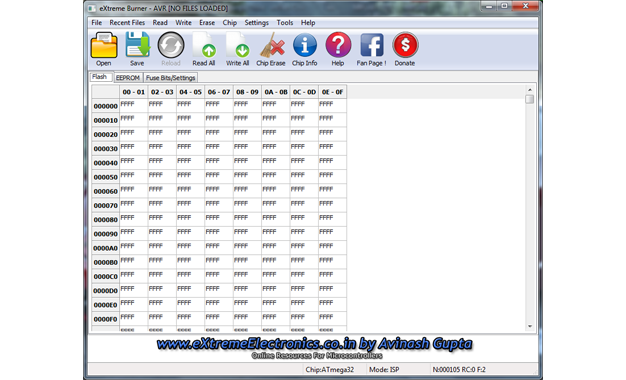
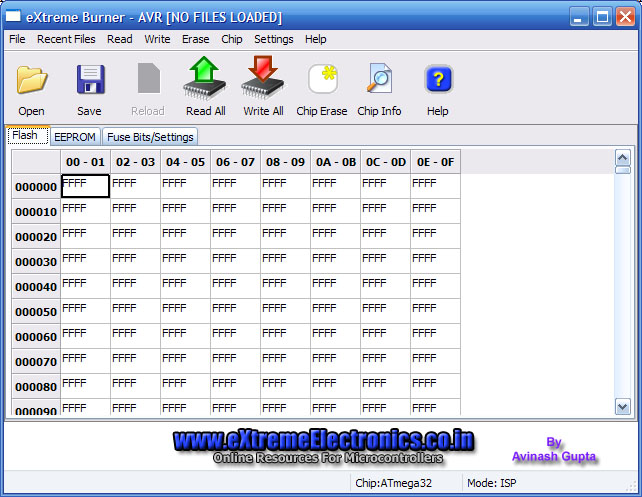
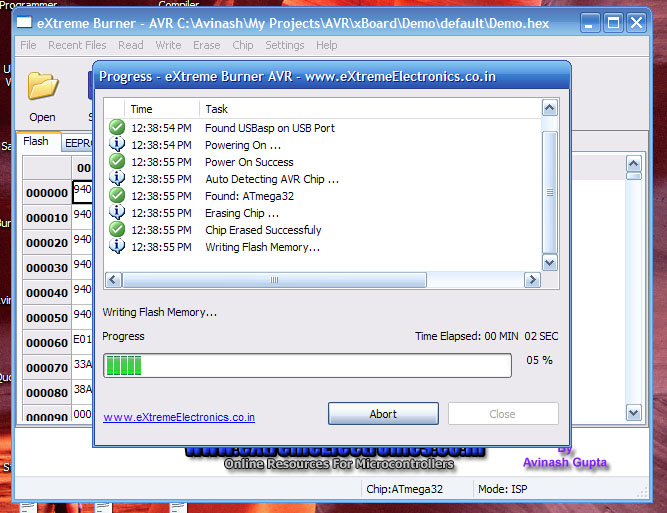
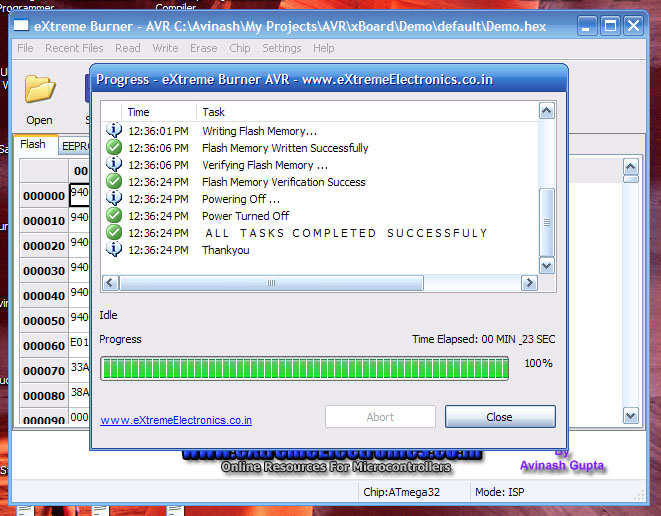
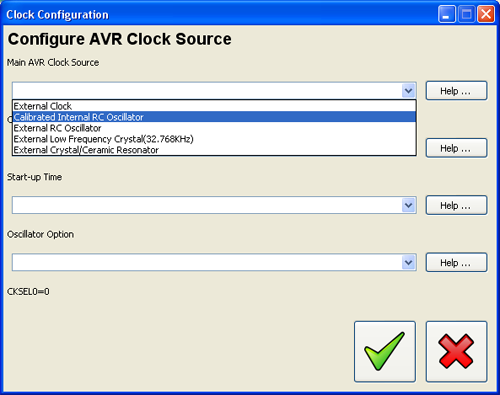
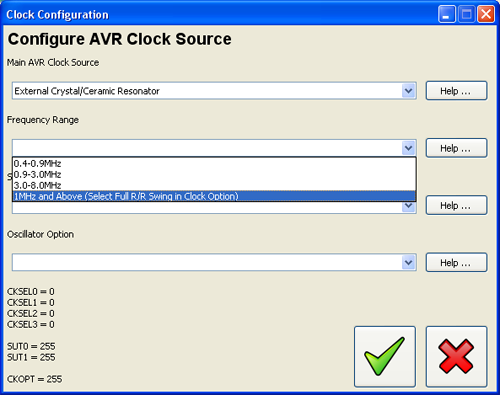
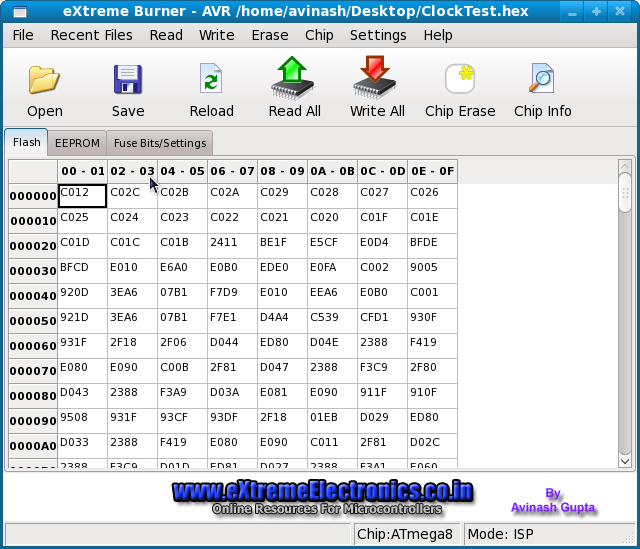
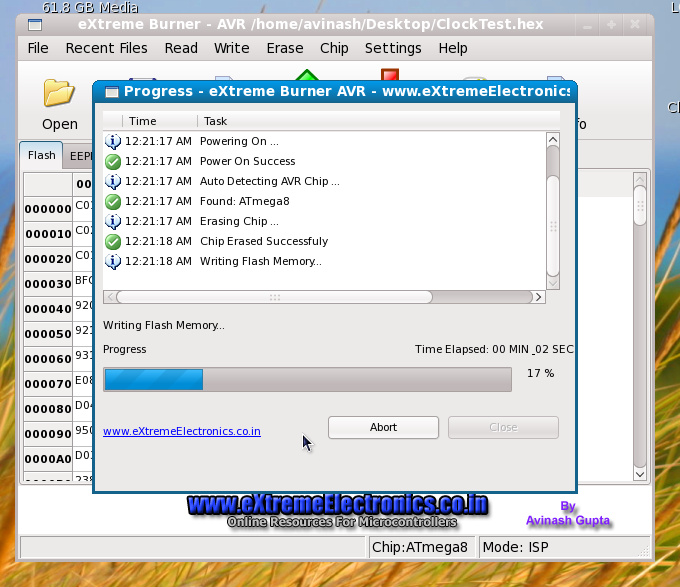

Hi Avinash!
I use Eclipse with AVR plugin, and avrdude, and it’s very userfriendly.
You can read/write fusebits, compile a project with one buton and write to MCU with another buton.
You can do more things, which I don’t know yet.:)
hi.
it is nice learning from your tutorials.
i have installed the burner but do not know how to use it .can you please explain?
Hi,
Thank you for given information, it is very fine for me to burn the chip
hi.
it is nice learning from your tutorials.
i have installed the burner . It is very use ful for me
thanks
regards
s.kumaresan
Hi Avinash,
This is a really cool software. Fell in love with it at the the first sight 🙂
Aashish
a great tool for beginners……..great job
Hi Avinash,
Can u please tell me the hardware, which u have used for programming?
Awaiting for ur reply.
Regards,
Anand
Always a head.
@ Anand the Hardware is USBasp and the link to it is spread on this page and also in the software’s help menu !!!
Hi Avinash I am trying to flash Atmega328P-PU for a project I have an AVRASP and I have downloaded as recommended by a friend your Extreme Burner but the version I have does not support the Atmega 328P where can I download the version that supports this chip without having to have a facebook account which I do not have or update the version I have.
Best regards, Ian.
Serial terminal not working properly.
Error:- UARTReadData: USB Error
What to do??
@Deepak Bansal,
Please see this
https://extremeelectronics.co.in/software/extreme-burner-avr-1-3-beta-test/
Dear Sir,
I’m newbie on avr
how to get (read) data Atmega16a on lockbit position
lf:24
hf:D7
lb:C0
Thanks.
Hi all is this device compatible with AVR studio
I don’t get what u mean by “compatible with AVR studio”
If u mean the compatible with output hex file of AVR Studio then answer is YES
Awaiting for Linux version!!!
Looking good, can’t wait to try this one out when I get home.
Mostly waiting for the linux version.!!!
🙂
Hi
Is it an open source software? Can we have the source code too?
Regards,
Glenn
@Glenn
Currently it is not open source, sorry. But may be in near future.
Hi Avinash,
Thank you for this really nice and good software. My student already built the hardware (USBasp) and installed the eXtreme Burner software (I will also do it very soon), but managed to run it only under WinXP. He did not have success with Vista in his notebook. Is there a way to install it under Vista? Something like a special driver? BTW, allow me to suggest you the inclusion of a “fuse calculator”, like the SinaProg.
Best Regards,
Ailson
Hi Ailson,
FUSE Bit calculator is Under construction ! Also one of my customer will it check under Vista. We will do something to run it under Vista.
Can Provide some tutorial on CAN in PIC????
@Mahesh Patil,
Sorry, I dont have any tutorial on CAN
is this software compatible wid windows vista
da best. Keep it going! Thank you
Very nice SWm and working very good. One question: It is a little bit to slow. How can I make it faster.
Regards
Hi,
is it possible to pass hex file through command line? Reason I’m asking this is because bascom has no support for avrdude and can’t pass mcu type through command line only filname with {FILE} command. I saw that eXtreme Burner automatically recognizes mcu type and if file could be opened with command line option it would be great.
Hello Avinash,
I was searching for an alternative to AVRdude, which is, as you say, not very “user-friendly”, and found your comment on another site, which led me here. eXtreme Burner is very nice, but I’d like to request a missing feature for V1.1, namely a way to VERIFY (independent of programming) the contents of a chip against a given file. AVR studio has this feature, which is very useful for checking if an “unknown” chip has the code in it that you think it does. An even better feature would be a way to list the differences (often marked by an internal date stamp). YAF (yet another feature) would be an ASCII interpretation of the FLASH (and/or EEPROM) contents in addition to the hex values (with a “.” or “-” for non-ASCII chars). I’m sure you’ve seen this format – it’s pretty common in the “business”.
That said, V1.0 is Very Nice, although I would rather that the “read” (or “write) buttons on a given “page” limit their actions to that page, with the “all” function being on the menu bar. I did have to “hide” the libusb files (per your suggestion). Thanks again for a major advance in AVR programming!
-JvZ (Seattle, WA, USA)
Hello Jim,
Thanks a lot for your suggestions !!! 🙂
I will surly apply the improvements that you have suggested. As this was the very first version so it was not that advanced.
hi, this is very good software, but it do not support usbasp hardware.
@Chatak
Hey man it is for USBasp then why it won’t support it !!! 🙁
PLEASE SEE THE NOTE AT BOTTOM.
hello avinash,
Can you suggest me which firmware and hardware should use out of many firmware and hardware shown in http://www.fischl.de/usbasp/ this site.Or suitable firmware and hardware for Extream-burner software.
Thanks in advance.
@Kunal
Use usbasp.2007-07-23
You can even use the latest one, no problem. I have tested with both of them
🙂
thanks Avinash,
it is working properly with great speed.
one more thing,i played with fuse setting, and i lost one mega 8 device. can you suggest me how to recover same device.
Thanks in advance.
Kunal
@Kunal
I don’t know
Great job on the program.
I saw that verifying the Flash Memory takes a lot of time (especially in slow SCK). Does it verify the entire memory or just the written one? If its not the entire memory I can’t explain why it takes so much time and I think you should include an option to disable flash verification.
@ kunal
Have you tried this method ?
http://www.larsen-b.com/Article/260.html
Hi Kunal,
If the Mega8 is not fried, one relatively easy way to recover it is to build a Dontronics DT006 parallel port SPI programmer (very easy to build, even in a protoboard, with just a couple or 330 Ohms resistors and a cap). As you have messed up with the fuses, it is very important that you use an external clock source tied to XTAL1 pin. The frequency is not critical, one to two MHz will do fine (I use 2MHz). You can nake one with a 555 timer. For the download software, you can use avrdude ou get the CodeVisionAVR (the free eval version) from http://www.hpinfotech.ro. Setup as the programmer DT006. Setup carefully the fuse bits to fit your needs.
Hope I have helped, and good luck
Ailson
Thanks you very much Ailson.
Awesome user interface 🙂 will there be support for ATMEGA168? I can test it for you. Also I would love to see it go open source.
Oh…. it does support it, I’m silly. Thanks for a great piece of software Avinash, it’s working great.
🙂
The Software/hardware setup works in VISTA too !!
Initially I got this “No Supported Programmer Found” problem. But when I deleted “libusb0.dll” and “libusb0.sys” (as told above in installation steps), it worked great.
I loaded the hex file an verified it as well..!!
For screenshot, visit the forum ‘installation Problem’ under AVR Microcontrollers.
http://forum.extremeelectronics.co.in/viewtopic.php?f=2&t=7
@Sumanth Toom,
Thanks a lot for testing it under Vista !!! 🙂
U did a great job!
Salaamz….
I m using ur gui software for burning my avrs… n its being wrking gr8! But it dint have the chip ATMEGA644P (I hv a couple of those in addition to ATMEGA164P)
Though i can program it using this software by not considering the chip… can u plz add up this device in the next version of the software…
Its a great job indeed… Thnxxx…
Regards
@Suleman
Thanks. 🙂
I will be adding support for ATMEGA644P and please help me by testing the support. I will be sending you the XML file(with ATmega644p support) and instruction shortly.
I have made an updated Windows driver for USBasp AVR programmer for use with avrdude and eXtreme Burner (Tested on Windows XP 64-bit Edition). Based on libusb-win32-device-bin-0.1.12.2.tar.gz.
http://www.experimentalscene.com/get.php?id=usbasp
MY USBASP CAN USE AVRDUDEGUI (YUKI_LAB V.1.0.5) NO PROBLEMS, BUT EXTREME Burner 1.0 MATTERS. Exit “mismatch LOCATION AT 0X00000000”, THEN “Task Retry Failed PLEASE” .. WHAT NEED DISETTING
@Al_AMIN
Pls use different USBasp firmware version.
Hi!
Thanks for good project. Please read my feedback.
I’ll be very glad if you will solve some problems.
1.Slow reading(maybe it seems so for me only?)
2.Help doesn’t work.
3.add settings menu. e.g. disable verifying(sometimes it is not needed)
4.add autoreload
5.add a button for writing FLASH only
6.add fuses description
A very thanks to you!
Hello Sifun,
Thanks for your suggestions!
1.Slow reading(maybe it seems so for me only?)
Solution: Please disable slow SCK by removing jumper (see USBasp page for details)
I will implement the following in next release.
2.Help doesn’t work.
3.add settings menu. e.g. disable verifying(sometimes it is not needed)
4.add autoreload
5.add a button for writing FLASH only
6.add fuses description
A very thanks to you!
Thanks! Much more faster! I thank that normal position is connected and simply soldered it to ground.
Some timeout takes a place before programming/reading. It appears with all software programmers. What’s the cause?
Very thanks and respect!
Sifun, AVR beginner.
Oh!
I think this timeout(5sec) caused by autodetection process.
How to disable it…. it will speed up process!
In windows vista you cant write the calibration fuses
and maybe its a tip to make da delay between writing and verifying cause my m16 gives errors with full sck but with slow sck is works perfect.
very nice software !
hi,
i wanted to ask when would be the next version with new features available here…
n Can u plz add up the usb pic programmer gui software….?
regards…
It would be nice to have ASCII option in flash/eeprom data windows.
Looks very nice. Will try it out as soon as my programmer arrives.
Fuse settings are a bit sparse… could have a drop down table as per AVR Studio
Hi. Very good software!
Will you develop multilingual version?
If so, then I can help with the translation program for Russian and Ukrainian languages.
@Sergiy
Many thanks for your Offer to help !! Yes I have plans for multilingual version. I will contact you soon for translation help
great software
does this compatible with output hex file of mikroPascal output ?
Hi Avinash
You can count with me to translate eXtreme Burner to Brazilian Portuguese, too! BTW, the USBasp driver was not being recognized in VISTA just because I didn’t include the two 3V6 zener diodes in the D+ and D- lines (as some USBasp hardware schematics around the Internet don’t). I relied on the two 68 Ohms resistors to protect the USB lines, dropping the microcontroller port voltage from 5V to around 3.6V. Once I included them, Vista immediately recognized the driver and eXtreme Burner worked beautifully. So, the bottom line is: THE 3V6 ZENER DIODES ARE EXTREMELY IMPORTANT, REGARDLESS OF WHICH O.S. YOU WORK WITH, INCLUDING LINUX!
Regards, Ailson
@Ailson
Thanks for your offer. I will contact u soon for translation ! 🙂
I also invite others to help me translate the software in their local language.
Hi
Extreme Burner is a great alternative for avrdude gui. It’s much more user friendly and easy to work with it. Many thanks for You Avinash. I have only one suggestion: it could be a little bit faster (for coding I use AVR Studio), now the time of writing the flash is 1 minute…
Best regards.
hi
do u have any tutorials on making a bootloader for mega8,
i want the program and also a circuit or hardware interface to connect the MCU to the PC.
i am also interested in using AVR GCC in ubuntu could u help me out
PS: the location of this comment may be irrelevant please don’t mind.
WOOOOOO!!!! Super!!! Good Job!
Pingback: ???????? ??? USBASP : ??????????? ??? ????
I can gladly translate it in romanian and even hungarian and french
Great Software!!
I need support for ATMEGA644 and ATMEGA644P.
please help me and sending the advanced XML file
(with ATmega644 and ATmega644p support).
I want test and support it.
Best Regards
Can you not just append the XML file with the appropriate data ???
This is great software, but i thing, you support some chip.
Hey u can look into AVR-Burn-o-mat for Improving on the fuse bit section.. he gives option like clock select,Boden etc.. checkout
Stoping verification would be a bad move…Do you really not have a few seconds to spare in your life to wait for the messages ? 🙂
Hey, it’s free.You have to pay a little bit for perfection.!
i love this site
I fine great your software….If you want I can help to translate your software to spanish language (South America need something like this!!…jajaj XD)
@Diego
Thanks !!! I will contact you
hey avinash,
do u have any link or step by step on how make ur own programmer(usb)
please correct me if i m wrong
1 download the firmware and other files
2 then program the atmega8 with the firmware
3 install all hardware(pcb)
4 then program other avr uC using that programmer using ur software of extreme burner
please tell the correct method if i m wrong.thnx in advance
regards,
-gaurav parida
@GAurav- that’s correct, but I think Avinash sells one ‘ready to go’, if you’re only making a one off….
I have made one exactly as you describe and it works perfectly.I have incorporated it all into an old product that worked via RS232, now it works via USB.
Hi guys, Sorry for the newbie question: I just hooked up a ATTINY13-20PU to an USPASP programmer. I can read what’s on the chip, i can erase whats on the chip, but i write something on attiny from a hex file, after writing the verifying goes wrong. Mismatch at location 0x000000000, task failed. please retry. This problem is very reproducable: ive tried this with several attinies, all of them fail this way. When performing a read to see whats on the ATTINY, the first, second, sixth, seventh, and so on lines are full of free bytes (FFFFs)
Have anyone had the same problem? Is this a connection problem, a problem with the programmer, or the extremeburner?
Thanks in advance
Rolandi
That’s tricky…. A guess (from your information) would suggest a faulty USBASP….can u try any other type chips(tiny25 etc.?)
Hi
it is great
but when i use it for ATMEGA128 and the program was very large the software failed to load the hex file
Plz answer me if there is a solution ?
@Khaldoun
Can you tell me exactly what message was shown??? It would help me fix it. Thanks in advance.:)
hi.
tanx for every things.
how i can use this program in vista ?
@martin.
thanks martin
but y its not an easy to work with manchestor code
i hav gone through wiki. i know it well.
but my question was can u help in writing the code.
i use Atmega 88
@Vikram
No one can write code for you for FREE !
Martin, Avinash Here, I thank you a lot for helping Vikram (for his pointless question.) But I have to delete these comments as they are not relavant to the page. Sorry.
Can’t help with writing the code, that’s down to you. It can’t be that hard, it’s self clocking.I guess this is a homework/coursework question, in which even more reason why I don’t help/write the code for you…..
Hi again, Ive tested it on an Atmega8 and it works flawless. I think my problem with partial writing of the hex code on attiny13s is because i use attiny13 and the program only supports attiny13A.
Thanks again for everything
Rolandi
Works flawless on Windows 7 (also tested on XP and Vista)
thanks Avinash!!
aLoNsO =)
@Alonso
🙂
Many thanks for testing on Windows 7 !!!
Tiny 13A should work ok….They both have the same signature bytes… 1E 90 07.
Avinash…. how about adiing ‘user defined’ sig bytes ???? this would allow programming of new devices automatically… allow 128K of flash buffer and 8k of eeprom buffer…. up to user not to overflow the buffers…. 🙂
Oh, by the way, thanks for confirmation of Vista working.
Hi Avinash, thanks for the software, I really love this.
-Iqbal
Thank you. Excellent ???????????? !!! Will expansion of the list of the list of the supported microcircuits ?
Hi All :),
Finally the Linux Version of eXtreme Burner – AVR is Here !!!
Try it out and share your valuable response.
Get it now from here
https://extremeelectronics.co.in/avr-tutorials/gui-software-for-usbasp-based-usb-avr-programmers/
Hi, Avinash
I needed to program a Atmega168P part, but just found an entry for Atmega168 in the “Chip” menu. I realized that you keep the parts database in the “Data” sub-folder in the XML file chips.xml. As the only differences between the 168 and 168P are the name itself and the chip signature (which identifies it), I copied the 168 entry and pasted it right below, changing the tags (to place the suffix “P”) and (to change the 168 signature 0x0006941E into 168P sig 0x000B941E, found in the datasheet), as below:
<CHIP>
<NAME>ATmega168</NAME>
<FLASH>16384</FLASH>
<EEPROM>512</EEPROM>
<SIG>0×0006941E</SIG>
<PAGE>128</PAGE>
<LFUSE>YES</LFUSE>
<HFUSE>YES</HFUSE>
<EFUSE>YES</EFUSE>
<LOCK>YES</LOCK>
<CALIB>YES</CALIB>
<PLACEMENT>.\Images\Placements\ZIF_DIP_40.bmp</PLACEMENT>
</CHIP>
When I ran eXtremeBurner AVR, I found the Atmega168P listed just below the Atmega168, and the part was programmed successfully. I detailed this information here for your knowledge (so you can safely include in the next release), and for all users. I take the liberty to ask other users to try other ATtiny/ATmega parts (at their own risk), copying the closest part and modifying the tags accordingly (not forgetting to change the tag). All the needed information can be found in the respective datasheet. If it works fine, the user might wish to post here to let you and the users to know.
Windows users: As an advice, it is more convenient to right-click the chips.xml file and click the “Edit” entry so it will be opened in Notepad, otherwise if the user double-click the file it will be opened in Internet Explorer.
BTW, isn’t time for a new Windows release?
Best regards and a fruitful 2010,
Ailson
@Ailson
Thanks a lot for your work.
eXtreme Burner – AVR (Linux version) does not work on popular Linux distribution Ubuntu 9.04.
Error message:
Mismatch between the program and library build versions detected.
The library used 2.8 (no debug,Unicode,compiler with C++ ABI 1002,wx containers,compatible with 2.6),
and your program used 2.8 (no debug,Unicode,compiler with C++ ABI 1002,wx containers,compatible with 2.4,compatible with 2.6).
There are probably problems with Python wxLibs on Ubuntu. On Fedora eXtreme Burner – AVR run normally.
HI SIR,
Sir as u have mentioned if “no programmer found” statement is coming the delete sum files from the folder where u have installed the software. SIR i have done that also but my pc doesn’t recognize the device my USB cable is also right.
and when i install the driver it says that the current software is better than what u r installing
SIR what should i do now?
PLS SIR help me out I am in a great trouble…
pla sir help me out
Hi Atul,
Please, tell us what Operating System you are using. If you can, tell which USB driver version you installed (0.1.10.1 or 0.1.12.1). Did you build your oun USBAsp programmer? If so, can you post the link to the page you got the schematic from? Does your programmer have the two protecting 3.6V Zener diodes in the USB D+ and D- lines? I had the same problem as yours just because I did not solder those diodes (Windows Vista). When you installed the driver, you did it as Administrator?
Waiting for your response,
Regards,
Ailson
Hello SIR,
I am using WIN Xp SP2.
The USB port to which i am connecting the programmer have the driver
C:\WINDOWS\system32\drivers\libusbd0.sys
My USB driver version 0.1.10.1
I have connected two 3.6V zener diodes in the USB D+ and D-
I have taken the circiut diagram and all the neccessary details from the site given below
http://robolabz.multiply.com/journal/item/57/USB_Programmer_for_AVR
The picture of the USB programmer which you will see that is made my be on a genral purpose pcb.
SIR when I connectthe USB cable my pc says that the usb device is not recognized and i have tried all the methods of updating the driver and even i have formatted my pc foe that.
SIR i am really freaking out pls help me out SIR
Thank for ur kind interest SIR
SIR,
when i am installing the driver of version 0.1.12.1 then also the problem is same
SIR what to do now??
waiting for your guidance…..
YOu will be very lucky to get that working if it is built on a ‘veroboard’.
Firstly, there are no caps on the crystal…..
For a few $$ you can buy one ready made…
Atul Singh,
Martin is right in that you *MUST* put two ceramic caps (22pF or 27pF should be fine) from each crystal terminal to GND. With respect to the ‘veroboard’, it should work fine if you got careful with the connections. Mine even worked on a ‘protoboard’ when I first built it for testing. After soldering the caps, post if still doesn’t work so that we can proceed. To speed-up things, if you have a voltmeter around, measure the Zener voltage from a removed device (or use one of the same type, if you bought extras) with a 680 Ohms resistor and a 5V supply. It should be around 3.6V. This is because as one is usually not sure which Zener diode he got (especially the ones glass-encapsulated), there is a possibility that the zener voltage rating is not the correct one.
Hi, Martin. Based on your name, you might be from a developed, first world, country. If this is the case, please, take into account that people from “the rest of the world” might not have that few $$ to spend on a ready made programmer. Best regards.
HELLO SIR
THANK YOU SO MUCH SIR
My programmer started working when i connected caps across the X-TAL.
Sir i want to ask that why we have to connect the caps across the X-TAL?
THANK YOU SO MUCH SIR FOR YOUR GUIDANCE
@Atul
You are quite correct sir, I forget there are less fortunate ppl in this world.
Glad it’s working, now you can move on with your experiments.
this is very good work and i have small problem.
i need add ATXMEGA family in this program .
please help…………
Pingback: Programy obs?ugujace USBasp pod Windows 7, XP | Diy – Elektronika
./avrprog: error while loading shared libraries: libwx_gtk2u_richtext-2.8.so.0: cannot open shared object file: No such file or directory
Please, HELP
Hello,
I am using SuseLinux 11.0 / Kernel 2.6.25.20-0.5.
While starting ./avrprog I get following error:
Fatal Error: Mismatch between the program and library build versions detected. The library used 2.8 (no debug,Unicode,compiler with C++ ABI 1002,wx containers, compatible with 2.6), and your program used 2.8 (no debug,Unicode,compiler with C++ ABI 1002,wx contai ners,compatible with 2.4,compatible with 2.6).
Abgebrochen
What can I do?! – Thanks, if you can help …
@Unstoppable
Fedora 12 – install wxPython 2.8.10.1 and dependence (wxBase, wxGTK …) from Fedora 12 repositories.
Under Linux distributions based on Debian (Ubuntu, Linux Mint, Dream Linux…) eXtreme Burner 1.0 does not work.
hi Avinash,
I need help I can’t download the hex file to the avr chip.
USBasp detected but can’t communicate with the target chip. However, when I used USBISP and AVRstudio it run well.is there any setting for extreme burner before I download the file??
Open Suse 11 – eXtreme Burner 1.0 does not work. Normal user can do nothing.
Install Fedora 12 ( http://fedoraproject.org/get-fedora.html ) and then wxPython 2.8.10.1 and dependence (wxBase, wxGTK …) from Fedora 12 repositories.
Look at the screenshot http://img42.imageshack.us/img42/6655/screenshotwt.jpg
Aco maybe tells the truth. Now I have the same.
First burning
Into a new, empty chip *. hex file to be written correctly.
Next burning
I set the configuration bits. I wanted to burn an *.hex file, but there was a warning message.
SBasp detected but cant communicate with the target chip.
Chip is good. When using simply serial programmer all works normally.
Hi,
first of all – great job, great software.
Secondly, when new version (with updates) will be available for downloading? 🙂
Tom
@Tom
Updates for Linux version exist ?
what about missing chips ! like tiny26 or many others
Hi dragos,
Look at my post #89 above. It deals with just that: How to add an Atmel chip (ATiny, ATmega) to the “Chips” drop-down menu. I didn’t look the tiny26 datasheet, but maybe its ISP programming parameters are close to the tiny24 (please, check it by yourself). Just copy and paste the whole entry for the Atiny24 chip (just bellow it) in the chips.xml file found in the Data sub-folder and modify its parameters, including its name (to properly show up in the “Chips” drop-down menu). Make a back-up of the XML file, just in case. Also, please check if your hardware is prepared for this newly entered part (ISP or ZIF socket SPI pinouts).
Regards,
Ailson
hi avinash
i am using your AVR development board 40 pin one. when i tried to interface with 16*2 LCD. i am not getting any display. i followed your LCD interface procedure. i heard we need to disable JTAG. can u tell me how to disable JTAG. i am using atmega 32 microcontroller
@ravindra
look man , everybody tries to do something and if he is not able to do that how can i setting miles away, whitout even seeing your setup solve your problem?
also please use the forum for such discussion.
i think there is a thing called datasheet which can tell u about fuse bits and how to disable jtag.
your comment will be deleted soon.
I agree, this isn’t a free consultancy forum.Too many people asking for the most basic of help. The best help forum and a wealth of historic information is avrfreaks.net
@ avinash
sorry for the trouble , i final figured out the problem. problem was with the contrast this it was not soldered properly. thanks for ur patience.
@martin sheobridge
thanks for the forum link. it helped me to figure out problem.
Sir,
At present I am using progisp to flash AT89SXX with usbasp(with modified firmware). Is it possible to add the support for AT89SXX chips in your software?
@Dhananjay
I used that its working and it can programme 3 to 4 times after that there is a problem with programmed IC.
If you ifnd that problem then please contact me.
When i try to run this software under OpenSuSe 11.2 (x64), i’ll have next error:
./avrprog: error while loading shared libraries: libwx_gtk2u_richtext-2.8.so.0: cannot open shared object file: No such file or directory
but i have this (library)file on path /usr/lib64/libwx_gtk2u_richtext-2.8.so.0
when i copy this to xAVR directory nothing change.
WxGTK, Wxwidgets is installed. Libusb too(i work with this library on another project).
Maybe we can persuade the owner to compile this with a static wxwindow library.
So will probably work on all linux versions.
May I consider part regarding your main guide to my personal site
this is the output i get in ubuntu while using usbasp
i use ubuntu 9.10
neo-server@neo-server-desktop:~/Downloads/xAVR$ ./avrprog
Fatal Error: Mismatch between the program and library build versions detected.
The library used 2.8 (no debug,Unicode,compiler with C++ ABI 1002,wx containers,compatible with 2.6),
and your program used 2.8 (no debug,Unicode,compiler with C++ ABI 1002,wx containers,compatible with 2.4,compatible with 2.6).
Aborted
Hellow Avinash,
You did a great job!
You said open source software will be soon.
Are you planing to publish source?
Thanks in advance,
Vladimir
How about a fuse settings like in BascomAVR, where is more clearly, it can be made ? How you do, allways look in the datasheet to “translate” de bit position !
@x_dadu
Nice suggestion. I am already having it in pipeline. Will implement it in next version.
Thanks
Most Excellent!!!
@Vladimir…. is that V vassilevsky of S.E.D ?
Hellow Avinash,
You did a great job!I like the tool very much.
AVR v1.0 is not parsed Extended SegmentAddress correctly,mabey next version can fix the bug.
Thanks!
*.hex @address 0x1E000 ATmega128
:020000021000EC
:10E000000C9446F00C9465F00C9465F00C9465F05B
:10E010000C9465F00C9465F00C9465F00C9465F02C
…
but in eXtreme Burner Flash tab
00E000 0C9446F00C9465F00C9465F00C9465F0,not correct.
Should be like this
01E000 0C9446F00C9465F00C9465F00C9465F0
@Tiger Stone
Thanks for the bug report And details. They can help be correct the bug. Thanks again for the help.
Re bug in hex address: Careful here! The first two hex digits are the BYTE COUNT, not the extended address. In fact Intel Hex format is limited to 16-bit addressing. There is a special command to change “segments” (remember, this format stems from the 8086 processor days!), viz. an address of 0000, followed by a 2-byte segment address. So for addresses above 65536 (0x10000), the segment address is 0x1000 (i.e. just divide by 16). Thus the command line in the hex file is: 02 0000 02 1000 EC (without the spaces). The first 02 is the byte count (the segment address is 2 bytes), then an address of 0000, then the special “field change” code of 02, followed by the segment address itself, followed by the checksum of the preceding bytes (to make a total sum of 00).
My copy of eXtreme Burner correctly displays addresses above 64K, but DOES NOT SAVE anything above that address. It also saves an .eep file, even though I un-check the box that says ‘save eep’.
Thanks for the great job.
Do you consider compiling a 64bit Linux version? I am getting the
./avrprog: error while loading shared libraries: libwx_gtk2u_richtext-2.8.so.0: cannot open shared object file: No such file or directory
Error, and thats mostly because I have not the 32bit wxGTK libs installed. I am currently running Ubuntu (Mint) x86_64 on the dev. machine.
$file avrprog
avrprog: ELF 32-bit LSB executable, Intel 80386, version 1 (SYSV), dynamically linked (uses shared libs), for GNU/Linux 2.6.9, not stripped
It would be really helpful to get extreme burner PIC port for Linux too.
Pingback: Programador USB para micros AVR de ATMEL | Automatismos Mar del Plata
I liked your software, it’s light and easy to use. I only suggest to put a button (or a shortcut) on the toolbar to write the flash|eeprom|fuses only. I know there is a menu command to do it, but after many cycles of programming only one of these i wished there were a faster way.
Thankyou anyway, it’s an excelent software.
Hi Avinash,
U r really doing gr8 job.
I want to program ATmega644p.I’ve added the details of microcontroller in XML file.But when I tried to write/read the chip, it came like task is failed & no supported programmer is found.Can u plz giv some suggestions regarding this.
Thanx in advance.
Very good job.
If you need help for french translation, contact me.
Merci.
@Jacques
Thanks for the proposal to help! I will get back to you.
Pingback: TRANSFORMATORS.lv
hi there,
thanks for this great software.
I would like to see a more user friendly fuse&lock bit setup.
Anyways great job!
energy
Hi,
I need support for M328p chip
is it possible to have the xml file?
nice job you have done thank you
Hi, great software, thank you !!! If there is possibility to improve fuses settings (like in Khazama) it will be perfect !
When will the support of the ATMega644(P) be available? I’m still waiting for it. Great Software anyway, exactly what i was searching for 😉
@Rayne
Read post # 89 and find out how u can add up more devices to the software 🙂
Alternately select ATMEGA 164P and ignore the error message.
Hi, I am a complete newby to programming AVR microprocessors. Forgive me if I ask a stupid question. From reading this blog I believe that it is possible to develop applications using the assembler provided with the AVR Studio 4 development environment, then write the resulting machine code to the AVR microprocessor (Atmega168 in my case) using eXtreme Burner – AVR software and a standard USBASP programmer. Am I correct? Are there any pitfalls in this approach?
Thanks and regards
Bob VK2ZRM
Sydney Australia
@Bob,
Yes your approach is All right !
Thanks Avinash, I really appreciate you taking the time to respond to my question. I’ll report back when I’m more advanced in programming AVR microprocessors.
Bob VK2ZRM
@Bob,
You may start to read the tutorials from here
https://extremeelectronics.co.in/category/avr-tutorials/page/3/
Remember at the bottom of the list you will find beginners tutorial while as you go up, you will find more advanced one!
Can you extend it to include serial\parellel port ISP’s. Like http://elecrom.wordpress.com/2007/10/15/make-your-own-ultra-simple-universal-avr-programmer/
@SRChip
NO Parallel or Serial Port Please! I only Made this for USB.
what about fuse interface! I spoke about it before. When you think it can be done? a mounth, a year, anything… 😀
tk’s for great job 😉
@x_dadu,
Can be done in a week but I am really busy with other thing can’t get much time to look after this.
Does that programm support USBProg for AVR?
This one:
http://www.embedded-projects.net/index.php?page_id=135
@Moe
USBProg NOT supported.
Could you include a Alphanumerical view for the Hexfiles like in Ponyprog (on the right side)?
http://electronics-diy.com/schematics/avr_programmer/PonyProg_Programming.jpg
I usually code a block of Text at the beginning of my Programs so that i can see which Program is in the controller (and which version)
sorry for my bad english
dear friend, the programmer is working good if we dont concider its pace in verifying, another thing is the fusebits, it would be better if it set fusebits to the factory defaults.
Pingback: Interfacing Graphical LCD with AVR MCU - Part II | eXtreme Electronics
It doesn’t work on uBuntu-lucid due to incompatible library:
”
./avrprog
Fatal Error: Mismatch between the program and library build versions detected.
The library used 2.8 (no debug,Unicode,compiler with C++ ABI 1002,wx containers,compatible with 2.6),
and your program used 2.8 (no debug,Unicode,compiler with C++ ABI 1002,wx containers,compatible with 2.4,compatible with 2.6).
Aborted
“
Hello Avinash,
I just want to tell you that I have tested eXtreme Burner with Atmega328p having signature 0x0F951E. You can safely update the next version of this brilliant software with this controller.
Thanx
Great job…. thanks a lot
Why doesn’t it support ATTINY12????Please release ATTINY12 support!!!
I would like to know if Extreme Burner supports Attiny45. I have read that that Usbasp supports it but I can’t find the option to select the chip in Extreme Burner. Can anything be done about it? I have about 10 chips that I would like to program via usb and I already have the usbasp. Works great with atmega8 but would like to test it for tiny45. Thanks.
@ Coka cokx & Bang Ming
Have a look at the post # 89. There is a way to manually edit the chips.xml file and add up any devices that are missing. It requires the device signatures of the chip (available from datasheet) u want to be added.
Cheers…
Allah Hafiz
Thanks suleman. But can anyone tell me what might be the problem. I am getting “Cannot communicate with target chip” error trying to program the Attiny2313 and Attiny45. I have just purchased 10 of each and they are new. I am using the Usbasp and extreme burner. My programmer works fine to program atmega8 but says it can’t communicate with attiny2313 and attiny45. Can anyone please help me. Thanks.
There might be a couple of problems:
.The microcontroller’s fuses might be set to a different crystal settings other than the internal (though they are shipped with internal crystal set)
.U might not be providing the power(Vcc=+5V) to ur controller either from USBasp or externally.
.Chk out your programming connector configuration.
PS: i have programmed attiny2313 and it works fine & so should attiny45…
Well, I have checked the voltage supplied. It is 5V, from the programmer. It’s very very strange. It does not work even for my Atmega32. I have heard a little bit bout factory settings. So, any suggestions on what to do? Use a different clock speed? Or take out the clock altogether? I really do hope it works. I doubt that all the chips I purchased are faulty as I have gt them from a reliable supplier. Anyway, it works for my Atmega8. Please help me. Thanks.
have u tied up an external clock source? or crystal oscillator?
Chk our that u shud have pulled up the RESET pin via 10k res.
PS: The factory settings of attiny45 and 2313 dont require reset to be pulled up or to provide external oscillator. Try tht anyway.. otherwise get another one n try 🙂
I did put a 10k pull-up resistor. Still didn’t work. Are there any other possible ways to fix it?
I meet same problem as post #72& post #81, but my chip is attiny13A.
So, I think there should be something wrong with ATTINY13x sport.
I tried to write an atmega8 chip, the usbasp worked ok.
I also tried khazama use same usbasp and attiny13A, it also worked.
hi,I’ve got a strange problem: as mantioned above I’ve got an error “no supported programmer found” but I’ve allready deleted proper files and I have two zener diodes. I’m working on win7x64 and in device manager USBasp is OK (working properly). Do you have any idea what’s going on?
#167 You must reinstall(update) libusb-filter to version 1.2.0.0.
my problem solved by adding dioda zenner 3v6 to the circuit…..
But.. i still can not install in windows 7 64 bit… any body have the driver…?
@Nico
We are building an Installer with built in drivers(signed!) for Windows 7 64bit edition. But you have to wait as I have lots of other work to do.
Hi Avinash,
Thanks for the nice and easy product. I have tried deleting the libusb0.dll” and “libusb0.sys” file as you suggested on phone and got it all working. Thanks very much for it.
One question, do you know any programmer to write code for ATmega8. Any suggestion would be a real welcome, as I aware of electronics and computers, but not much in the way of programming/microcontrollers.
Hi,
How do you set the fuse bits using this programmer
Hello.
I want to use eXtreme Burner from bascom-avr (using external programmer, selecting “C:\Program Files\eXtreme Burner – AVR\AVRProg.exe”).
But when I click on Program Button, computer freezes few seconds, but eXtreme Burner don’t launch.
I have to launch eXtreme Burner separately, and it works fine..
Is there an issue ?
Thank you.
Hi,
1. gcc –version?
2. Licence? GPL or Creative Commons?
3. Sources downloadable?
c
Hi,
ich habe folgendes Problem gelöst (Suse 11.3):
Hi,
Problem gelöst (Suse 11.3):
Fatal Error: Mismatch between the program and library build versions detected.
The library used 2.8 (no debug,Unicode,compiler with C++ ABI 1002,wx containers,compatible with 2.6),
and your program used 2.8 (no debug,Unicode,compiler with C++ ABI 1002,wx containers,compatible with 2.4,compatible with 2.6).
Aborted
Lösung:
Download + Installation folgende RPM
ftp://195.220.108.108/linux/ASPLinux/i386/RPMS.12/wxGTK-2.8.4-3.0.120asp.i386.rpm
Version wxGTK-2.8.0 brachte Erfolg bei Fedora 10.
Demnächst teste ich auch noch Ubuntu 10.
i have a problem with the schematic on fischls site
numbered all his capacitors …i cant seem to locate C2 ???
can anyone tell me the value of c2 and where to place it .. plz
thanking you
is der a difference between the ATmega8 and ATmega8l ????
can i use the ATmega8l in the given schematic ??
Hello Avinash,
please can you send me also the xml file with the Atmega644P support?
many Thanks
André
hello avinash,
i loved your software from the day i saw it getting famous,
it has helped me a lot in learnin a lot by practicaly burning the code on to chip.
but now as i installed windows 64 bit. and did not get drivers for the usbasp. i removed it and am running kubuntu,
as i am new to linux i am not getting what your explaination foe linux installation is,
i did download, then extract the file.
opened terminal, but am stuck at this point. can you please please please tell me what to do further?
i have installed libusp and wxGTK
but am stuck with the terminal part.
PLEASE help me
@Shreyas.
64 bit Windows 7 Version will come soon.
the problem is i am addicted to using this software for burning. and want to use it on linux. so please tell exact procedure
@ John
Contact me at sulemanzmail@gmail.com. I may be of help regarding the hardware issues (atmega8L n caps) u r facing cz i have spent quite a bit of time debugging em…
Cheers
@john
ya john you can also use ATMEGA8L instead of ATMEGA8 for USBASP,
ATMEGA8L can be overclocked.
@shreyas
Hai shreyas..you can install drivers for usbasp currently available at
http://www.fischl.de/usbasp/usbasp.2009-02-28.tar.gz
it’ll work perfectly with Windows7 64bit OS,as i’m working with it.
Hi avinash why cant you add 89S series microcontroller in this software. I have already posted one here in my site http://www.8051projects.info/blogs/usb-8051-avr-programmer.html
but it uses progisp which is in chinese & English with changed firmware for atmega8.
Please have a look on it.
Hi, seems that there is existing serious trouble regarding the install procedure in the Linux. I use Ubuntu 10.10, and there is simply no way to make your program workable. Either the “Fatal Error: Mismatch” (exact report as noticed guys above), or reported missing lib files.. Please let us to know what exact installable package (.deb, acceptable for the Ubuntu) is the right solution and where is possible to get it. The above mentioned RPM (wxGTK-2.8.4-3.0.120asp.i386.rpm), even converted by the Alien, doesnt work in the Ubuntu 🙁
@Jwwebber,
I know the problem exists. I will recompile it under Ubuntu 10.10 an soon as I have some free time and post here.
Currently it works under Fedora only.
With regard to your Linux version, I haven’t read the entire blog so I’m not sure if this has already been discussed.. It is a very serious security problem to have to run a program as root and there is a fairly simple way to work around that on systems that run udev (kernel 2.6+ I believe). Essentially the problem stems from the fact that the kernel is creating the device node for the USBasp device as being owned by user and group ‘root’ and that needs to be changed. The man pages for udev can be confusing so here’s the short fix:
In /etc/udev/rules.d/ a rule file is needed for the USBasp rules (which must be created as root!). I use the file name “70-persistent-usbasp.rules”. The file contains:
ATTRS{idVendor}==”16c0″, ATTRS{idProduct}==”05dc”, GROUP=”dialout”, MODE=”0664″
SUBSYSTEM==”usb”, ATTR{product}==”USBasp”, ATTR{idVendor}==”16c0″, ATTR{idProduct}==”05dc”, SYMLINK+=”USBasp%n”
The first line (ATTR{idVendor}..) identifies devices that have the specified vendor and product ids (e.g the ids of the USBasp) and specifies that the /dev node should be owned by the group ‘dialout’. The group name can be changed to any valid group if dialout doesn’t work for you. Now anyone who is a member of the group dialout will have read/write access to the USBasp without having to be root.
The second line is optional, it creates a convenient symbolic link in the form of /dev/USBasp? where ‘?’ is a number (starting at 1). If multiple devices are plugged in then each will get a unique link (e.g. USBasp1, USBasp2, ..). I have other tools that work directly on this link so it’s more convenient than looking for the device in the usb tree.
I hope you find this helpful. Feel free to ask for clarification if I haven’t described something clearly enough.
can’t wait for working ubuntu version 🙁
method shown in post #189 doesn’t work for me. ATM i’m on ubuntu 9.10 32 bit
Hi All !!!
I have compiled it specifically for Ubuntu 10.10 too! So it should run with out frills on latest Ubuntu release.
Please check and Inform.
thankyou a million times!!!
i verified, program runs on Ubuntu 9.10 and im able to read and write to Atmega8 😉
at the beginning program didn’t saw the programmator (perhaps due to usb restrictions), but in one forum i found this:
———————————————————————-
The following should get it working – it only allows access to USB devices by users in the “usbusers” group (I have you add root to the group because I’m not sure if the keyboard, mouse, printer, etc., would work otherwise).
In a terminal window (applications/accessories/terminal) type:
sudo addgroup usbusers
sudo adduser usbusers
sudo adduser root usbusers
sudo gedit /lib/udev/rules.d/100-local-permissions.rules
This should call up the editor and the file shown should be empty.
Add the following to the file shown:
# USB access limited to users in usbusers group
SUBSYSTEMS==”usb” MODE:=”0666″ GROUP:=”usbusers”
Save the file, exit the editor and close the terminal window.
Now plug in one of your USB flash drives (if external USB hard disk, you must unplug it and then plug it back in for the rule to affect it).
———————————————————————-
It helped me solve my problem, hope it will help someone else too 😉
@zelija
Regarding post #189 not working for you.. I’m not sure which kernel Ubuntu 9.10 is using but you can check to see if it has a man page for udev. I’m pretty sure that Ubuntu has always used udev for dynamic device management but I might be mistaken. The machine that I’m using it on is running Ubuntu 10.04 (LTS). Also, the udev file that I described in my post only contains 2 lines (with the second one being optional) but the post broke the second line over two lines so it might mistakenly look like 3 lines. You might want to check that if 9.10 is running udev but things aren’t working for you. You might also want to check the udev man page to make sure the custom rules.d directory in 9.10 is under /etc/udev/ or if it was put somewhere else (probably unlikely).
@jeilja
Regarding post #192.. You should never edit files in /lib/udev/rules.d because these files are likely to be overwritten by software updates. If you look at the man page for udev you will find find reference to /etc/udev/rules.d as the place for customization. This is why my post (#189) indicated that the change should be placed in the /etc/udev/rules.d directory. Also, FYI, root has access to everything so you should never need to add root to a special group (e.g. usbusers).
Something that I forgot to mention on my initial post (#189) is that when making this kind of udev group customization, you should make certain that the group you specify is actually a valid group on your system (usbusers is not a valid group in 10.04 Ubuntu) :-).. You might also want to carefully consider whether or not it’s a good idea to make all USB devices accessible to users (as opposed to just a single type of device like the USBasp) because it presents a significant security risk.
I installed the ubuntu 10.10 version.
error while loading shared libraries: libwx_gtk2u_richtext-2.8.so.0: cannot open shared object file: No such file or directory
I have no clue where to get that file. synaptic does not know it.
Fred
Pingback: USB programátor Atmel AVR : weblog | Tomáš Salaj
hi all,
I may be treading on known territory can I make USBASP work with ATmega8L instead of ATmega8PU(are they the same thing)?
thanx in advance
@yawar,
yup. u can make it with atmega8L-8PU as well. Just adjust the fuse bits for 8Mhz crystal and use a 12Mhz crystal with the U-C instead of a 8Mhz…
Cheers
Hi, Avinash!
I tried the fresh Ubuntu version, and it doesn’t work for me. I’ve got an error, that the program can’t find shared library libwx_gtk2u_richtext-2.8.so.0 although the library itself is present under /usr/lib . Ubuntu 10.10. Any advice?
Avinash,
I run ArchLinux with wxgtk 2.8.11-2
avrprog says:
Fatal Error: Mismatch between the program and library build versions detected.
The library used 2.8 (no debug,Unicode,compiler with C++ ABI 1002,wx containers,compatible with 2.6),
and your program used 2.8 (no debug,Unicode,compiler with C++ ABI 1002,wx containers,compatible with 2.4,compatible with 2.6).
Aborted
Any clue? thanks!
daniel
Pingback: AVR Project – ATmega8 Based Smart Code Lock | eXtreme Electronics
Hi,
this extreme burner is a great tool but I have one problem using him. It does not support ATmega 328P chip. So there is no way to program this chip with ex burner??
Thanx!
@ RULSAN
Read out the post # 89 and follow the procedure for editing the xml file.
Cheers
Pingback: MyEtec » Blog Archive
hi avinash,
please tell me how to change SPI clock frequency in extreme burner programer?
Hello All
I am using Ubuntu 10.10 on a Sony PCG-K37 laptop.
I am using a USBAsp programmer from ProtoStack.
When I run avrprog I get this message
root@dadslt:/home/mike/avr/xAVR# avrprog
Chip signature bytes: 0xff 0xff 0xff 0xff
Error: Unknown chip. Check cables.
Aborted
When I run lsusb I get
root@dadslt:/home/mike/avr/xAVR# lsusb
Bus 003 Device 001: ID 1d6b:0001 Linux Foundation 1.1 root hub
Bus 002 Device 005: ID 16c0:05dc VOTI shared ID for use with libusb
Bus 002 Device 002: ID 046d:c51b Logitech, Inc. V220 Cordless Optical Mouse for Notebooks
Bus 002 Device 001: ID 1d6b:0001 Linux Foundation 1.1 root hub
Bus 001 Device 001: ID 1d6b:0002 Linux Foundation 2.0 root hub
The VOTI device is the USBAsp device.
What is wrong?
Thanks.
@Jafolives
Your target board has the fault. Which MCU you are trying to program?
Post screen shots and photo of your target on the forum.
http://forum.extremeelectronics.co.in/
Also read this guide
https://extremeelectronics.co.in/downloads/usbavrprogrammer/docs/IntroductionToISP.pdf
Thank you
I can connect just fine with avrdude.
I am using a development board from protostack. It’s schematic almost exactly matches the one in the guide in post 204.
Any thoughts?
Pingback: USBasp – USB programmer for Atmel AVR controllers « Innovation Center
Pingback: USBasp programmer « Innovation Center
Fine. if you don’t have answer so be it. Telling me Windoze is the answer just doesn’t cut it. The claim is that eXtreme Burner works with Linux too. If that just isn’t true don’t waste the time of serious hobbyists. Remove the bogus information from the Internet.
Thank you.
Ruslan,
for atmega328p
add this to your chips.xml file in the data dir
ATmega328p
32768
1024
0x000F951E
****256** <—not to sure this line
YES
YES
YES
YES
YES
.\Images\Placements\ZIF_DIP_40.bmp
not to sure on the line in ****, but I was able to program fuses and flash successfully with these settings. Make sure to remove the *** and <— when you paste.
It someone would like to inform the significance of the line, I would be gratefull. (I have looked through data sheets for all other parts listed and cannot find the appropriate values.)
I don’t know why but the formatting was lost
ATmega328p
32768
1024
0x000F951E
256
YES
YES
YES
YES
YES
.\Images\Placements\ZIF_DIP_40.bmp
for atmega328p
ATmega328p
32768
1024
0x000F951E
256
YES
YES
YES
YES
YES
.\Images\Placements\ZIF_DIP_40.bmp
this works for me, I can program fuses and flash.
I’m not to sure on the PAGE section, if someone could add someinfo as to the value it represents.
Problem on Ubuntu 11.4 [64b]
./avrprog: error while loading shared libraries: libwx_gtk2u_richtext-2.8.so.0: wrong ELF class: ELFCLASS64
all missing libraries problems for 64-bit systems I fixed as described here:
http://www.debian-administration.org/articles/534
I work with Debian and I did following:
1. Downloaded libwxgtk2.8-0_2.8.10.1-3.1_i386.deb and libwxbase2.8-0_2.8.10.1-3.1_i386.deb
2. sudo dpkg -X /mnt/sda5/downloads/libwxgtk2.8-0_2.8.10.1-3.1_i386.deb /emul/ia32-linux
3. sudo dpkg -X /mnt/sda5/downloads/libwxbase2.8-0_2.8.10.1-3.1_i386.deb /emul/ia32-linux
4. export LD_LIBRARY_PATH=/emul/ia32-linux/usr/lib:/usr/lib
5. ./avrprog
if somebody want to build the hardware for this he may check out this link
for usb avr programmer schematic go to this link
http://microembeded.blogspot.com/2011/04/usbasp-usb-programmer-for-atmel-avr.html
Hello Avinash
i liked ur s/w
can u tell me from which language u hav developed it?
can u send me source code plz?
@Vikrant
NOT at all!
hello
i have been using this nice app for a while
till…..
1-the other day i was tried to program ATMEGA48PA(chip sig=0x1E920A)but it is not supported and your app only works with ATMEGA48(chip sig=0x1E9205)i think.
2-there is another problem too! whenever i want to program my ATMEGA128 the app only programs 64K of its Flash!!!!!!not capable of programming the whole 128K!!!
Pingback: Pemrogram (downloader) Mikrokontroler AVR melalui USB | DSP & Embedded Electronics
hi, avinash..
is this software for free?
And free for reseller if i make the hardware and sell it with this software?
@Andi,
Yes this software is free, even for resellers who wish to bundle it with their hardware. For for resellers it is advised to get a re-branded software. For cost of re-branding please send and email.
Hi all,
I have been using this excellent programming software for almost a year, with Atmega168 on prototyping board and hardware programmer from Protostak.com. This combination works flawlessly and I have written many AVR assembler programs and downloaded them with exterme burner software. All works beautifully.
I wish to upgrade to Atmega128 stamp from Futurlec.com.
Are there any known issues with Extreme burner and the 128 chip? Do I need to change any parameters?
Thanks in anticipation of reply.
Bob VK2ZRM, Sydney Australia
@Bob,
I think I cannot access memory above the 64K Address. If you encounter any other issue please inform so that I can correct.
OK, will do!
It will be several weeks before I get to progarm the 128 but I will let you know either way.
Bob
Pingback: Protostack ATmega168A development kit and USBasp programmer arrived « Oakkar7, another Blog
hello
thx for ur program !
is it possible to send me the xml file for atmega644A
nico from france
thank you so much for such great tutorials.
i want to make a device which controll other devices using usb.
So please guide or make a tutorial on interfacing a mcu through usb.
Pingback: Using AVR Studio 5 « maxEmbedded
Hi Avi, wanted to know if Sparkfun’s Pocket programmer support via your software, ref:http://www.sparkfun.com/products/9825, I am just entering into this AVR arena potshots by my modding of RS Transmitter based on Atmel AtMega64 8-bit MCU – called re-flashing. Hope you get me. Thanx in advance.
@Vbe
Sparkfun’s Pocket Programmer is based on USBtiny thus NOT compatible with USBasp
Hello,
First, my English is not well. 🙂
I use the Atmega328P-AU SMD type, and config from #211.
It can not write data to Flash and EEPROM, but Fuse can work.
The task showed “Mismatch at Location 0x00000000”
How can write data to this controller?
TAIWAN
hello again!
i have been sucessfully used this piece of software for a long time without problems both on windows and ubuntu. yesterday i tried avr studio 5 and it’s really great ide for work with avr. only problem is that it doesn’t know how to use usbasp programmer.
i thought i could execute a command line after successful build to automatically burn hex file into chip, but it seems that extreme burner doesn’t support command line arguments… 🙁
so i have a question: are you planing to implement simple command line arguments (such as extremeburner.exe hexfile.hex microcontroller_name) so it could be used together with avr studio 5? so far i found that this could be the best combination for avr development, i even got rid of eclipse and code::blocks 😀
thankyou for your hard work!
have a nice day!
Best zeilja,
could you tell me how did you get extreme burner to work in ubuntu? i am using ubuntu 11.04(natty) on a compaq netbook but i cant get it to work.
you can mail me at
tolunay1993[AT]gmail[DOTT]com
Pingback: USBasp downloader untuk windows 7 « CONSYST
Pingback: USBasp downloader untuk windows 7 « CONSYST | Control System Technology
Hi there. I was trying to install extreme burner on Ubuntu 10.4 but when i try to launch it (with root privileges as you say) it gives me that error:
error while loading shared libraries: libwx_gtk2u_richtext-2.8.so.0: cannot open shared object file: No such file or directory
I have managed to install that libraries to /usr/lib but still this error stands….
Does anybody know how to fix it? Please send me an email (spirosbond@hotmail.com)
Thanks in advance
Check post #213
Hi
The calibration bytes are not shown correctly, I have only checked with m128 and m8.
The values were compared with the value from jtagICE and avrdude.
For example for a m8 I get ADADADAE instead of AEADAAAA
Alex
@alexan_e
Thanks for bug report. I will have a look at it.
Potentially a nice program but you could do away with a lot of keyclicks which are not necesserry.
1. When using it 99% of the time, there will be a new hex file, which should be reloaded. So instead of the current hotspot sensing and dialog, which requires two clicks in addition to the write click, why not have a tick box in setup, where you select if you want auto-reloading and have a splash screen, which tells you it is reloading for a second or so and then all you have to do is one click for the write.
2. When the writing is done, close dialog when the application loses mouse focus. No close click required!.
3.
About one in four attempts to write, it says that the wrong chip is detected. What is the point of asking whether to write or not? I would rather have it detect it correctly before writing. Just have an abort option. which when clicked closes the window.
At present this requires two clicks.
4.
You could reduce the size of the grids a little, to fit more data in the window.
This is almost an excellent program, but I don’t like using it because of the above annoyances.
@rexlee,
Thanks for the careful observation and the time you spent sending your feedback. I will note down the suggestion and work to implement then in future.
Thanks
Pingback: USBasp & Win7 x64 « Italian Maker Blog
I have a great desire to help with the Russian localization of the interface. How can you help with this?
Hi Avinash
Rather than write to ask for help, I just want to say thanks for making this brilliant software available to the hobbyist.
Clearly you have put in a huge amount of work for which, I for one, thank you greatly for!
I’m using your Burner for flashing RC Electronic Speed Controllers (ESC) and it makes it much easier than ye olde AVRdude.
So cheers & thanks. I hope your skills bring you success!
@Argo-2
Thanks a LOT !!!
Pingback: AVR-Wecker
better extreme burner V1.3 give some supported chips like atmega128 ,644p and etc. and give icon for write flash Only.because if write All, we have to wait more..thanks
Hi,
I’m running Ubuntu 11.10 where I can run it easily. But when I click read all, it gives me…
No supported programmer found. Please connect USBasp on USBport.
What should I do?
@Dewsworld,
I think you forgot to read the part which tells how to run under Linux. It in the above article.
Sorry! I couldn’t fix it yet. I run it as root. But still I get the message, No supported programmer found. Please connect USBasp on USBport
Hi Avinash, first of all, thank you for this is cool piece of software!!!
As you hav released V1.2 for windows. I`m waiting for its LINUX version. Because, most hardware crazy people love linux!!!
Best Regards
Create a rule in /etc/udev/rules.d/93-usbasp.rules and add:
# UsbAsp (http://www.fischl.de/usbasp/)
SUBSYSTEM==”usb”, ENV{DEVTYPE}==”usb_device”, ATTR{idVendor}==”16c0″, ATTR{idProduct}==”05dc”, GROUP=”users”, MODE=”0666″
Flags8192
Many many thanks! It works!
I’m glad that helped.
Bug, in Save dialog uncheck “EEPROM data” has no effect,always save all files.
(WinXP, eXtreme Burner – AVR v1.2)
@Marian,
Thanks
Hi sir,
I only need to know in which programming language you have design a great application for AVR usb programmer.
and where can i study to get learn to design interface application.
PLEASE make either
– a statically linked version or
– a 64-bit version or
– release source code
I don’t want to install 2000 32bit-libraries (.so-files) to use your software. Thanks.
@ JANNIS
it also work’s on 64-bit version of operating system.No need to install 2000 32bit-libraries (.so-files) to use your software.
Download latest version of software.
I downloaded both “xAVR.tar.gz” and “xAVR_Ubuntu.tar.gz”. They only contain one binary (which are “xAVR/avrprog: ELF 32-bit LSB executable, Intel 80386”). No 64bit-version there, no source code.
Forgot to say: I tried to run them and it then fails with “./avrprog: error while loading shared libraries: libwx_gtk2u_richtext-2.8.so.0: cannot open shared object file: No such file or directory”.
While I do have this file as 64bit version, I don’t have the 32bit version and this is exactly what I don’t want to install here.
Hi
I am very new to AVR
and was hoping to use this software for ATtiny25
but it does not seem to support that chip
should it work with ATting25 ?
hello again!
i’m back with 2 bugs (still there on the NEW version 1.2)
1- you can not program ATMEGA_128 whole memory (just half of it can be programmed!)
2- another BUG!!!!
a- open the Burner
b- select the chip to ATmega_32
c- open an ATMEGA_128 Hex Program!!!!!
d- look What happens :((((((((((((
I had the same experience with ATMEGA128 allways stuck in the midlle proces of programming. What is other software programmer to use for successful programming mega128?
i too faced the same problem when burning for Atmega128. Any solutions for this…….?
Thnx in advance.
I programmed a 328 today using the 168 chip setting but I would like to get full memory support for 328, will this come soon in a new version?
@Pete,
Change the flash section in the XML file.
Thanks but does this not defeat the purpose of eXtreme Burner, I will now have to go off and find all the info about the new chip to make sure all the parameters are exactly correct.
Okay I think I found the info, can someone tell me if this is correct for the 328 chip used in the Hobby King quad board? I am not 100% sure of the signature. Okay this does not work, it does not add the 328 chip, should I just mod the 168 setting with the new memory details?
ATmega328 32768 1024 0x00069514
256
YES
YES
YES
YES
YES
.\Images\Placements\ZIF_DIP_40.bmp
Looks like even though I have changed the detail in the xml file the details don’t change when I look at the chip listing the 328 is still not there or if I change the details for the 168 then it is not listed in the chip info, not confident this will work at all.
@Avinash i like to learn about programming of CAN module of pic will u please help me by giving a small tutorial introduction to programming CAN? i will supply all my source code to extreme and will share my work here in forum also abt CAN . i am using micro c and i used their inbuilt functions but i like to create my own functions but from data sheets i didnt get a proper start thanks
Pingback: Turnigy 9CH - Page 286 - Modelisme.com
Thanks you thousand times…
I’ve just installed and tried it on ubuntu 11.10 and it’s working well… I am finally able to make my student’s project based on atmega8…
sending s small donation for the linux version 🙂
again thanks a lot 🙂
@Majoo,
I thank you a thousand time too !!!
Its really nice if we can be of any help to the peoples.
We are grateful for your donation.
10:07:08: Can’t load image from file ‘./Data/emulator.dll’: file does not exist.
10:07:12: Can’t load image from file ‘.//Images//Placements//ZIF_BLANK.bmp’: file does not exist.
10:07:12: wxImageCtrl::SetImage Says : Can’t Load Bitmap file !
10:07:12: .//Images//Placements//ZIF_BLANK.bmp
10:07:12: Can’t load image from file ‘.//Data//usbiocustom.dll’: file does not exist.
10:07:12: wxImageCtrl::SetImage Says : Can’t Load Bitmap file !
10:07:12: .//Data//usbiocustom.dll
10:07:12: can’t open file ‘./Data/chips.xml’ (error 2: No such file or directory)
Do not install, what should I do?
Ubuntu 11.04
Pingback: ?????????????????????? « ??????????
Pingback: USBASP?AVR???? « ??????????
Pingback: Flashing ESC RCtimer/Turnigy/Hobbywing - BaroneRosso.it - Forum Modellismo
Pingback: My First Steps into Embedded System « Experiement to Learn
It’s a really great and very usable software, so it’ll be very nice to add more supported chip
Thank you so much for this program !
Had problems burning Tiny13a until I changed xml file to change page size param from 64 to 32, than all worked well. Thanks for a great product.
One problem I have not solved is how to load an “.eep” file, when I try to load it, it places the data in the flash space, and not the eeprom space. How does one load eeprom data?
@Jim,
Thanks for tip to use Tiny13a!
To load .eep data in EEPROM area use Open EEPROM File from the menu. You must me using Open from the toolbar.
You must ‘be’ using Open from the toolbar. I assume
The page size for a ATTINY13 is 16 bytes.
Hi,
Installed from your downloaded exe. I have Win 7 32 bit. Instals OK including the USBasp driver, but when trying to run it I get Registry corrupt error.
Help!
Please
John
Works great Avinash. Keep up the good work. Hope you liked the donation!
I’m using the Mega8 with AVR USBASP.
Is the calibration byte for the RC oscillator working? When I write and then read back, I get different data back (write box is ticked). I write (example) A6A6A6A6 and read A4A4A4A4…
Do you have a list of known bugs/unfinished work (so I know if it is me being stupid, or just not finished)?!
Less confirmation clicks on the next rev pls. And do we really need a ‘thank you’ message- it is a bit cheesy!
Thanks 🙂
fred
@Fred,
Thanks for your donation.
Sorry for late reply(was on holiday)
Ok I will check out for the bug.
Pingback: Using AVR Studio 5 | Test Blog
How can I run this on 64-bit linux ?
can you compile for it or is there another way ?
thanx
Hi.
Any time I want to program or erase a chip the following error appears:
Power on failed!
can not communicate with target chip.
I have tried different AVRs, like mega32 and mega8, but there is the same error!!!
What is wrong???
Is any Compiler like AVR Studio for Ubuntu Linux is There,Please specify.
Hi
tryed to install on 64 bit Ubuntu 12.04 but following error occurs with Linux and special Ubuntu version:
./avrprog: error while loading shared libraries: libwx_gtk2u_richtext-2.8.so.0: cannot open shared object file: No such file or directory
I´ve already checked if libwxgtk2.8-0 was installed and it is newest version. Can you please help because as long as it doesn´t work I´ve to use boring Windows:(
The same trouble
Seems it’s works only on 32 bit
I’ll try install libwxgtk2.8-0 32bit library
Hi Guys!
I have a request, can you put the ” COMPARE ” function, in the, eXtreme Burner- AVR Program???
It is elsewhere, basicly function.
Thanks!
Best regards: Tyo
Hello, i can’t read or program Atmega8 with the programmer USBasb and default int.RC-Osc. with 1MHz. If i program the mega fuses with another programmer to more than 1MHz, than and only than it ist possible to communicate with eXtreme-Burner. It seems to be a problem with the clockspeed of eXtreme Burner, but there is no settings in eXtreme Burner as in Kazhama?
Or is it possible to set the clockspeed?
Please help me and thank you for your help,
Roman
You must set the USBAsp to Slow SCK to read/write to the AVR at 1MHz. Otherwise, eXtreme Burner has no problem in itself regarding this. This is a common issue with USBAsp to set SCK jumper properly for slow speed.
Hi!
Had a problem, when I open the *.eep file it loading the flash area, and I try ctrl+c and ctrl+v copy betven tvo side, but dont work.
How can I load the matter!
Best regards: Tyo
Hello! Thanks for your great programmer. I want to know if this software is able to program Atmega1284P (with an USBasp board). Thank you! Regards!
When i try and run I get Security error The registry is corrupt. Any ideas would be appreciated.
regards
John
@John,
Run from Windows admin account
Thanks, That problem solved.
I now find I am unable to edit the cards file to add support for ATmega 328p. I am unable to unlock the directory and or the file in order to save the edited copy. I have asigned my self ADMIN privileges and shanged the properties of the directory and file but they seem to revert to “Read Only”. Not a problem with your excellent software, I know but if you have any suggestions then I would be grateful.
Regard
John
Pingback: Using Atmel Studio 6 « maxEmbedded
Hello
GUI is excellent, but it would be possible to add a function to autoimport? Then watch the changes in the specified hex file and if it changes, then burn it?
Thank you.
Pavel
Hi,
Solved edit of cards file. Thanks for great software How about a version that works with USBTinyISP ?
Regards
Keep up the good work
John
Hello, i can’t read or program Atmega8/16 with the programmer USBasb and default int.RC-Osc. with more then 1MHz. If i program the mega fuses with another programmer to 1MHz, than and only than it ist possible to communicate with eXtreme-Burner. It seems to be a problem with the clockspeed of eXtreme Burner, but there is no settings in eXtreme Burner?
Or is it possible to set the clockspeed?
Please help me and thank you for your help,
Inder
hi
in ubuntu 12.04 i got this error
Fatal Error: Mismatch between the program and library build versions detected.
The library used 2.8 (no debug,Unicode,compiler with C++ ABI 1002,wx containers,compatible with 2.6),
and your program used 2.8 (no debug,Unicode,compiler with C++ ABI 1002,wx containers,compatible with 2.4,compatible with 2.6).
Aborted (core dumped)
any suggestion?
Senores.
Seria bueno que este software tenga la opcion de configurar la frecuencia de programacion (bit clock).
Espero puedan hacerlo en su siguiente actualizacion.
Señores.
Seria bueno que este software tenga la opcion de configurar la frecuencia de programacion (bit clock)..
Espero puedan hacerlo en su siguiente actualizacion..
Hello.
First time using extrim burner v1.2 .
very nice interface.
but:
1.attiny2113 –>fuse bits/settings –>all buttons “bit datails …” not active –>???
2.click button “configure avr clock” –>”sorry, low fuse bit details not avaible for this chip”—???
Hi,
I have been using this excellent software for many months to program the ATMEGA168 with great results.
I now wish to move on to a larger ATMEGA, such as the 40 pin DIP ATMEGA1284. Is the 1284 supported? If not, can I program this chip as one of the 40 pin DIP ATMEGA’s with less memory such as the 32/64/644?
The larger number of I/O ports is more important to me than the extra memory at this time.
Are the ATMEGA32/64/644 supported? I am using version 1.0, and I see that version 1.3 is now available.
Thanks for a great product.
Bob Mutton, Sydney, Australia
Hi,
I apologise up front for asking dumb questions, that may have been asked earlier, or may have been subject of an earlier post. As I mentioned in my recent post, I have been using this excellent software for some time, with great results. I have upgraded to version 1.3 today. I have two questions:
1. Is there a tutorial or an earlier post which describes how to add new chip types to the burner software? I assume this is done via the HTML file in extreme burner program file?
2. I can’t see how to invoke the clock setting software. How is this done?
Thanks in anticipation of your reply.
Many regards
Bob Mutton
Sydney Australia
OK, So I went back thru earlier posts and found one by “Alison” dated Jan 4, 2010. Thanks Alison.
I now believe I have the ability to add new chips to Extreme Burner. I’ll leave a post when I successfully add a new chip, with details on how I did it.
By the way I found the clock settings under the fuse bits tab.
Regards
Bob, Sydney, Australia
Hi:
im trying to write a program to a ATtiny13A, but it keeps giving the error:
Mismatch at location 0x00000000
Can any one help me solve this???
I really need to program the chip and i’m getting out of ideas…
Thanks
Hello Sir,
I have been using extreme burner for a long time now without any problems!But i try to load a hex file in a tiny 13 flash memory and I keep getting the above error : Mismatch at location 0x00000000
TASK FAILED PLEASE RETRY
Could you please indicate me what is going wrong??Do you have any suggestion to this problem??
Thank you very much in advance!!
Thank you for its work, it is paramount that there is at present in this area.
Hello, Avinash I have used your software and it is working fine but i just want to know one thing, if you’ll help, that in which language you made this GUI and will you provide me with some tutorial for that also……which seems to be helpful to me…
Hi,
this software support xmega programming with usbasp same as avrdude?
No, not right
sir
how to use usbasp for programe atmega328
it is not in list of microcontroller in eXtreme Burner
I choosed as option the ATMega168, but it have not enaught EEPROM Space, so it doesn’t write it right!
The ATMega328/328p is’ produced since 2009, why it doesn’t available in the extrem-burner, it’s quiet trendy?
Is it possible to fix it, please???
Greatings Mike0815
is posible to add sortcut comands to loat firmware from diferent aplications like bascom avr , bascom avr has a crapy usbasp like you software to much so simple and intuitive.
Hi.. I am using a windows 8 os. And when i run program an getting an error report like – libusb0.ddl is missing
sir
this extreme programer dosn’t have the option for MCU ATMEGA32A …..AND when i program my MCU after selecting the chip atmega32…MCU programed but in middle an error show “correct device not found …” (something like this) …
is there any problem or can i ignor it ??
@Mukesh!
If its says *something like this* then please do something like this and obviously your problem will be solved !
Pingback: USBasp for Downloader Firmware Mikrokontroler AVR « fahmizal_note
Pingback: Network cable disconnect using relays and a microcontroller | Bugariu Catalin Laboratory
Hello ,
I purchase the usbasp avr programmer 2 months back.
there is no support for the ATtiny167 controller in the GUI software provided,
Is it possible to program this controller . or do i need some other hardware.
Please reply as i have stuck and had no idea about hw to proceed.
Thanks in advance.
@Azhar,
What is your Order ID?
Hello Avinash,
My order id : 3747
Order Date : 26 April 2012
Product : USB AVR Programmer v2.1 + USB cable
*************************************
There is also no support for Atmega16M and Atmega32M (the one which contains LIN)
Please help me.
Hello Avinash,
any feedback
Pingback: Regler flashen – mehr Leistung für den Murkelcopter! | Flugwiese
Cool tool! Thx!
But support for ATtiny 25, 12, 13, 26, 44, 45 and 85 would be very nice.
I have updated the xml file to fix the ATtiny13, and added the ATtiny25. Let me know where I can send you a copy to include in the next version of XB!
Hello does anybody has a XML file to support ATTINY 85 ??
Please tell me where I can download the xml file? Or can you send me a copy?
@Pete
what is PAGE in xml file???
Pingback: DC Motor Control using AVR | maxEmbedded
The installation for linux doesn’t work..
I was unable to find “libwx_gtk2u_richtext-2.8.so.0” library for my system (Running Ubuntu 12.04.
But, I found an RPM here http://rpm.pbone.net/index.php3/stat/4/idpl/12139211/dir/opensuse_11.x/com/wxWidgets-2.8.9.1-7.4.x86_64.rpm.html
I then converted that RPM file to debian package and installed the library….but still the application says that the requisite library is missing. Did I miss something??? Whats in those libraries? Please help……I need this to work….(I can’t use avrdude, its too inconvenient to use)
Pingback: STC89C52/51 Mini System Development Board 51 MCU For STC AT89S52 | EletroFun
Pingback: USBasp & Win7 x64 | Black Stuff Labs
hello Avinash!
eXtreme Burner is not compatible with Windows 8 yet…
I am looking forward to a version compatible w/ Windows 8 as soon as possibl….
THANK YOU!
THANK YOU! Very good program!
Hi, I have addet the XML-File with a couple Controllers!
How can I uploade it here?
Mike
HI,
there has been already please version with possible programming Atmega328 ?
Martin
In my XML-File I’ve added M168p, M328/328p, also AT90S2313, Attiny4313…
…but I get no reply how to upload it on this page!
Mike
is posible to add sortcut comands to loat firmware from diferent aplications like bascom avr , bascom avr has a crapy usbasp like you software to much so simple and intuitive.
Pingback: Remote Temperature Monitoring using GSM - AVR GSM Project | eXtreme ElectronicseXtreme Electronics
Hello everyone,
It is a good one to try. But When I try to do click some buttons (for example Chip Erase), there is always a window: Incorrect Chip Found! Continue? My USBasp is the ATmega8a.
My PC: ubuntu 12.04 LTS
Any suggestions?
Pingback: USBasp - USB programmer for Atmel AVR controllers - Electronic ?tefan
Pingback: AVR MCU Chaintools | OpenHardware.Ro
Pingback: AVR MCU Toolchain | OpenHardware.Ro
how can i use this program in windows 8?? i need it badly:
(
Pingback: Getting Started with AVR MicrocontrollerseXtreme Electronics
Pingback: mcutips.comUSBASP - AVR and AT89Sxx Programmer | mcutips.com
Hi,
Thank you for given information, it is very fine for me to burn the chip.
????
?????? ?? ??????? ??????
Hi,
Thank you for given information, it is very fine for me to burn the chip.
????
?????? ?? ??????? ??????
Hi.
Nice software, but no ATMega328 nor 328P support – any chance I can get XML with updates?
Software is really super.
Only would come in handy to him update about new type chip.
Will in early time any upgrade ?
Martin
Hi,
this extreme burner is a great tool but I have one problem using him. It does not support ATmega 328P chip. So there is no way to program this chip with ex burner??
Thanx!
sory no 328P
yes 329V
thanks
hi
“eXtreme Burner – AVR v1.3.2 ” has problem with A png file …
thanks alot
—————————
AVRProg Error
—————————
Can’t load image from file ‘E:/Avinash/My Projects/DevC++/AVRProg/Images/draw-wave-icon.png’: file does not exist.
—————————
OK
—————————
Hi,
Same Problem in my Version 1.3.2
how we can fix this?
Greetings Mike
Hi,
May I confirm also same problem.
Bug Fixed You can download it from here
https://extremeelectronics.co.in/software/BurnerAVR/extreme_burner_avr_v1.3.3_setup.exe
Please try and inform.
thanks …
bug fixed….
The best AVR Programmer.
hanks …
bug fixed….
OK
Hi,
What is it like with expansion about chips e.g . 328 and 328P ?
@Martin,
Work in progress.
OK,
Thank you
For what its worth, here are the settings for ATmega328p for “eXtreme Burner -AVR v1.2”.
Those work for me (using usbasp programmer on Arduino Uno board).
Add to CHIPLIST “Chips.xml”:
ATmega328P
32768
1024
0x000F951E
128
YES
YES
YES
YES
YES
.\Images\Placements\ZIF_DIP_40.bmp
This is the full “Fuselayout.xml” but you can use it to extract only the info you need ( LOWFUSE layout 2, HIGHFUSE layout 5 and EXTFUSE layout 4 are relevant for 328p):
Posted by: shom_show
« on: May 02, 2012, 07:12:16 AM »
Insert Quote
Myself Sumanta Kumar Show is facing a problem with burning program in ATMEGA32
microcontroller. While burning the program into the microcontroller with Extreme Burner-AVR a
message is coming that “MISMATCH AT LOCATION 0X00001F80”. I am attaching the circuit and the
ISP connection diagram. Please have a look on it and please suggest me how to solve this
problem? Yours response is highly appreciated.
Sumanta
Posted by: OlliW
« on: March 19, 2012, 07:20:24 AM »
Insert Quote
Hey,
OK, no confirmation, I hence better stick with avrdude.
Nevertheless, THANKs for listening.
Cheers, Olli
Posted by: OlliW
« on: March 10, 2012, 12:05:40 AM »
Insert Quote
Hey,
I want to use USBasp with eXtreme Burner for flashing Atmega88PA and Atmega328P, but these are not available in the list of v1.2. I looked through the things, and found also the two threads in this forum, but they gave no unambigious confirmation. So, please allow me to ask explicitely, if I would add this to the chips.xml
ATmega88PA
8192
512
0x000F931E
64
YES
YES
YES
YES
YES
.\Images\Placements\ZIF_DIP_40.bmp
ATmega328P
32768
1024
0x000F951E
256
YES
YES
YES
YES
YES
.\Images\Placements\ZIF_DIP_40.bmp
HI,
May I set other language ? Nowhere am this possibility do not find ?
Pingback: USBasp – Make a USB programmer for AVR Micro controllers | TinyLAB Electronics
Hey, I’ve been trying some usbasp gui software and this one works fine, I use GNU/Linux Trisquel.
It would be great if you publish it as free (I mean license it as free software), you will surely get a lot of help to make this software better than it is, and the work will always be mainly yours.
You are genius , Thanks very much
Pingback: USBasp - Make a USB programmer for AVR Micro controllers | TinyLAB Electronics
There are several fuse calculators on the web. I like/use http://www.engbedded.com/fusecalc/ and put the values into avrdude command line in makefile. Avrdude works good for me.
Hi, your extreme burner is ok, but the chip list , how can I update it?
i need to programm attiny48 but isn t in the list supported procesor, how insert in the list this attiny48 ?
hi
—————————
AVRProg message
—————————
Usage: AVRProg.exe [-ff ]
-ff, –flash_file= Path of HEX File Containing FLASH data.
—————————
how can i use parameters?
Hi Avinash,
great job! I use your eXtremeburner with a USBasp clone under Windows 7 64 bit. It’s working fine.
I have a wish for a new feature 😉
Support for SPI-FLASH’s. Most mainboards do have this type of FLASH and good boards also have a SPI-header.
Thanks and very much
thanks a lot for all your tutorials…… you are awesome
please let me know….
can usbasp lock microcontroller ?
can it disable pin1’s reset function and make it work like a i/o pin ?
@Ayaz
Thanks for feedback !
Yes it can ! 🙂
Yes it can ! 🙂
very excellent , can you say, how can use “serial terminal” in tools menu? when connect hardware and start extreme burner, and execute serial terminal this error is appears “UARTreadData:USB error”. if you’re not angry, for my question. please tell me, how to solve it? (I use 1.4.2 version)
The programmer works very well, and is one of the easiest to use that I have come across. There is one problem that I cannot overcome.
The ‘Read All’ button works fine, reading the Flash code into the correct window, and also the EEPROM, but when I try to open files into the two windows, so I can then ‘Write All’, the EEPOM file seems to overwrite the data in the ‘Flash’ window. Maybe I am doing something wrong?
With my thanks and best wishes,
Nick Nelson
@Nick,
Thanks a lot for your feedback.
Ok I will have a loot at the bug you described and try to fix it !
Thanks for the time you took to report the bug.
My apologies, I see this question was already answered last year. I think it would be a good enhancement though if the ‘Open’ button could be made to apply to whichever code window had the current focus.
All the best, Nick
Hello Avinash ! your blog really saved the day and my project. Now time for me to help others. I used ATmega328P and for 8MHz crystal, i made variation in chips.xml and fuselayout.xml which are as follows:
IN CHIPS.XML just add
ATmega328P
32768
1024
0x001e950f
128
YES
YES
YES
YES
YES
.\Images\Placements\ZIF_DIP_40.bmp
In Fuselayout.xml
1) For Low Fuse, vary layout id2 as user likes…
2) For High fuse, vary layout id3 as user likes…
3) For Ext fuse, vary layout id4 as user likes…
Finally in Fuse and Lock bit settings….
Low Fuse = 0xFF, High Fuse = 0xD9, Ext Fuse = 0xFF, Lock bits = 0x3F
These settings worked superb for 8MHz crystal.
Only thing you need to do is to legalise it in software so it should not give the message
“chip not identified, are you sure you want to continue?” Here, Pressing yes will program the chip.
Pingback: More devices available for eXtreme Burner AVR | Viktor Jamrich
Hi man! I have problem!
program say me: HEX file error. Hex file NOT found. Cannot open Hex file. In Func AVRProgFrm::LoadHexFile()
Please help me! v1.2 works correctly!
Hello Aselicon!
could you solve this problem? How?
Hi! No=( Reinstall Windows not help. use v1.2
Hello!
I get an error message, when i want to load a hex file.
program say me: HEX file error. Hex file NOT found. Cannot open Hex file. In Func AVRProgFrm::LoadHexFile()
I use on win7.
What is the problem?
Thx!
Cought same error on Windows 10 64-bit. Used last version (it was hard to find it because author’s link doesn’t work). Searched Internet for a fix and no result. So… It seems author stopped to support his creation :(.
Pingback: USBasp – USB programmer for Atmel AVR Microcontrollers - ActwithRobots
Pingback: USBasp - USB programmer for Atmel AVR controllers - ActwithRobots
Pingback: ???????????? AVR ?? 3$. | Electronics Engineering BLOG
Bismillahirrahmanirrahim.
Thank you for creating Extreme Burner for Linux. I am Linux user from Indonesia. My friends (Windows users) in here are very happy to user Extreme Burner.
Pingback: Pengantar Pemrograman AVR – Tutorial Avrdude di Linux untuk Membakar HEX ke Atmega128 Melalui USBASP | Ade Malsasa Akbar
Thank you, A lot of advice.
Pingback: Tools Software dan Hardware AVR | MTC Electrical Art
It is just fantastic on Win 7, so easy to use! Unfortunately, it is incompatible with Windows 8, or so Windows 8 troubleshooter tells me. When I try to run it, it tells me the libusb0.dll is missing.
Anyway, can still use it on my old Win 7 computer, I suppose. Thanks for the great software. When you get a Win 8 version running, I will make a contribution.
If anyone wants to program ATtiny841 chips, add the following to the “chips.xml” file in the eXtremeBurner data directory:
ATtiny841
8192
512
0x0015931E
16
YES
YES
YES
YES
YES
.\Images\Placements\ZIF_DIP_40.bmp
@Geoff_S
Thank you very much!
Hello Avinash!
Thank you for your software. I am using it. I found one bug. When I am using ATmega128 Extreme Burner can write only first 64kB in flash memery. Could you correct this?
Greetings,
Jezyk
I have the same problem 🙁
sir,your we forum is really useful .
thanks a lot sir.
Sir,
I have tried installing the USB AVR Programmer 2.1 by connecting it to my laptop and installing the extremeBurner software from /USB AVR PROGRAMMER/Software/ . After installing, it gives an error message saying..
“libusb0.dll is missing from your system”.
please sir can you tell me whether i can install it in windows8 or not
Pingback: Using AVR Studio 5 - maxEmbedded
Pingback: DC Motor Control using AVR - maxEmbedded
Pingback: Using Atmel Studio 6 - maxEmbedded
Hi,
Great program.
Does any of the versions of this program posted can program a Atmel 328P chip. I notice the Atmel 324P is listed in the chip menu but no Atmel 328P.
Any info will be appreciated.
Is it possible to create a ARM version, compatible with Linaro? I want to use it with raspberryPi or some TV Stick?
Hello,
how i must set the settings to use for a Attiny841 configure AVR Clock Manager?
Pingback: Tools Software dan Hardware AVR | MTC Electrical Art
your software didnt identify my usb-asp programer. (windows xp-sp3)
[img]http://szar.comxa.com/up/f575e8837d06.jpg[/img]
I’ve had some issues with various older usbasp programmers in the past and an update of the code is usually all that it takes. They usually run off an atmega8 chip and the only way to update it though is to have another one and you just daisy chain them together with the 10 pin cable.. Sorry thats not very helpful in your case. But I’ll tell you one thing. 99.9% of the time it’s actually just something you’ve overlooked. Check to make sure that you’ve set the software to SPI mode as it loads up initially in Zif socket programming mode. check to make sure you have the usbasp drivers correctly installed. If you know for a fact that your usbasp works because it works with other software then it’s either an arcane odd programmer that is non standard and not compatible or it simply needs it’s firmware updated. It could also be that you’re on windows XP or god forbid, windows 98. You can get a good usbasp on ebay for 3 or 4 bucks. Buy two if you can. It always pays to have two! 😉 get one that comes with a free 10 to 6 pin adapter.
Great software! I find it very useful. However, I have one suggestion. I find that it lacks support for some very common atmel 8 bit chips that I use often, such as the atmega8u2, atmega16u2 (both are found on the Arduino R3 as the USB interface), and Attiny25/45 and 85 which used more than almost all other attiny chips.. I currently program my atmega8u2 chip by substitutiing Atmega8515 as it has similar specs. A solution to the problem? In your next release, why not provide an option to update the “chip database”? That way you can continually update the chip list without someone having to wait for a brand new release. I’d really like to see you include all of the 8 bit chips if possible. If thats difficult then I think you’d find member contributions would eventually fill in all the missing chips.
” libusb0.dll is missing from your computer …”
each time I try to run extreme burner ( this is with windows 7 64 bit )
This is a great program just which I could get it to work on my new computer
anyone have any ideas
it has to do with the driver for you usbisp device. it’s not installed correctly or else you have the wrong (older) version installed and it’s not compatible with windows 7 x64 operating system. Try the following link to the pdf file on information on how to update and fix the problem! Hope this helps.
http://www.pinguino.cc/download/doc/libusb-windows7.pdf
THANKS I WILL GIVE IT A SHOT
hi
The burner can not detect the programmer.I am using extreme burner v.1.4.
Pingback: Disable JTAG of AVR Microcontroller - ActwithRobots
Hi,
Thank you for to share your software.
I have installed last version on my pc.(1.4.2)
When i open flash file software giving below error.
https://www.dropbox.com/s/9hbaggexynn294q/ep%20error%201.png
https://www.dropbox.com/s/2pnrymev8gcmtwj/ep%20error%202.png
Pingback: [??????] FRDUINOLITE ??????????????????2 | ngitigadget's Blog
Pingback: Fixing the Arduino MEGA 2560 | brightbulb
Pingback: USBasp – USB programmer for Atmel AVR controllers - My Embedded
Version 1.4.2 do not read flash from 2560 (FF).
EEPROM and fuse bits read fine.
Avrdude read this chip fine.
Dear Avnish,
Undoubtedly extreme burner is a very useful tool and also there is a linux version thats wonderful. The only suggestion I have is there are many AVR chips it doesn’t support eg: atmega328 and many more how about having a version which supports more chips. this could be done in a simple manner were one includes external files with info related to the chips and one just includes those files and the same GUI supports more chips.
@Rohit Khanna
Sure
Hi Avinash. I experienced eXtreme
Burner- AVR v 1.4 on win 7. There is a problem: can read but cannot save read the file. Error! V1.0 allows you to save. Can I change something or configure?
@Alex
Ok I will check the problem and inform you. But have to wait till I get some free time.
Hi
Are you going to add atmega328p ?
Hi there,
downloaded the Linux version and had all of its dependencies installed, but still can’t run it. At first, I got an error related to libusb that I knew I already installed because another software required it. This libusb error was solved when I installed the 32 bits version.
Now I have error libwx_gtk2u_richtext-2.8.so.0: cannot open shared object file: No such file or directory
Is it possible that your software wasn’t compiled properly for 64 bits machines?
@ Cubytus
Pls use libusb.dll (64)Bit .
I had to do it for my 64 BIT Win 8.1
The 32 bit Libusb.dll was giving error during compilation of makefile in winavr
It may work out
@Cubytus why don’t you google the error.
Guys at github or avrfreaks may have a solution!.
a msys.dll specific to 64 Bit system is required.
Give it a try. I have this zipped file. got it from the web.PM me kssoin@icloud.com
Dear Avinash,
I avidly follow your tutorials and your good work.
I have ordered a USBASP programmer from your store.
I wanted to know if it can be used with avrdude with the command line instructions?
Does it have room for firmware upgrade once you develop it to work on Windows 8 and up.
Regards
Karanbir
Dear Avinish
when i connect usb avr pc identifi it says, new hard ware found. but i installed win driver programmer not supported .
pl help
@Lucky
Admin rules!
All comments have been removed Aha
ubuntu 14.04:
./avrprog: error while loading shared libraries: libwx_gtk2u_richtext-2.8.so.0: cannot open shared object file: No such file or directory
Is installed here:
/usr/lib/x86_64-linux-gnu/libwx_gtk2u_richtext-2.8.so.0
The lib is less than 1MB, why don’t you link it statically?
Regards
Ralf
How do you link the library? I have the same problem running in ubuntu (in w7 runs fine). Avinash solved this problem?
Thanks
Pingback: Menambah Chip ATMega328P pada eXtreme Burner | APKIT
Dear Extreme … I am trying to program Orange 3 Axis Stabilisers which use the ATMEGA168PA chip. At present I have your GUI 1-4-2 for Windows.
This version does support such chip – is it possible to update the CHIP section of the program ? or include in a release of new version ?
Many thanks.
Dear Avinash,
I became adventurous, and shot my foot.
I recompiled the code for usbasp and flashed it on to the Atmega 8 of the USBASP programmer. The programmer does not work. Can you provide the hex file so that I can get the programmer working?
hello
thank you for your good app
you asked a question:”You need to run the app by root privilege to access the USB Port (Some day
I will find a fix for it, if you know it please let me know !)”
to solve this problem,
you can use ‘udev’ laws
tnx
Dear Avinash,
Received the programmed USBASP Atmega 8 chip today.
It is working.
There is one issue that you can check at your end.
When this is connected to the AVR Development board for Atmega 32A
The command avrdude -c usbasp -pm32 -v
gives the correct response just once.
If the command is given second time
it gives an error that the device has failed to initialise … pls check connection …
If the usb programmer is unplugged and re plugged then the command again works (but for one time only).
Regards
Well I have found solution for the problem mentioned above.
Now there is no need to specify the SCK by way of -B switch and the usbasp need not be unplugged and replugged to function without any glitch.
I upgraded the hex on the Atmega8. Any body needing it may respond.
The Programmer works very fine!!
very nice GUI and easy to use without ready boring manuals.
when i made the hex file it automatically reload it and with one press (write all) i have it in the uC and see it working
(maybee an option to to this automaticaly? would be gorgeous!)
when it support a bite more uC e.g. ATTINY85, ATTINY26 i will support you!
May i can help
@Florentin
Thank you so much 🙂
Auto burning also in progress.
I prefer not to use the “burn all” option. It will burn blank information to the eeprom in the atmega or attiny (doesn’t hurt anything but why do it when there is no reason to?) and it will also set the fuses to what has been specified.
However, if you make a mistake with your fuses, then you may end up locked out of your chip. The only solution is to get a high voltage programmer. it needs to be able to step up the 5v usb to 12volts.
I ended up investing in a MiniPRO USB universal programmer on e-bay. The TL866CS. It was £30 for the basic model shipped from China. It’s able to fix all the fuses i’ve messed up. the only downside is that I purchased a TQFP-32 to dip adapter for it to program my atmega8u2, etc. but it can’t support tqfp-32. However, USBasp to the rescue and it works when I put the tqfp-32 adapter into a breadboard and use this software.
i like this software for it’s ease in “ripping,” the hex from attiny and atmega without a hassle.
The best AVR programmer that I had ever used. Thx a lot.
Suggestion: add in program’s help how add suporting attiny45 and etc MCs.
I haven’t’ had a great deal of trouble adding in various Atmel chips. If you look at the chips.xml file you’ll see how to add in your own chips. It’s easy. The atmel datasheet for your particular chip contains all the information required. You just have to search for it down near the bottom. However, it’s written in little endian format, so it’s backwards. Just take a look and you’ll see how to enter the correct information.
Pingback: Bungle.lv | ???????????? AVR ?? 3$ (USBasp)
Hai avinash.i am currently working in kuwait .i cant get any part here.cam you give me code for usb asp programer using atmega32 with its internal crystal
Pingback: [?? ?????????] ??????????? ????? ??????? Imax B6 - itfm.pro
Hello,
I think there is problem in “eXtreme Burner v1.4”
I tried upload a flash file into ATtiny13A, but after read data back from ATtiny13 to eXtreme Burner the data are “smashed”.
Excuse my bad english.
Here is a picture for better understanding:
http://www.astromik.org/forum/extremeburner.gif
@Milan,
Thanks for reporting !
But it will take some time for me to check about this problem.!
just a little information and you no answer 🙁
hi
i am using extremeburn 1.2
I need to add to this program 3 devices
Atmega329V
Atmega649V
atmega644P
Is it possible to do this please help me urgent
thanks
Hy, Avinash,
I stil use eXtremeBurner V1.0 on XP SP2 machine.
working fine but..if after launching the program (load hex files, setting the fusebits, etc), write all.
Is OK. If i do nothing few minutes (can be 2 min or 15 min, is not the same) and after i try to write again, a message “No Supported Programmer Found” .
If i extract USB cable and insert again, working fine until the next “No Supported Programmer Found” ..
Can use 1.4.3 on XP SP2 without problems?
Can be my problem because of v1.0? But..v1.0 worked fine 3 years and the machine haven’t internet or network conection.
I replaced few weeks ago the programmer with another one, the old programmer is broken.
Thank you
Hello!
I managed to put ATmega1284 (and 1284p) in chips.xml
I tested only with 1284 (not 1284p), but it should work with 1284p (according to datasheet)
The only difference is in signature bytes (in viewpoint of programming).
Please send me an email, so I can send my settings, if you are interested to include them in future versions …
I use v.1.4.3
Thank you! Regards!
you need to make a donation for a version that includes all the chips?
I think no… this is latest version… But developer can tell us more.
I do not use too often this application (I’m already accustomed to avrdude).
Instead, I directed many beginners(and some friends) to use eXtreme Burner to write easy fusebits…
(mainly to set different AVR’s in Arduino IDE) and to learn/check fusebits… and so on…
Hi, i am very much interested in your program , trying to leave MS-Windows aside , but when i run it under Linux-Mint , i have an error message:
./avrprog: error while loading shared libraries: libusb-0.1.so.4: cannot open shared object file: No such file or directory
missing library, isnt it?
need help ,
Thank you
Hi!
What about Atmega328p support?
Thank You
Hello,
I just downloaded and installed eXtreme Burner – AVR.
I want to burn an ATTiny26 chip, but I didn’t find this is the chip list.
As I am new to this process, can some help me with this? Should I choose another (similar) chip from the list?
Thank you
I really like your eXtreme Burner. Neat program and impossible to get lost in a zillion features. However, I would say that ‘important’ MCUs like the ATmega328P (Arduino) are missing from the chips.xml file. MAny sites show to include it. But it could be really handy if it would be possible form inside the menu to download new MCU parameters either as now in the chips.xml file or as small individual files, e.g. atmega328p.xml.
Hy, i installed the last version and my problem still persist.
In fact if i programm now one atmega162, is ok. If i leave the programmer connected and the eXtremeBurner open for 5-10 min, if i want to programm another atmega162 i receive the message “No supported programmer found”.
Must deconect from USB, reconnect and work again.
So, the problemm is not because of EB version. Windows set himself a “timeout USB connection”?
Thank’s.
hello Liviu. obviously the problem you have here is with your USB port going to sleep. Are you using a laptop? Even if it’s plugged into the wall, you may still have the usb fall asleep after 10 minutes of being idle for the purpose of saving battery life. It doesn’t sound like there is anything wrong with your programmer. Investigate how your usb is configured and make sure that it doesn’t switch off or go to sleep after a set length of time. Windows 7,8, etc. you’ll find solution in your “power options.” Also, it’s possible for a desk top to be improperly configured so no matter what, check your usb power settings. You should also check your pc BIOS for how it is configured for waking up and going to sleep. Windows will follow the rules set down by the BIOS, but sometimes it gets confused.
Thank you, Grant, i have a laptop plugged into the wall and i’ll check the usb settings, in XP SP2 or in BIOS.
Best regards
Please, in 1.4.3 version appear a new option:
Settings>Hardware settings>speed.
In the list of speeds appear 500Hz to 1.5 MHz.
What mean that?
At this momment nothing check; If i check 1.5 MHz the writing speed rise?
In my case, 90% i write atmega 162, the rest, Atmega 8 and few other type of chips.
Well, hello there. I think i found kinda bug, it cant open hex files with cyrilic symbols in path e.g.: C:\Users\?????\Documents\Atmel Studio\6.2\GccApplication1\GccApplication1\Debug
Can you fix it?
Can’t download the software because the form asks for facebook url . I don’t have a facebook account. Now what?
Hello,
I want to download your program but I don not have and do not want a Facebook account (a real time waster!)
Do you have a direct link you can send me?
Thanks.
Sam
@Sam Reaves
Mailed you the direct download link.
Dear Avinash
I had purchased 3 programmers from you.
The first one is USB AVR Programmer V2.0
the second and third are Ver 2.2
I want to program AT Tiny13A.
I am able to erase, read the chip.
But Lo byte fuse is neither erased or changed
also I am not able to write the flash.
Please suggest what to do. Also share if some known issues are there with Tiny13A programming.
Thanks and regards.
Ravi Nangia
R.R.Electronics
# 65-A, HSIIDC Industrial Estate,
Sector-31, Faridabad-121003 (Haryana), INDIA.
Phone : +91-129-2276214,
Mobile : +91-9811734512
Pingback: Elektronika | Pearltrees
Sorry but I would like to download your latest “Extreme Burner”
I just want to program AVRs. I do not want to waste my time with social media. Although I have a minimal Facebook account I cannot see how to use it and in any case do not do not want to extend any usage.
Thank you.
@Alan, Please check your email for link
Great!
Many thanks.
Alan
Hi,
your “GUI Software for USBasp based USB AVR Programmers” appears to be a great tool, but I can´t download it because I do not use social media. Can you provide a direct download link (I am on Windows 10).
Thanks in advance and have a great day.
Karl
Hi Avinash,
Like a few others I am not on Facebook and have no desire to be, so it would be much appreciated if you can email me a direct download link.
Thanks in advance,
Lars
Hi
I also don’t use Facebook, and if possible would like to get the Windows version of your USB AVR Programmers software.
It would be greatly appreciated. Thanks
Jim
I want to view the burned code in my chip ATMEL 1321 ATTINY85 20SU. Also want to monitor the working of the code including all the data transferred or received by the chip. can also mail the details in this mailing address bilal.sarwar@yahoo.com
hi Avinash
actually great job, thanks for this.
is this burner supports AT89sxx series or just AVRs ??
thank you again.
Hi,
I haven’t got facebook and got no idea what you mean to like the link or tell you what’s on my mind, is there a way to get the app without using the facebook thing?
Cheers,
Loz
Dear Avinash!
Sorry but I would like to download your latest “Extreme Burner”. I do not have a Facebook account.
Do you have a direct link you can send me?
Sergey. Thank you.
hi
protected ATMega8 How to only eeprom read?
email.:fatih_35m@hotmail.com
you need a master to help me
thanks
Hi Avinash,
Is it possible to upload hex file generated by Arduino IDE to ATMEGA328 using usb asp Programmer without first uploading Bootloader to it.
I have tried your software with usb asp Hardware but evry time it get failed in verification step.
Also please let me know is it possible to upload hex file to 100s of ATMEGA328 in one sinle click by cascading method or some other suitable method.
@Vishal,
These are the reason why I don’t use Arduino nor recommend it to anybody. Because the “feature” itself becomes “bottleneck”. The feature here is “Arduino can be programmed without requiring any external hardware” but to problem the Arduino bootloader one needs a real programmer. And if this is used in production environment in place of a prototyping environment, where the chip needs to be programmed just once. The bootloader is just a overkill and not a feature or advantage!
Motral of the story “Arduino is not at all scalable and adoptable in any other enviroment other than prototyping”
Hello Avinish. Thank you for creating such a great program as Extreme Burner AVR!
Only one problem 🙁 The Ubuntu Linux version cannot save the EEP file, always generates an error “Cannot Write to file”.
Is it possible for you to provide a fix for this otherwise fantastic software?
Thank you in advance.
-R.Z.
@Robert,
Sorry, Linux version not under development
@ Avinash
I am using Arduino because of lots of open source libraries available. This reduces the development time.
If there any way to upload hex file build by arduino to AVR using external programmer.
Hi Avinash,
I do not use facebook.
Could you be so kind and send me a download link to your tool via mail?
Thank you very much in advance!
Best,
Sascha
Hi Avinash,
I have same problem, like a user Sergey – I don’t have a Facebook or other listed social nets account.
Can you send me direct link?
With best regards, Vik…
Hello, and it is possible to change the language in the program on the Russian or Ukrainian ?. since English is not much, and not only I, and in the language I would have been convenient to use the program. tell me what program files can be localized into Russian. thanks in advance
@Artem,
Yes, goto settings menu and then select language
there is no Russian language
support planned for Mega32U4 etc. ?
best regards
I found this video on youtube helpful about using extreme burner https://www.youtube.com/watch?v=a-V-jv4jSQw
Hello Avinash,
first thank you for your great software, more stable and faster than tools provided with Avr studio.
I like to use it and I am sad when the chip I want to program is not in the list.
I have seen many trys on the forums to add new chips, it seems successful with Atmega328P (the one in Arduino). I want to do the same with Atmega48P, Atmega48PA, Atmega48A, Atmega88P and some other.
Could you publish a description of CHIPS.XML usage, and where to search in chip data sheets or avrstudio config?
There is special keywords (example YES), that I would like to understand.
If you help me, I would be happy to add many chips and send to you the new CHIPS.XML
Thank you for your attention, best regards! Berni
Hello! Tried to install ver.1.4.3. When you try to open .hex file for writing to the chip the program gives the error “HEX File NOT Found”, “Cannot Open HEX File. In AVRProgFrm Func::LoadHaxFile()”.
Operating system Windows7 x86, Windows 8 x64, Windows XP.
Nice software. But I am getting error “Power ON failed”, could not communicate with target chip. But I checked voltage on VCC and GND it is 4.25V. What to do?
Sorry! I don’t participate with a social network, so I click thinking sharing your application with other methods.
Thank’s
Hello, I do not understand how to add the list of options ATtiny12. and whether or not this program is supported by the chip. please refresh the ASIC to support / work with ATtiny12. Thank you.
hi,
To run the program on 64bit systems, this is what i did on my ubuntu 15.04 64bit.
1] sudo dpkg –add-architecture i386
2] sudo apt-get update
3] sudo apt-get install libc6:i386 libncurses5:i386 libstdc++6:i386
4] sudo apt-get install libusb-0.1-4:i386
5] sudo apt-get install libwxgtk2.8-dev:i386
To run the program as non-root user.
1] create a new group say usbusers.
‘
groupadd usbusers
2] edit any file in /etc/udev/rules.d for eg 70-persistent-net.rules [ or create your own file. you may
want to use man] and add the following line to it.
SUBSYSTEM==”usb”, ENV{DEVTYPE}==”usb_device”, MODE=”0664″, GROUP=”usbusers”
3] add your user id to group usbusers
usermod -a -G usbusers username
Pingback: ExtremeBurner On Linux 64 bit – PurelyBInary
Hy,
i have problems in win 8.1 64 bit version.
Programmer is recognized, ExtremeBurner launch, ok.
Open flash, open eeprom, fusebits ok. Atmega162.
Write all->OK or “Mismatch at address …xxxxxxxxx
xxxxxxx= oooo or another randomly address.
I didn’t found yet a “pattern” or a mechanism of “mismatch”…
In XP work fine. Another programmer used, the same think.
No, in ALL systems the same thing. Is about Dell Latitude E6430.
Tried on XP, W7 64, W8.1 64. With ALL drivers from Dell site or without any driver installed. The same thing: after writing, on VERIFY phase can be all OK or can be “Mismatch on address XXXXXXX”, XXXXXXX=0-FFFFFF
More frequently if i press “Read all” button from “Fusebits screen”.
hi,
had the same issue. I had some component hooked to the SPI interface pins of the Uc, which was interfering with the communication. Removed it and the programmer started working fine.
But on Fujitsu Siemens, Acer, Lenovo or a noname PC work fine the same programmer.
And i haven’t another identical DELL Latitude E6430 for know if ONLY MY del is broken or 6430 (or USB controller) is incompatible with driver…
Hello Avinash
Great software made by you(Extreme Burner)
Is it also works on command line at background of GUI
@Sadasiba,
Nope, no command line.
Hello Avinash,
I need help in one issue (may be my less knowledge) i am facing.
I have my code which will write into EEPROM memory during operation.
during code testing When I update code and flash again entire EEPROM is getting erased.
This is very disturbing because EEPROM data is important and I wanted to keep it untouched while updating code data.
Please post here http://digital-wizard.net/helpdesk/ask
Hello Avinash,
I have posted in mentioned website.
Could you please guide me how to check the reply for my query?
I am unable to see the forum in the website under helpdesk.
Thank you.
Hi Avinash,
I like to download latest version of Extreme burner software.
Could you please send me link to download? I am sorry I am not user of social media sites.
Thank you.
Hey man,
It was really useful and thanks for providing!
Have you tried or working for Linux-arm-processors(eg., Raspbian on Raspberry pi), also for OSX!!
Dear Avinash,
Thank you for your reply to my queries regarding EEPROM issue.
I am buying USB AVR Programmer v2.1 from your website.
I have a request, can you provide me “6PIN ISP Cable” along with programmer? Becasue my controller board have 6PIN ISP header.
Look like 10PIN or 8PIN ISP cable is shown in website. Please reply.
I am using programmer usbasp first time and i need help to start burning simple files like LED flasher
Digital wizard does not provide download link. it goes on loop. please give correct mirror link.
hi Avinash
i use long time eXtreme Burner – AVR 1.4.2 it is very nice software
i try new version but maybe is bug
Fuse Bits /Settings/Configure AVR Clocks
Select / Calibrated Internal RC Oscilator
Select / 8mhz
Select / Star-up time
Disappear OK and Cancel Button version is 1.4.3
Extreme burner is great software, but current USBasp driver it uses “libusb-win32″(version 1.2.2.0) is not compatible with Arduino IDE.
If i update USBasp driver to libusbK (version 3.0.7.0), USBasp works with Arduino IDE, but Extreme burner do not open at all.
Maybe its time for new update 🙂
Hi;
I am just discovering this nice programming tools; thanks for the works.
Nevertheless, It seem that there is a serious problem with fuse programming and I already block two MCU just changing the value.
I am using the 1.4.3 version with ATMEGQ328P
original fuse was 62 D9 FF (int clock 8mhz with /8 divider)
I change (activating the check box) low fuse to E2 then click write to prog
an other time was using embedded “configureAVR clock” button
No problems with fuse programming.
Please tell the exact selection you are setting on Configure Clock dialog.
And what clock settings you wish to do …
Hi Avinash,
original MCU reading give low fuse= 62 high = D9 ext = FF ie internal Clk 8mhz + divided by 8
If I use your embedded with “calibrated internal osc” + “Nominal” 8MHz + startup 65 ms + “option” NO option get message “cannot find bit ckopt in any fuse byte” then the result is E4 D9 FF instead of 62 D9 FF
I try also to set @ 4MHz with internal clock that brick my mcu before finding external calulator that never offer 4MHz internal option…..
As /8 divison fuse was not good I calculate that I should change low fuse to E2
So I try to set “manually” low fuse to E2 check the box and click to write a new MCU and brick it again 🙁
I finally use an other sofware to setup my fuse to E2 D9 FF and then it works with this other software.
I read those back in you software and red it good as I want them ????
Then I can program the FLASH and EPROM with your soft 🙂
Very strange isn’t it ?
Hi Avinash,
How to contact you for other project?
Thanks,
Deep
Pingback: How to Program an AVR Microcontroller-Atmega16 Complete Guide
Dear Avinash,
Thanks in advance for quick reply.
My project was running good, today when I add a function as new I got an error.
Really stuck with this error. Program compiled and but could not flash.
error is “Mismatch at Location 0x0000000*
when i try to flash earlier versions its fine, working good.
can not attach the screenshot of error.
Please suggest your views. I am using latest version of “Extreme Burner” and V2.2 programmer.
same for Arduino as well (latest version).
Thanks.
Rafeeq
Hi Avinash,
I’m using your GUI to program Atmega 2560 AVR. It works great. I can program the flash fine and the AVR program runs as designed. I have one problem though. When I read back the flash memory, the command seems to work fine (pop-up window shows that all commands were executed successfully), but the flash data shown after reading is all 0xFF. I’m sure it cannot be 0xFF as the AVR program is running fine.
Any clue? IS there perhaps a fuse setting that prevents reading the flash? If so, I woudl have expected an error to be reported.
André
Ideal for a programmer purchased at http://www.bookgames.ru/electronic-components-measuring-instruments
Hi Avinash
I like the gui of eXtreme Burner. It’s really user friendly. But I have a problem programming ATmega162. After programming flash and then reading, only part of my code is in the flash and the rest is FFFF. My hex file is here: https://pastebin.com/uuqtgRBr
After uploading it, correct data is present in flash up to address 27F. At address 280 there is FFFF instead of 0086. I have two ATmega162 chips and this error happens on both, so it doesn’t seem to be a broken chip.
I am using an UsbASP programmer (https://www.fischl.de/usbasp/) with drivers usbasp.2011-05-28.tar.gz
It was my fault. I had wrong power connection on my PCB. After fixing it, programming with eXtreme Burner works perfectly.
Hi Avinash,
I installed with thanks your program “extreme_burner_avr_v1.4.3_setup.exe” on a PC running XP.
For it, I built already a USBasp programmer as shown on the schematic “usbasp_schematic.pdf” from “Thomas Fischl\usbasp_atmega8_32”.
As a test, I put an ATmega8A on the target 28-pin socket and tried to read its contents. I got “Power On Failed” after “Found USBasp on USB port”. I wonder what this could mean. On the schematic, both MCUs (the master and the target) are powered already by the USB 5V terminal.
Would you please help me solve this problem. Thank you.
Hi again,
I solved the problem that I mentioned 3 days ago. I just connected the jumper J3 of low speed.
For instance, I used using a standalone parallel programmer. Now, I have to be careful in setting the fuses while I use the USBasp serial programmer. The setting of two fuses should be fixed if the MCU needs reprogramming or to be read:
SPIEN=0 (programmed), Enable SPI Serial Interface
RSTDISBL=1 (unprogrammed), Enable Reset Pin
Therefore, the high nibble of the fuse high byte takes 4 values only (as in ATmega328):
8, 9, C, D
If any value of the 12 remaining ones is used while setting the fuses, the user will get “Power On Failed” when he will try reprogramming or reading the same MCU; as it happened to me.
Pingback: ATMEGA 328 bootloader | ???????????????? ESP8266, ATMEGA ? ????????
The ‘Read All’ button works fine, reading the Flash code into the correct window, and also the EEPROM, but when I try to open files into the two windows, so I can then ‘Write All’, the EEPOM file seems to overwrite the data in the ‘Flash’ window. Maybe I am doing something wrong?
Hello, nice work! Please add an option to compare (verify) the buffer data (first reading) with the chip data (second reading). Like PICKIT2 or others programmers. Thank you. PICKIT2 image: https://www.microchip.com/forums/download.axd?file=0;703100
Hello, nice work! Please add an option to compare (verify) the buffer data (first reading) with the chip data (second reading). Like PICKIT2 or others programmers. Thank you. PICKIT2 image:
hello
in the version 1.4.2 is missing under settings the possibility to select the language?
Anyone having an idea how I can add another language?
Pingback: Programmers utilities - Homemade Induction Metal Detectors
Pingback: USBasp Atmel Programmer - Pulse Induction Metal Detectors %
Heyy since years i’ve using this tool and it is realy wirking fine
but still there are some bugs inside (eg can’t program tiny13A or calculate the fuses on ATMEga328)
and also would it be fine to be able to programm more AVR chips
is there a possiblility to get an update in the futere?
or to get the source code to help to improve it?
I have Ubuntu 32 bits OS. When I ran the program show me the next message:
./avrprog: error while loading shared libraries: libwx_gtk2u_richtext-2.8.so.0: cannot open shared object file: No such file or directory
How I can fix that problem?
Thanks
Pingback: Firmware Upgrade for USBASP Clone - Fixing Error Setting USBASP ISP Clock - ATMega32 AVR
I downloaded the programmer. Looks well. But it does not support ATiny85chip. Is there a solution to it?
Thank you.
I have completely rewritten AVR microcontrollers definitions for the “eXtreme Burner – AVR 1.4.3” program. Archive contains corrected files “chips.xml”, “fuselayout.xml” and “clocksystems.xml”, which should be copied to the program’s “Data” installation catalog (overwrite old files). Currently 86 models with different signatures are supported (ATtiny, ATmega, AT90CAN, AT90PWM, AT90USB). I’m waiting for Your tests, suggestions and opinions. Download 7-Zip archive from here: http://romanworkshop.blutu.pl/other/Data.7z
Thanks Mr. Roman!
Thanks Mr. Roman!
And I thank you for your great program 😉 I have added support for all known 8-bit AVR microcontrollers with ISP interface (except ATtiny327 Automotive which probably was never produced). The updated archive is available at the same place: http://romanworkshop.blutu.pl/other/Data.7z
Please note that the oldest models do not allow programming of all fuse bits (AT90S1200/2313/4414/8515) or only the SPIEN bit (ATmega323, AT90S2323/2333/2343/4433/4434/8535) via the ISP interface.
I found problem with “eXtreme Burner – AVR 1.4.3” program: when there is more than 101 chips definitions, they don’t work. Chips number 102-111 can’t be selected at all from Chip menu list; after selecting chips number 112+ error message “Hex File NOT Found !” is displayed or program is crashing.
The easiest workaround is to remove unnecessary definitions of microcontrollers from the “chips.xml” file. Maybe author will update the program 😉
Installed “eXtreme Burner – AVR”. Works well. Thanks!
You need a forum for Q&A. This is a complete mess to sift through.
I just downloaded this, and tried installing the USBASP, and not a 100% sure I have the correct driver for it.
Currently, as I at the moment lack a proper ICSP-cable adapter, I tried a dry-run in Arduino with USBASP as programmer, and I saw the indicator blipped for a second, so I’m on the right track there at least.
Now, I’m unable to find any settings for how to initialize the programmer in your application, so I went down here to find some answers, and but any possible answers written here, got lost in the tidal wave of unnecessary & other important questions and comments.
You really (!!!) need a forum for this. Can’t stress this enough.
You can’t expect us to having to fork out the relevant stuff out of this hey-stack.
I realize that this program is quite old from the start, and I noticed that the screen shots are out of date too, and that also surprises me that there’s no dialog for connecting to the programmer, considering the quite extensive amount of programmers, and clones of programmers there are out there, and Windows hardware-handling with numerous variations of drivers, and therefor vast diverse settings.
It’s been like about an hour, and I haven’t even checked the installation folder yet, so there might be some clues there to any .ini-file or whatnot.
This isn’t even mentioned above, but I’ll have a look-see in a bit.
Anyways, check out https://www.proboards.com/ – Don’t know anything about it, but I did a quick google, and it might be something, or it might be crap. I don’t know. Find out, please!
This version of Extreme Burner works well on Win7 32 bit PC with USBasp programmer.
Thanks for the support to Avinash and all who are involved in this software..
sir, i have to burn hex code in ATMEGA164A AU smd microcontroller. but, extremeburner is not showing the option for it. can you please suggest any way to do such.
Thanks
Pingback: Programming ATmega microcontroller-Step 1-Choosing the tools
Hello and thank you for this application
The download link has expired
Czyta?em ?e to jest dobry program a chcia?bym si? pouczyc a program jest przyjemny dla pocz?tkuj?cych