
Hi All,
I was adding support for some chips with big flash memory (like ATmega2560 etc.) in my Programmer Software eXtreme Burner – AVR. But right now I do not have any ready setup with ATmega2560 so I ask anyone of you who have got a ATmega2560 (or ATmega128) setup to please carry out a simple test.
Just download the eXtreme Burner AVR 1.3 Beta. And try to flash the following hex files.
And update me the details via a comment on this page.
Serial Interface.
Now your USBasp can double as a USB to serial converter at NO extra cost! We now have a basic serial terminal integrated in the eXtreme Burner AVR ! The terminal can be launched from the Tool Menu. But you need a modified USBasp Firmware to use the terminal. It is available from here.
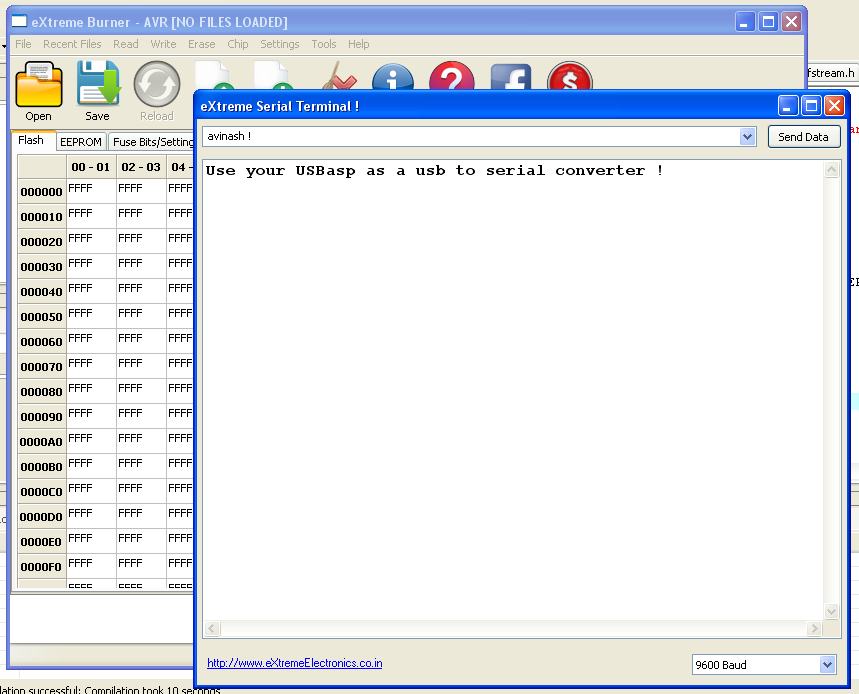 |
eXtreme Burner AVR v1.3 Beta ! |

Since AVR programming is done by SPI protocol, is it possible to program a SPI EEPROM using the same programmer?
Hi sir, just now i tested eXtreme Burner AVR 1.3 Beta.
It’s working fine for ATmega128 board.and also speed is double as copmpared to previous V1.1. Thanks for making
great AVRISP programmer.
@Murali,
Thanks! for testing … 🙂
Sir I am working on at mega 2560;
Is this Extreme burner can be use for
programming it?
because i have seen some where that there is the option of burring AT MEGA 2560 also.
please help.
That’s an okay for Mega2560 also…. I check it myself….
@Shawon,
Thanks! But I already did so !
Hello sir…
can i use USBasp for serial communication… i seen somewhere you said that you have changed the some firmware setting… and a “USBasp.hex” file is given there…
i have that hex file but i want to know how to use this…
Please
Thank you
Ismail…
I think there’s a bug in your software’s serial terminal part…. It doesn’t quit in case of any error…. It would be great if you can integrate an Arduino programming utility, support for other chips like ATMega328, etc and upgrade the fuse editor part…. Best wishes…
i too have tested ,host mcu was atmega 16,i checked my connection i was only reciving half of the text sent from mcu ,and after tat it was saying some uart error and usb asp 1.3b hung with usb asp programing led up
USBasp Firmware with UART Support – this firmware is for what kind of UsbASP hosting MCU – atmega8, 88 or 48 or else??
@Billikin,
Atmega8
In that case it’s not working properly. In serial port window I’m getting Exception messagebox. It’s poping up again and again. (Win7 32bit).
I tried the Usart on Atmega16.
Its working perfectly fine.
But it would be better if we can send characters without pressing enter.
And it is not working as a comport.
i am the learner of Avr Programmer
i hope u can help me
Hi,
I’ve tried v.1.3 Beta with Atmega1280 and I have to say that software doesn’t work properly.
I’ve read the ATmega1280 on Arduino mega 1280 Board.
Start of Bootloader is at 1F000h but eXtreme Burner is reading it into buffer at 10000h.Yes I’ve also add following lines in chips.xml for ATmega 1280:
ATmega1280
131072
4096
0x0003971E
256
YES
YES
YES
YES
YES
.\Images\Placements\ZIF_DIP_40.bmp
Everything is same as for ATmega2560 but Flash size.
Another thing is with loading the same Bootloader from hex file. As I said it sould load to 1F000h but the eXtreme Burner loaded file to 0F000h.
Third thing what I’ve noticed is memory size definition for ATmega640 in chips.xml. It should be 65536.
Other programmers (Bascom and ProgISP) are reading this ATmega 1280 properly also hex file as well.
I’ve also checked Arduino board with ATmega328. It reads the ATmega328 properly and hex file too. For this I’ve added definitions for hi fuses in fuselayout .xml and put definitions for chip in chips.xml.
fuselayout.xml:
chips.xml:
ATmega328(P)
32768
1024
0x0000F951E
128
YES
YES
YES
YES
YES
.\Images\Placements\ZIF_DIP_40.bmp
Best regards,
Jaka
@Jaka,
Send me the ATmega1280 hex file. Have to check what exactly is the problem.
Again for ATmega328:
adding following lines in fuselayout.xml:
LAYOUT id=”5″ comment=”For ATmega328,328P”
BIT position=”0″ name=”BOOTRST” details=”Select Reset Vector” default=”1″
BIT position=”1″ name=”BOOTSZ0″ details=”Select Boot Size” default=”0″
BIT position=”2″ name=”BOOTSZ1″ details=”Select Boot Size” default=”0″
BIT position=”3″ name=”EESAVE” details=”EEPROM memory is preserved through the Chip Erase” default=”1″
BIT position=”4″ name=”WDTON” details=”Watchdog Timer Always On” default=”1″
BIT position=”5″ name=”SPIEN” details=”Enable Serial Program and Data Downloading” default=”0″
BIT position=”6″ name=”DWEN” details=”debugWIRE Enable” default=”1″
BIT position=”7″ name=”RSTDISBL” details=”External Reset Disable” default=”1″
and adding following lines in chips.xml:
CHIP
NAME>ATmega328(P)
FLASH>3276810240x0000F951E128YESYESYESYESYES</CALIB
.\Images\Placements\ZIF_DIP_40.bmp
Hi, I followed your instructions above to add the ATmega328 to the fuselayout.xml and the chip.xml files. Now the program won’t load. It comes up with an error that it has to shut down. When I rename the original files back it works. I need the ATmega328 added so I can program one. Please help. If need be I can send you the files where I copied your information into. You could check it over and send it back to me. Or could you just sent me a copy of the 2 files that work.
THANKS
Hi Alan
Did jou solve your problem with burning Atmega328 ?, I have very similar problem
Actually I am facing a problem while burning program
in ATMEGA32A. I am trying to burn the blinkled program
in EXTREME BURNER -AVR. A message is coming that
“Attiny 32A is not found, then continue it with users
permission”. But in the configuration options of AVR
STUDIO4, Atmega32 is selected. Can anyone please
address this problem and suggest me. Waiting for all
of your response. Thanks in advance.
It will be better if you can email me –
(sumanta.show@gmail.com / show.sumanta@rediffmail.com)
@Sumanta,
Din’t u see the Chip Menu !
Oh God! Please tell me do u have brains out of stock in your manufacturing unit !
Sir please let me know that can burn hex file on ATmega644 on eXtreme Burner.
Hello.
Can you add support for the ATmega1284P-PU IC in your software? It will be much apreciated! your software is so easy to use but lacks some IC compatibility.
Thanks for all!
i really hope they do add support for atmega1284p-pu..
thanks
Hi!
Is it possible to see amount of flash occupied with downloaded .hex file?
In this or previous version of burner.
It would be very usefull to see how much space is free for larger programs.
I think avr dude tells you percentage of full flash.
thank you,
regards
Hi,
I have successfully programmed ATMEGA2560 microcontroller with V1.3B (Clicking on ‘About’ shows V1.2). It is working fine.
Thanks
Hi sir,
This is Abhishek Pandit, one of your old student. Where are you now? Long time no information of yours. Please reply with your email id and mobile number. My number is +919748338128.
Hi,
When you program WDTON on ATMEGA128,is not realy programmed. After Read Fuses is still unprogrammed.
With other software is working.
Regards.
Same with ATMEGA8
Sir,
Is the connections for serial communication using usbasp same as that for usb programming?
Pls help
Pingback: AVRweb – web based avrdude interface | Embedded projects from around the web
Hi
How can one use the USBasp UART support?
Data is sent as raw trough SPI?
Thanks
eXtreme Burner – AVR 1.3 Beta fails to run on Windows 7 x64:
—————————
AVRProg.exe – System Error
—————————
The program can’t start because libusb0.dll is missing from your computer. Try reinstalling the program to fix this problem.
—————————
OK
—————————
Hey I was working on with ATMega 128, works fine. Also some of my friends tried with 2560, it works good. I will be getting ATMega 640 in some time, will check it too. But there is problem with ATMega164 and 324.
Most of us have got ATMega324P-20PU, I see no option except ATMega324PA in the menu. I selected that option anyways and clicked on “Write>Flash”. All the other settings where taken care of, but it always says at the end ‘memory mismatch’… I thought my MCU was not good so I checked with 3 other, but still the same.
@ExtremeElectronics, please look into it. If this problem is addressed, then this software will be complete.
Sir I am working on at mega32;
Is this Extreme burner can be use for
programming it?
I don’t understand about USBasp connection to microcontroller (use serial terminal )
can anyone tell me about the wiring diagram…. please…..
whether using rx / tx port?
Pingback: How to set the AVR Fusebits « PocketMagic
hi
the “EXtreme Burner – AVR 1.3 Beta” is one of the best AVR programmer.
I’m waiting for The final version of this useful tool.
thanks alot
eXtreme Burner AVR 1.3 Beta is not supported with 64-bit Windows 8.. it detect USB as unknown device and when i open software eXtreme Burner AVR 1.3 Beta it shows some error asking for file libusb0.. I Disable Driver Signature Enforcement and also try by manually copy paste the file libusb0 in system32 folder but the problem still there… Kindly tell me the way out
Hello! Try to copy libusb0.sys to SysWOW64 directory.
Hy my name is Florin and i am working on a project based on attiny 25/45/85 and i am stuck in this software trying to erase my chip’s. They are not in the list. Please can you help me. Thank you very much. This is the best software i worked with.
Hi,
Technically Attinny84 and Attinny85 are the same except i/o pins.
So you can add to chips.xml file following lines and you will have support of attinny85. Just take care on pinouts when programming. It works fine for me:
ATtiny85
8192
512
0x000B931E
64
YES
YES
YES
YES
YES
.\Images\Placements\ZIF_DIP_40.bmp
I’ve added mega644p to chips.xml but software display “ATmega644P not found”, Incorrect chip found continue?
how do i work with mega644P chip
ATmega644P
65536
2048
0x001E960A
128
YES
YES
YES
YES
YES
.\Images\Placements\ZIF_DIP_40.bmp
Hello everyone!
I just tried to open the hex file “Sim300demo.hex” from the website to flash it in the mega 32 but when I click open i get an error corrupt hex file and then Cannot Open HEX File. In Func PICProgFrm::LoadHexFile.Also the same problem when I build a new hex or with every hex used.
I am using extreme burner v 1.2 on Windows Xp SP# platform . It is the firs time happening after a long time using the same program (my pc is just formatted).
What do you think is going wrong??
hell friends,
am using atmega 16, how to lock the softwware to avoid copying
Software is really super.
Only would come in handy to him update about new type chip.
Will in early time any upgrade ?
Martin
About new possible feature:
– it’s realy annoying when programing, let’s say Atmega88PA witch choosen Atmega88 type. Popup window is showing with warning every time (detected mcu type is different). Is it possible to add option to tool configuration not to show this window??
– same thing with programing window – add option to automatically close writing/reading window if no error occured.
Nevertheless tool is extremely usable to me.
I am new at this and would like support in the new program for the ATmega328p ..I think Extreme is a wonderful prg. for people that either don’t want to compile code and just want to easily load hex onto project chips…
thanks.. Mike
Do I need to connect only TX and RX pins from USBisp and I don’t see 5v supply from programmer(do I need external ??).
Hello sir,
I am using ubuntu12.04,
Please suggest how to use serial communication.
Hello,
I read in the list above, the atmega 328p is supported, but in the Chip list, ATmega 328P does not show. Can you advise if it is possible to upload boot-loader to this chip using your extreme burner.
regards,
Barry
Me either.
Hey guys
Excuse me, I have a problem with the Programmer and that’s I can’t program Atmega128!!!
Can you guide or help me Please!!!
for me very important!!!
Thank you everyone!!!
Sir, can you please tell if there is extreme burner application designed for linux ???… I need it
Hi, I have made donations to this software but in the last months it’s not been updated or anything, Is this going to be updated at all, With new chips.. Any reply from — Avinash — thanks
does anybody has the chips.xml for atmega128rfa1 please ?
i have an atmega 328p but there is no option in the chips menu..
has anybody encountered this??
Look at jaka’s answer.
The code he gave is a bit messy, due to tag rewriting in the comments, but you can easily rewrite it with the appropriate syntax by looking already existing chips and layout xml syntax in the original files.
Hi i need really your help, i used extreme burned software on my arduino mega2560, starting https://extremeelectronics.co.in/software/extreme-burner-avr-1-3-beta-test/ , but, after that, my Arduino mega2560 no longer accepts any password, not even a simple piscars LEDs can help me ?
What this hex file for examples in this program description ?
Hello, can you tell me what is the newest version of extreme burner! Many Thanks.. Keep up the good work…
Will the Atmega1280 soon be supported?
A number of us with QidiTech 3D printers (which use the Atmega1280) need to change some fuse bit settings to be able to upgrade the firmware:
https://www.3dhubs.com/talk/thread/avatar-iv-qidi-tech
Any suggestions would be greatly appreciated.
Thanks,
Bill
Hi, just tried installing Extreme Burner AVR. installs OK but will not run as I get an error ‘libusb0.dll’ is missing.
Can you help with advise how to fix this?
PC is windows 8 64 bit with intel processor.
Thanks very much,
Dave.
On Windows 8 and above you need to disable driver sign enforcement. Please Google for video steps for that.
Hi Avinash,
I recently discovered this wonderful program.
Easy to use and very user friendly.
I translated this one into French.
I do not see how to attach the file here.
I am looking for your email and I send you the file immediately.
Thank you again and really a good job.
Where join the file extreme_burner_avr.po translated to French?
Alain.
Hello..
There was such question.
The program for the installation of protective fuse, which would protect the controller reading, put a check mark or not? if put, what to enter for protection from reading? I’m a novice.
The “Configure avr clock” icon is displaying wrong value for the low fuse.
When selecting internal RC clock, 8 Mhz, no clock out, without dividing by 8. The low fuse value should be “C2”, however the function displays “C4” which will freeze the microcontroller.
In case of the Atmega88 will be configured “external low freq.”
Hi Avinash,
Today I downloaded extreme_burner_avr_v1.4.2_setup. Installed it on my laptop. After successful installation, and on start of the application an error comes up and shuts down the programme.
Title of box is AVRPROG.exe – Application error
The application was unable to start correctly (0xc000007b)
click OK to close.
How to correct this situation.
I downloaded the 1-3-bete also and it also gave same alert.
? ????????? Atmega328 ATiNY45&
For Atmega328 ATiNY45 https://www.mikrocontroller.net/topic/378843
Hi,
how can I edit the language file “avrprog.mo” in eXtreme Burner for me?
The German version has some erors.