
This tutorial give you the details of synchronous serial communication, which is the basis of data transfer in communication standards like SPI and I2C. The tutorial is aimed for a beginner who has no experience or any idea of serial communication. So intermediate user who already has some idea about serial data transfer can skip this tutorial and jump directly to SPI or I2C tutorials.
Data Transfer.
Knowledge of data transfer is very important for any embedded system developer. In any embed ed system data is moved between several units like between RAM and CPU. There are many methods and technique for data transfer each having its own pros and cons. So different data transfer technique is used in different situations. Some example of data transfer are
- Simple parallel transfer. (Used to transfer 8,16,32 … bits of data in the same time)
- Asynchronous Serial Transfer (USART) – Old but still in use mode of serial communication using only 2 lines (+1 additional line for GND).
- SPI – Serial Peripheral Interface – Standard Mode of communication between different ICs. Many ICs designed for a Variety of Jobs like Flash Memory, LCD controller, Ethernet Controllers etc uses this standard for communication. So if you want to use any of these functionality you need to have a knowledge of SPI.
- IIC(or I2C) – Inter IC communication : Developed by Philips is also used by a variety of ICs like EEPROM,Temperature Sensor, Real Time Clock Chips etc.
- USB: Who doesn’t know USB ? – A very advance, high speed and thus complicated serial Bus used in PCs to connect almost anything to it!
- Fire Wire
- Ethernet
- many more …
Mode Data Transfer can be broadly divided into to types
- Parallel Transfer – In this mode a number of bits (say 8,16 or 32) are transferred at a time. Thus they require as many electrical line as the number of bits to be transferred at once. This method is fast but disadvantage is more number of lines. So they are basically used when the units involved in data transfer are physically close and almost fixed with each other for a long time. Ex CPU and RAM, The PCI Cards inside your PC. These are close to each other and packet inside the CPU box and are disconnected from each other less frequently.
- Serial Transfer – In this mode only one bit is transfer at once. So to transfer 8bits, 8 cycles are required. So these requires less number of physical lines (actual number of lines depends on technology used like SPI use 3 lines while I2C uses 2 lines, there are some technology that uses just a single wire !). The advantage is that due to less number of like IC using these technologies are small with low PIN count.
In this tutorial we will just focus on synchronous serial communication that is the basis of I2C and SPI.
Serial Communication
In serial communication basically there are two fundamental electrical lines (and one for GND), one is called CLOCK and Other DATA. The actual data is transferred BIT by BIT on the DATA line. The clock line signals that when a BIT ends and Other BIT starts. How clock line does it depends one the standard used. The clock line changes its level, that is when it goes HIGH from a LOW level or vice versa to signal this. Lets take the first case, that is the CLOCK line goes HIGH to signal a new bit is available. In this case the algorithm to TRANSMIT 8 bit will be as follows
- Initialize CLOCK and DATA lines to 0
- Check the 0th bit
- If it is 1 then make data line HIGH else make it LOW.
- Wait_1
- Make CLOCK line HIGH to signal new bit is on the DATA Line.
- Wait._2
- Make CLOCK line LOW again.
- Check the 1st bit
- If it is 1 then make data line HIGH else make it LOW.
- Wait_1
- Make CLOCK line HIGH to signal new bit is on the DATA Line.
- Wait_2
- …
- REPEAT TILL ALL 8 BITS ARE TRANSFERED
- …
- END
Here we are transmitting the 0th bit first (LSB first) but some standard may use MSB First (8th bit then 7th bit … and so on). Also a HIGH on data LINE is signaling new bit but again this depends upon standard. The timing diagram of above steps is given below. The animation will make things clear for you.
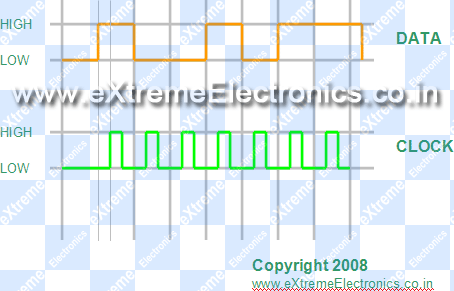 |
Timing Diagram of Serial Data Transfer. Example Data = 10010111 |
The "other" device which is receiving the data follows the steps given below to receive the data.
- Wait till the CLOCK line is LOW.
- When CLOCK line becomes HIGH read the DATA line, this gives the 0th bit.
- Wait till the CLOCK line remains high.
- Go to step 1, repeat until we have got all 8bits.
- Merge all 8bits to get the data.
- END
Master And Slave
These are two terms often used with serial communication. The MASTER is the device which controls the CLOCK. So the First example given above is of Master Transmitter while the Second is of Slave Receiver.
Now you should have got the basic over view of serial communication. These will be helpful when we move to I2C and SPI tutorials. If you have any doubts please post a comment or better post a new topic in the forum . Your feedbacks can help me a lot in improving the tutorials.

Hello engineer,
How can we know that the clock is located at the middle of the DATA sent..or how the timing?
and may I ask about PLL? Phase-Lock Loop.
hello sir,
i need some help regarding, how to enable and disable serial in communication. and how to clear an array.
thank you
Hello Vishal,
Pls give details. I didn’t understood ur question.
@deen
it doesn’t matter. we should give the clock a few micro second after setting the data.
#vishal
to clear an array, you need to fill it with a numbers (usually 0).
Hi,
Just wanted to know the advantages of transmitting a MSB first and then a LSB in a serial data transmission.
I want Total information of USI in SPI and I2c in msp430 give some pdf files
hey avinash…
i request you to write a detailed article on SPI master slave routines.
Thanks for that tutorial: great clear intro to synchronous comms! LOL at the Indians asking hopeless questions “Please do my job for me”…no wonder the country’s a tip.
i request you to write a detailed article on SPI master slave routines inc
Pingback: Interfacing 12 bit SPI ADC (MCP3204) with AVR Micro | eXtreme Electronics
Hello sir,
You are doing superb and appreciating work.Thanks for that.
I will be thankful to you if you give tutorial on interfacing colour lcd and nokia mobile with microcontrollers. Thanks in advance.
Hello Ravindra,
Colour LCD Tutorial will follow. Right now I am developing a Library for 128×64 graphic LCD. Extensive tutorials for GLCD is comming soon!
Thank you sir..
Nice explanation given in this post specially about data transfer and serial communication.
Dear Avinash,
Great work done .A wonderful website which is so lucid and simple.for A beginner like me it is very useful.
Thanks a lot for your efforts.
One thing i would request you to give some detailed tutorial about I2C or some links so that i able to understand how to use this protocol to interface various devices(like temperature or light sensors) with AVR micro controllers.
I again appreciate the job done by you and wish that this website keeps on going.
With Best wishes and regards
Hi,
Great work done. As an engineering student this is how I think my teachers should teach. Thanx.
great work done.sir,can u upload a tutorial for sd card or mmc interfacing with atmega8 and gradually monitoring its stored data in a pc,it is a very much versatile as well as nice project.I hope all the avr-techies will be in unison with me.
hi can any one help me i want to receive i2s audio digital data using spi protocol in atmega32
how can i do that the protocol looks similar except for the channel select
which can even vb ignored
hello sir,
I am a beginner in avr c. Just now i am interfacing external max187(12 bit serial adc) with atmega16. So I Want tutorial spi tutorial in avr c for 12 to 8 bit conversion adc in atmega16 + how to encode the given quantized signal coming from the DOUT of the max187.
Hi
I need basics of i2c and spi… and need to know how it works,,,,,,, It will be better if u give details
Pingback: ad7714 interfacing to pic18f4550.
sir can we have the detailed code on spi communication between 2 mcu.