
In this tutorial we will set up the TIMER0 in fast pwm mode and use it to generate PWM signals of varying duty cycles. In this way we would be generating analog signals of voltages between 0 and 5v. In the example we will connect this output to a LED and see how it varies its brightness. Please see the previous tutorials on PWM and TIMERs before reading this tutorial.
PWM
Timers
Setting Up TIMER0 in Fast PWM mode
Setting up the TIMER0 in fast pwm mode is very easy and just require one line of code. You only need to deal with one register named TCCR0 (Timer Counter Control Register For Timer 0). You just need to set up various bits in it to get the required setting. The various bits of TCCR0 is given below.
TCCR0
This register is used for configuring the TIMER0. See Timer Tutorial for more info. The explanation of various bits of this register is as follows.
Bit No |
7 |
6 |
5 |
4 |
3 |
2 |
1 |
0 |
Name |
FOC0 |
WGM00 |
COM01 |
COM00 |
WGM01 |
CS02 |
CS01 |
CS00 |
Initial Val |
0 |
0 |
1 |
0 |
0 |
0 |
0 |
0 |
(Note The Bits in RED are discussed here)
WGM – Wave Form Generation Mode
The table below shows the various modes supported by TIMER0. We have covered Normal mode in "Timer0 tutorial" and CTC mode in "Timers In compare mode" tutorial. And this tutorial we are interested in Fast PWM mode.
Mode |
WGM00 |
WGM01 |
Mode Of Operation |
0 |
0 |
0 |
Normal |
1 |
0 |
1 |
PWM Phase Correct |
2 |
1 |
0 |
CTC |
3 |
1 |
1 |
Fast PWM |
From the table it is clear that for Fast PWM we need mode 3. To get it we must set WGM00=1 and WGM01=1
COM – Compare Output Mode
These bits are used to set the Output mode in various Wave form generation mode. For Fast PWM mode these can be used to achieve following output modes.
COM01 |
COM00 |
Output Mode |
0 |
0 |
Normal Port Operation (OC0 disconnected) |
1 |
0 |
RESERVED |
0 |
1 |
Non Inverted PWM |
1 |
1 |
Inverted PWM |
We need the "Non Inverted PWM output mode" so we set COM01=0 and COM00=1
CS – Clock Select
These are used to set an Input Clock for TIMER. We set them as follows to get Ftimer=F_CPU (i.e. no prescalling). See "Timer Tutorial" for more info.
CS02 = 0
CS01 = 0
CS00 = 1
Now the TIMER is in Fast PWM mode to vary its output duty cycle we just need to set the OCR0 (Output Compare Register for Timer 0). For example setting it to 0 will generate PWM with duty cycle 0% (Totally off) while setting it to 128 will generate 50% duty cycle and 255 will generate 100% duty cycle signals.
Note: The output waveform is available in the associated Output Compare Pin of the microcontroller. For example for Timer 0 the associated OC pin is OC0. You can find its location from Pin diagram in datasheet. In ATmega16 and ATmega32 it is on PORTB bit 3, i.e. PB3. This pin must be set to output to get the PWM signals.
Sample Program
The in the following program we set up TIMER0 in fast pwm mode and use the generated PWM signals to vary the brightness of a LED. This is the simplest program to get you started with PWM signal generation. We start with minimum brightness and increase it gradually and then again reduce it gradually to zero. This process is repeated as long as the system is powered.
#include <avr/io.h>
#include <util/delay.h>

void InitPWM()
{
   /*
   TCCR0 - Timer Counter Control Register (TIMER0)
   -----------------------------------------------
   BITS DESCRIPTION


   NO:   NAME   DESCRIPTION
   --------------------------
   BIT 7 : FOC0   Force Output Compare [Not used in this example]
   BIT 6 : WGM00  Wave form generartion mode [SET to 1]
   BIT 5 : COM01  Compare Output Mode        [SET to 1]
   BIT 4 : COM00  Compare Output Mode        [SET to 0]

   BIT 3 : WGM01  Wave form generation mode [SET to 1]
   BIT 2 : CS02   Clock Select               [SET to 0]
   BIT 1 : CS01   Clock Select               [SET to 0]
   BIT 0 : CS00   Clock Select               [SET to 1]

   The above settings are for
   --------------------------

   Timer Clock = CPU Clock (No Prescalling)
   Mode        = Fast PWM
   PWM Output  = Non Inverted

   */


   TCCR0|=(1<<WGM00)|(1<<WGM01)|(1<<COM01)|(1<<CS00);

   //Set OC0 PIN as output. It is  PB3 on ATmega16 ATmega32

   DDRB|=(1<<PB3);
}

/******************************************************************
Sets the duty cycle of output.

Arguments
---------
duty: Between 0 - 255

0= 0%

255= 100%

The Function sets the duty cycle of pwm output generated on OC0 PIN
The average voltage on this output pin will be

         duty
 Vout=  ------ x 5v
         255

This can be used to control the brightness of LED or Speed of Motor.
*********************************************************************/

void SetPWMOutput(uint8_t duty)
{
   OCR0=duty;
}

/********************************************************************

Simple Wait Loop

*********************************************************************/

void Wait()
{
 _delay_loop_2(3200);
}

void main()
{
   uint8_t brightness=0;

   //Initialize PWM Channel 0
   InitPWM();

   //Do this forever

   while(1)
   {
      //Now Loop with increasing brightness

      for(brightness=0;brightness<255;brightness++)
      {
         //Now Set The Brighness using PWM

         SetPWMOutput(brightness);

         //Now Wait For Some Time
         Wait();
      }

      //Now Loop with decreasing brightness

      for(brightness=255;brightness>0;brightness--)
      {
         //Now Set The Brighness using PWM

         SetPWMOutput(brightness);

         //Now Wait For Some Time
         Wait();
      }
   }
}
Downloads
- HEX File ready to run on ATmega8
- HEX File ready to run on ATmega16
- HEX File ready to run on ATmega32
- Complete Atmel Studio 6 Project for ATmega8
- Complete Atmel Studio 6 Project for ATmega16
- Proteus simulation file for ATmega8
- Proteus simulation file for ATmega16
Hardware Setup
To run and test this program you need an AVR MCU (ATmega16 or ATmega32)(ATmega8 won’t work!). To keep the hardware simple we will use the MCU with internal 1MHz oscillator (this is default factory setting for new MCUs). We will add a good quality RED LED to output compare pin (OC0) of the MCU. This is PIN no 4 on ATmega16/32 Micros. Vcc PIN (pin 10) is connected to +5v and Gnd PIN(pin 11,31) is connected to gnd. This is not show in diagram.
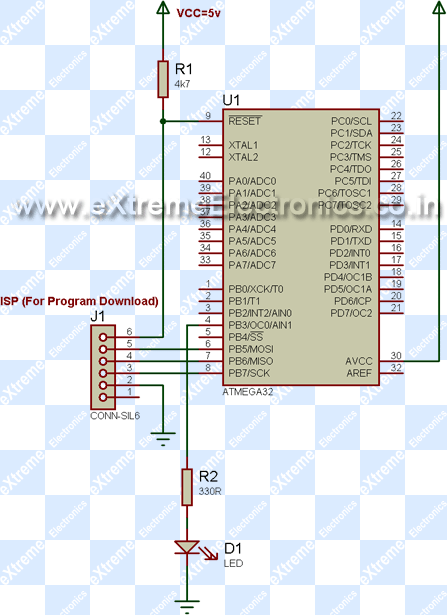 |
Fig. 1 – A PWM controlled LED |
|
You can program the chip using this simple avr programmer or buy a USB Programmer.
Video
The PWM controlled LED in Action !!!

using which software u draw the circuits.Pls recommmend a
good avr simulation software.
Hello John,
The best avr simulation software is VMLab
http://www.amctools.com/
Its little hard in the begining as there is no GUI circuit maker, you have to make circuit by writting netlist. But don’t get afraid you will quickly get it. And then it will be very powerful tool for you.
@Mitchell
Pls see ATTiny Datasheet for info on Registers. May be the ATtiny TIMER0 DOES NOT have PWM(pls confirm this by datasheet).
Many Modification may be needed to port it as this is for Mega series.
when simulating
in oshon’s software (AVR IDE)
i am not geting the PWM output…….
i am using atmega32
help ……………………
@ Nataraja.
Hello 🙂
Please, How can I know whats wrong with ur setup. Assuming that the code is 100% correct, proceed with debuging. Try to spot the problem urself.
Try moving this line to beginning of InitPWM() function
DDRB|=(1<
DDRB|=( 1 << PB3 );
gr8 Sir
Sir i want to work on interrupt also…
can we get some gr8 Tutorial on external interrupt also
Thanx
Ismail
Download Sample Program
the hex file after compiling and this file which u gave
Download Compiled HEX file
dont match !!!!!!!!
Hi, and thank you Avinash for these wonderful tutorials!
Attiny13 has two comparators on timer0, OC0A(PB0, pin 5 of the MCU) and OC0B(PB1, pin 6 of the MCU), in PDIP configuration.
So, you need to change
DDRB |= ( 1 << PB3 ); //PB3 means 3
to
DDRB |= ( 1 << PB0 ); //pin 0 of Port B
Hi Avinash
Fantastic tut.
Thanks for your time.
Sample code that works, wow. Cool
I have already recomended your tute to fellow students at uni.
Regards
microsys
Hi Avinash
Fantastic tut.
Thanks for your time.
Sample code that works, wow. Cool
I have already recomended your tute to fellow students at uni.
australia
Regards
microsys
Very Nice Tutorial on PWM. Thanks a lot.
Regards,
Sandeep
Hello Sandeep,
Thanks! 🙂
Dear sir,
I have downloaded VMLAB and installed it. But i don’t know how to use it with WinAVR. Currently i m working with ATMEGA16.
Please help me…
Thank You!
hi avinash
thanks for this great tutorial.
Can you make a programme for PWM at 38 Mhz so that i can use that with TSOP1738.
@sanjay
TSOP requires 38KHz (not MHz).Using PWM we can only generate certain values of frequencies(F_CPU,F_CPU/1024 etc)generally F_CPU is 16 Mhz,so we cant just produce any frequency we wish.
@avinash
is there some way to produce waveforms of desired frequency using avr mcu’s.Also,there is a small webpage error,the link “timer tutorial” under “clock select” points to serial comm tut page.(just a small error!!).
Hey Avinash,
Would like to thank you for the awesum tutorials you have put online for help with AVRs. I am studying in NZ and we are currently working on a path follower robot capable of solving a maze. It is using Atmega8. Was trying to get the PWM working for the robot but am a little confused about the use of timer/counter. Would TCNT2 ( counter 2) which has got both output compare and an 8 bit counter be useful for PWM? Is that the major change I have to do in this code (replacing the registers from TCNT0 to TCNT2) or am I forgettoing something else?
Would be grateful for your help
Cheers
Tanmay
@Tanmay
See datasheet of ATmega8. I recommend use the TIMER1 it has got 2 PWM outputs.
Wonderful tutorial.Just wanted to know how 2 PWM outputs would be more beneficial as explained above?
wll nutzlos i am also in same projct hlp me,in shortest path finding ,no idea how to wrt code for it ,using atmega 128
Thanks a lot sir.
I have no words to say my convenience. The datasheet was craking my head. It was redicules. This was so easy. And very understandable…
Is it possible to produce PWM out of any pin
@Prashanth
Answer: Nothing is Impossible !
y not ?
it is possible , 32 servo controller etc etc
use atmega series MCU’s to control servos at their I/O pins (PWM output)
.
but there are restriction , depends on the application and most of the case’s u have use another MCU,
master salve system kinda ….
.
i have used 30 pins of my ATmega32 lo control servo’s (30 of them)2 pins left for TX,RX
Thanks for the reply.this is exactly wat i have been waiting for
Hello! First of all! Bravo! Very nice job.
My problem is not really starting the PWM, it’s about stopping it.
Let’s say that when I press a button I wish that the PWM cycle to stop.
I tried to CLEAR bits COM1 and COM0 as the datasheet of ATmega16 says “Normal port operation, OC0 disconected”.
Maybe I am missing something. Thaks.
@Mircea,
To Stop PWM
1) Stop the timer by stoping its clock input.
2) Make “Normal port operation, OC0 disconected”
3) Make the PORT as INPUT by clearing the DDRx
hey, thanks for the tutorials, they are really helpful.
i have tried using the same above program example to program the timer2 so that i can produce a pwm signal at the pin 0C2 on the atmega16, i made the adjustments below but it doesn’t work..pliz help!!
TCCR2|=(1<<WGM20)|(1<<WGM21)|(1<<COM21)|(1<<CS20)
DDRD|=(1<<PD7)
OCR2=duty
Pingback: Sound Generation by AVR Micro - Tutorial I | eXtreme Electronics
well this helped me understanding very clearly but have one confusion that PWM channel gives us a benefit that it works at side no matter what happens in main code so what if i want to go like this i have to measure battery voltage and adjust PWM according to the voltage to keep the battery at 13.2 volts now how this should be established
secondly if i use 12 or 16 MHz crystal what i have to change in code or this will work
The compiled HEX file and program do not match because Avinash made some mistakes while setting the mode of TCCR0. Maybe he debugged it before hexing which is why both are different.
Check the mode settings table of TCCR0 and output mode with the program line where they have set the mode for TCCR0…….
I think this page has the same title as the first one on PWM.
Hello guys! Great tutorial here. Why you stopped the PDF versions I start to save PDFs for easy future references but after “AVRTutorial-TIMER0.pdf” all the articles don’t have one. I imagine it’s a arduous job, but is a nice resource for studies and for preserve the content. Anyway, thanks a lot by that great explanation!
Dear Avinash,
With regards to your code, I dont understand where the value in the variable ‘duty’ assigned to OCR0 will come from. However I understand that the value must lie between 0 – 255.
Are you saying that after setting up the code like you’ve done, I have the option of generating my value (decimal) between 0 – 255 and assign it to the variable ‘duty’?
@Jean,
I think you don’t understand about ‘functions’ in C language.
Dear Avinash,
I’m sorry I dont understand what you are saying
I’m trying to conect a Atmega8 with an dc motor and an LCD(to show forward or backward or fast or slow) and control the speed on the motor. Because I’m a beginer I don’t realy know how. So far I succeded in making a programer on paralel port that works for my atmega8 at 4Mh in hex. I’ve tyed some schematics but didn’t had any results.
I also have an L293D as shown in tutorial!!?!
PLS H E L P!
Hello Avinash.. cool tutorial… ekdum mast…
i was wondering how to control the speed of a dc motor using pwm technique… timer0 has only one output through the OC0 pin and hence cannot be used to control a motor. Can i use timer1 and timer2 to control them?? If yes, then how??
Thanks in advance!! 🙂
Pingback: RC5 and Manchester Coding « Sparktastic
hi Avinash,
Ur avr turorial series is very much simple and easy to understand for the beginers like me and others also,GOD
bless u and reward for this great job done and hope so that u will continue this effort.i espacially find it very much worthy to step into the world of microcontroller.May Allah bless u and success u in ur efforts.once again thank u for this great tutorial series.
thanks
i want to make line follower using more than about 8 sensors.
ur tutorial for PWM helped alot.
i wish i could get a good tutorial for PID.
Hi,
I’m new to programming MC.
I need two PWM o/p, i.e one to enable 1 and another to enable 2 of motor controller!
From which pin can i get another pwm o/p??
Thanks in advance.
@Illuminator
Use OC1A and OC1B pins.
Timer1 is a 16bit timer with dual PWM outputs.
@avinash and @illuminator
we can also use OC0 (timer0) and OC2 (timer2) for that purpose. Though they are 8bit timers, but its sufficient for motor controller enable pin..
Thank you for clearing the concept of PMW by microcontroller.
Now I have some doubt for pericular type application. Suppose I am getting a digital output and convering it in to some value( like your Ultrasonic range finder application) where port B bit 3 is already engaged.(as data bit to LCD) how I get pwm output in pin OC1A or OC1B for the converted value(or unconverted value.!)should I write the converted value to OCR0 or how. Please reply
regards,
Uttam Dutta
@Uttam Dutta,
Use TIMER1 for PWM. The OC1A and OC1B are free in most of my design.
Hi
Is it possible to manually copy value of OC0 to specific pin..
If yes, how..
for wg. we want to value of OC0 to PORT C PIN 7…
@avr noob
You didn’t got the point at all!!!!!!!
The analog value generated on PWM pin is NOT real analog. Its pseudo analog. That means if you copy it to some other digital pin the value that is copied depends on when the OCx pin is sampled. It it was high at that moment the other digital pin where it is copied will become high and vice-versa.
@avinash what about the phase correct pwm….post something on that…i cant find it on ur site..thanx in advance
Pingback: Atmega8 pwm generation
gr8 work avinash..keep it up..can u tel how to interface sensors to motors in pwm mode..i mean in case of a line follower robot??
thanks..
Pingback: Operating a Motor | The Robot Diaries
Hi, thanks for the tutorial.
However I had a doubt,
Is it possible to control the brightness of the led using ULN2003 IC ( using PWM output from the microcontroller, input to ULN2003)?
If not which IC can I use? I need to vary intensity of a group of LEDs instead of only one,hence I am using ULN2003(which can give about 30 volts)
Hoping for a reply,thanks in advance.
Nakul Javali
Nakul Javali: Look at the STLA02.
thank you very much avinash sir 4 your help…your tutorials are awesome,you are doing a very excellent work for us. i am just a beginner & hav just started learning AVR for my project…i need to generate a PWM signal with varying duty cycle using ADC to fire the PMOSFETS in dc-dc converters..would you plz send me code to email plzz…
thanking you in advance…
Krishna kant
@Krisha Kant,
First of All I am no “sir” !
Don’t ask me to do anything for. I don’t work for free !
Why will anyone mail you anything … we all have our life ?
can i generate 4 pwm in Atmega16 at the same time
thnx a lot for ur efforts 🙂
@Ahmed
Yes
This site is really great!
This is going to help me a lot in my project work.
Bravo! Bravo!!
dear sir,
I am having an problem regarding a c program.
mine program is
#include
#include
void InitPWM()
{
/*
TCCR0 – Timer Counter Control Register (TIMER0)
———————————————–
BITS DESCRIPTION
NO: NAME DESCRIPTION
————————–
BIT 7 : FOC0 Force Output Compare [Not used in this example]
BIT 6 : WGM00 Wave form generartion mode [SET to 1]
BIT 5 : COM01 Compare Output Mode [SET to 1]
BIT 4 : COM00 Compare Output Mode [SET to 0]
BIT 3 : WGM01 Wave form generartion mode [SET to 1]
BIT 2 : CS02 Clock Select [SET to 0]
BIT 1 : CS01 Clock Select [SET to 0]
BIT 0 : CS00 Clock Select [SET to 1]
The above settings are for
————————–
Timer Clock = CPU Clock (No Prescalling)
Mode = Fast PWM
PWM Output = Non Inverted
*/
TCCR0|=(1<<WGM00)|(1<<WGM01)|(1<<COM01)|(1<<CS00);
//Set OC0 PIN as output. It is PB3 on ATmega16 ATmega32
DDRB|=(1<<PB3);
}
/******************************************************************
Sets the duty cycle of output.
Arguments
———
duty: Between 0 – 255
0= 0%
255= 100%
The Function sets the duty cycle of pwm output generated on OC0 PIN
The average voltage on this output pin will be
duty
Vout= —— x 5v
255
This can be used to control the brightness of LED or Speed of Motor.
*********************************************************************/
void SetPWMOutput(uint8_t duty)
{
OCR0=duty;
}
/********************************************************************
Simple Wait Loop
*********************************************************************/
void Wait()
{
_delay_loop_2(3200);
}
void main()
{
uint8_t brightness=0;
//Initialize PWM Channel 0
InitPWM();
//Do this forever
while(1)
{
//Now Loop with increasing brightness
for(brightness=0;brightness0;brightness–)
{
//Now Set The Brighness using PWM
SetPWMOutput(brightness);
//Now Wait For Some Time
Wait();
}
}
}
i want that motor should run at its max speed for certain durartion after acheiving max pwm
so, would you please help me to sort out this problem
its a humble request
your sincerly
nitesh kotwal
Pingback: generate and vary duty cycle of a pwm from atmega 32
Hi Mr.avinash,
I appreciate ur tutorial!! Most top threads in google search .. are redirecting to your tutorial!!! I do want a help.. I want this same program for atmega8 development board with 12mhz oscillator…..! im waiting for ur reply .. thank you!
hey Avinash ur tutorial is d best one i hav seen yet…it make me understand very easily…thanx a lot for dem!!! i need ur help since i m a newbie in microcontroller i dont know how to put this knowledge and get the desiered result…i use CODEVISIONAVR and ATMEGA16 so can u plz tel me step by step method to reduce the speed of motor…i wil b highly thankful to u …i m searching and trying for it for about 10 days but not getting it…u r my last hope plzzzzz HELP!!!
Pingback: valore uscita microcontrollore
I’m using the following code for PWM in ATMEGA8, to control the speed of a DC Motor using L293D. It works perfectly in Proteous simulation . But it doesn’t work on hardware, the motor moves in a constant speed. Please help.
#define F_CPU 1000000
#include
#include
void pwm(uint8_t x)
{
OCR2 = x;
TCCR2 |= (1 << COM21);
// set none-inverting mode
TCCR2 |= (1 << WGM21) | (1 << WGM20)|(1 << CS21);
}
void delay(int dur)
{
for (int x=0;x<dur;x++)
{
_delay_ms(100);
}
}
int main()
{
int i=0;
DDRB |= (1 << DDB3)|(1 << DDB0)|(1 << DDB1);
PORTB|=1<<PB0;
PORTB&=~(1<<PB1);
while(1)
{
pwm(254);
delay(5);
pwm(170);
delay(5);
pwm(100);
delay(5);
pwm(0);
delay(50);
}
return 0;
}
Regards
Bikash
Bikash, we can understand what you are trying to made.For your convenience,we will suggest you to try our Line Following
Robot Kit product. It gives you a platform on which you can make any kind of LINE FOLLOWING ROBOT. In this kit “ATmega8”
mcu is connected with a L293D motor driver IC which drives two DC gear motors. Along with this kit you will get a library
and examples. With the help of these examlpes you can control the speed of a DC motor using L293D. Thank you .
For more information http://store.extremeelectronics.co.in/LFR-Kit.html
hello Gaurav,
I am not trying to make the line following robot. I am just trying to implement pwm in a dc motor.
the code seems correct in simulation but when attached with a motor , it doesnt works in the hardware. please help me understand what i am missing.
thanks in advance.
Regards
Bikash
Bikash, i am getting your point.This is a comman problem. We have already made a code for this problem and also checked it.A tested hardware is also available with this for the smoothly running the code. So you please use it.Because from sitting here we can not find what’s wrong with your hardware. So it’s better to use a trusted and tested product. For more information http://store.extremeelectronics.co.in/LFR-Kit.html
Thank you.
hey bikash,
are you using a flyback diode parallel to the dc motor?
sometimes its just such simple things that are missing.
regards
tommie
As stated by you,the program runs flawlessly and when u put all the things in place the motor starts to its full speed,
So Try this check points,
Remove the motor and check the pwm voltage at the input pin of l293d and check the voltage at the op of the l293d in adjacent to change in your pwm cycle,
Always use a flywheeling diode with a inductive load since the mosfets tends to get damaged due to the noise spiked that are present when inductive load is turned off.
Sir, can u suggest me on generating 40 KHz square wave with 50% duty cycle?
@Sreejit
Cost will be US$100
Thank u for prompt reply.
But what i meant was generating the wave using atmega16/32.
Ya for that program only the cost is US$100
Hello Avinash,
Thanks for your AVR tutorials! They are very informative and well illustrated. I am clear with the concept of using PWM modes to generate variable duty cycles. But I am confused with the frequency varying part. I want to vary the frequency of the PWM signal from 2Hz to 2.5KHz in steps of 1Hz. How do I do that?
Regards,
Ashish
Outstanding tutorial, made my job so much easier! The manual for the ATmega part is way too busy with a dozen options such as interrupt that are not needed in my application. Kudos!
@Sam,
Thank you very much ! 🙂
Hi
Ashish
What is the PWM frequency?
IS the frequency remains constant with duty cycle changes?
Thanks
@gonio
Yeah The frequency remains constant as the duty cycle changes.. only the TON and TOFF ( that is time for which pulse is high and time for which the pulse is low respectively)changes for a PWM signal,which in turn changes the average Vout at the related output compare(OC0,0C1A,OC1B)pins
The table COM – Compare Output Mode is wrong.The values on the middle are inverted. Check the datasheet of Atmega32.
hi, maybe my comment is similar with some other users’.
I wanted to ask you to make a tutorial for Phase Correct PWM. I didn’t find a understandable tutorial.
thanks a lot
Hi, The tutorial was great I got understand all things, but I want to move two motors by Atmega16, I attach the motors at OCR1A and OCR1B and gives pulse simultaneously as below program.
I found “ICR1” in some site, Whats the mean of this..???
and WGM11 is only set all other 3 are reset is that correct.??
The motor is running but its very slow….!!!!
void main()
{
TCCR1A|=(1<<COM1A1)|(1<<COM1B1)|(1<<WGM11);
TCCR1B|=(1<<CS11); //*PRESCALER=64 MODE 14(FAST PWM)
DDRD|=(1<<PD4);
DDRD|=(1<<PD5);
while(1)
{
OCR1A=255;
OCR1B=255;
_delay_us(10);
}
}
Thanks sir,
Can you please help me to generate the pulse of 2V (upper limit) & 0V ( Lower limit) with 3.6ms duration & 2ms width??
I also want a pulse of 50V at the output of ATmega 16/32. Is that possible…??
please send me the Program as a reply Your reply is most important for me . Please reply me as soon as possible. Thank you.
Please Avinash sir My final year project is painding because of this program .. I’m totally new for the AVR family please send me the program @ ingawalehrishikesh@gmail.com. I’m eagerly waiting for your reply.
Hey, i have run the same code and then on proteus, but the problem is that when i have observed the output by a voltmeter , voltmeter rapidly changes values between 0-2.88 volts. why is that so?
Hello,
I have written code for intensity controlling of RGB led using Pwm and the code is
#define F_CPU 1000000UL
#include
#include
//#include
void init_timer0()
{
TCCR0|=(1<<WGM01)|(1<<WGM00)|(1<<COM01)|(1<<CS01); //PB3
//DDRB|=(1<<PB3);
}
void init_timer1A()
{
TCCR1A|=(1<<WGM01)|(1<<WGM00)|(1<<COM01)|(1<<CS01); //PD5
}
void init_timer1B()
{
TCCR1B|=(1<<WGM01)|(1<<WGM00)|(1<<COM01)|(1<<CS01); //PD4
}
void main()
{
while(1)
{
DDRB=0xFF;
init_timer0();
init_timer1A();
init_timer1B();
OCR0=128; //green
_delay_ms(10);
OCR1A=255; //red
_delay_ms(10);
OCR1B=128; //blue
_delay_ms(10);
}
}
but the red pin is not giving voltage could u plz tell me error.
hai madhavi i need to talkto u about avr program..can u give me your mail id
hi, I emailed you a Persian translation for the eXtreme burner app a long time ago, but you didn’t add it to the app, can you please add it now? thanks.
hi Avinash,
can we use this fast pwm for digital to analog conversion ?
In my project, i am playing wave. format audio file. like audio player.
for this application i am using ATMEGA32 series IC and i am reading wave. format audio file from SD card using SPI Protocol. can we play this audio file using Fast PWM concept.
if possible can share information.
thanks ….
Sir I am new in AVR family
I have to make my major project in which a analog signal feeded to ADC (pin 40) in ATMEGA 16, internally i have to convert that signal in digital form and proportionaly to genrate a PWM wave on (pin 18).
I am already done with lots of exercise but unable to do the same.
please help me with coding my e mail: himanshu8431@gmail.com
I want a c program for AtMega8… I can controll the pwm by TCCR2 increasing the value of OCR2… The program will like that when a input pin(say PB0) goes high then the value of OCR2 will incrase, then if input pin is low the value of OCR2 stops wherever it is. Again if input goes high, the value of OCR2 will increase where it was stopped. Thanks..
Hi, I think that your calculation for the duty cycle is wrong.
imo it should be:
(OCR0+1)/256
So a DC of 0% cant be reached with the registers as they are
OCR0=0 ==> DC=1/256 * 100% (This NOT 0)
OCR0=255 ==> DC=100%
Regards
Ruud
hi sir
i want to generate a wave form as — max 2.5v bottom -2.5v. i have used the referance voltage for this an i had adjust the voltage btw 2.5 and -2.5 volt….. now i want to generate a wave-form like … first pulse 2.5v then -2.5 v after that 2.5v and after that 0v for few us and then -2.5.
im getting problem in generating 0v wave.. plz help me
how can i generate a pulse btw the max and bottom value.. plz sir reply me ….
Thank you for sheering your knowledge, your tutorials are great and very helpful
Jack
Sir,
I am fresher but.i used VMlab in CDAC sir please tell me how i can run spi,I2C program in a dual window.
and how I can get hex file to load in proteus
Mr. Avinash, plz guide me how to set the frequency of PWM in Avr and also the duty cycle.
In one of my project I need 40KHz PWM signal with varying dutycycle.
Pingback: A DIY Arduino data logger: Build Instructions – Part 4 (Power Optimization) | Arduino based underwater sensors
Hi Avinash,
I need to control the brightness of led using two push buttons, up and down. (if s1 is pressed the butycycle increased by 10
% and if s2 is pressed butycycle will be decreased by 10%). can you please give me any idea or sample code?
I can make on chargable basis …
Hi Avinash,
I need to control the brightness of led using two push buttons, up and down. ( s1 to decrease the dutycycle by 10% and s2 to increase the dutycycle by 10%). Can you please give me an idea on how to achieve this.
Thanks!
Is it possible to generate a specific frequency using the Attiny24 with 50% dutycycle?
40 kHz Square Wave
How do I make PWM on 2 or 3 pins ?, like PB02 PB03 PD05 PD04
My Dear
in the first yot tell :
We need the “Non Inverted PWM output mode” so we set COM01=0 and COM00=1 === COM00=1
but in main cod your write:
TCCR0|=(1<<WGM00)|(1<<WGM01)|(1<<COM01)|(1<<CS00); ======= (1<<COM01)
is it ok ?