
Hi Friends,
Welcome to my AVR tutorial Series. In this article I will describe my Infrared Remote Control Library. Hope you will enjoy it.
I was very much amazed my remote controls since long. The simple circuits described in magazine were just operated like a switch and can only switch on and off an application. That means only single channel. That was of not much use. What I wanted was access to each key on remote control. I wished I could decode the signals generated by common remotes controls found in our homes. This way I could make multi channel remote controls for any project. So I went on and after some web research, coding and debugging I finally succeeded !
Actually I completed that more than one and half year ago (in may 2007). And now I thought I should also make it available to others who are in need of it so that they can use it in their projects. So I went on to make it more "clean" and also to make it more "easily portable" so that it can be used with different devices operating at different frequency. And now the result is here, a very easy to use library that can add remote control feature in any of your AVR project !
Using a IR remote has many advantages over using push buttons, like
- Less I/O pins used. You only need to engage a single MCU pin and you get over 50 input buttons !!!
- A typical DVD player remote costs only Rs40 to Rs 80 in India ($1 to $2 !!!). Compare with this the cost of using push buttons soldered on verobord.
- At last its Wireless !!!
But the only problem is the "difficulty" involved but you don’t need to care for that because you can use my library free of cost !
Specifications
This remote control decoding library decodes the remote signal encoded with NEC format which is also known as Japanese format also. This format is very popular in India I have tested it with my old "BPL" TV remote, Intex DVD player remote and other DVD player remotes that are available in electronic shops, all worked very fine. But there are other remote control formats too. Like RC5 which I think should be popular in US. My HP Pavilion Laptops remote control does not work with this library. It is because it uses RC6 encoding (I think so). So if this library does not work with your remote control it must be using other encodation technique.
Hardware Setup
The Sensor
This library requires minimum external hardware. To test the library I have also connected a 16×2 character LCD module which will be used for displaying the decoded value of the key press. The LCD is only required for testing and to note down the key code of the various keys on remote.
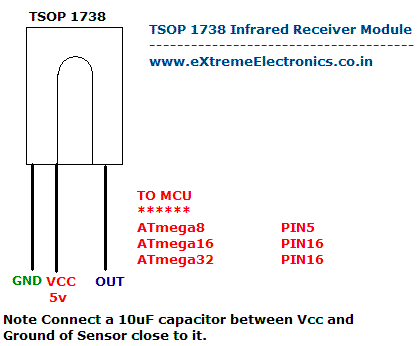 |
Fig – Connecting the sensor. |
|
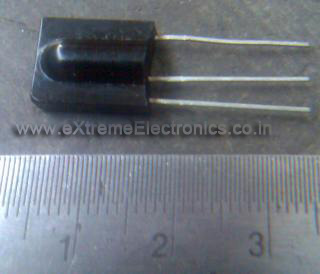 |
Fig – A real TSOP1738 IR sensor module. |
|
The LCD Module
We connect a LCD module to the AVR to run the test program. The display will be used to display the key code received from the remote. This demo will also help you know the key code of the various keys on your remote control. To learn more about LCD interface with AVRs see this. The connection is different for ATmega8 and ATmega16/32 so I am giving both below.
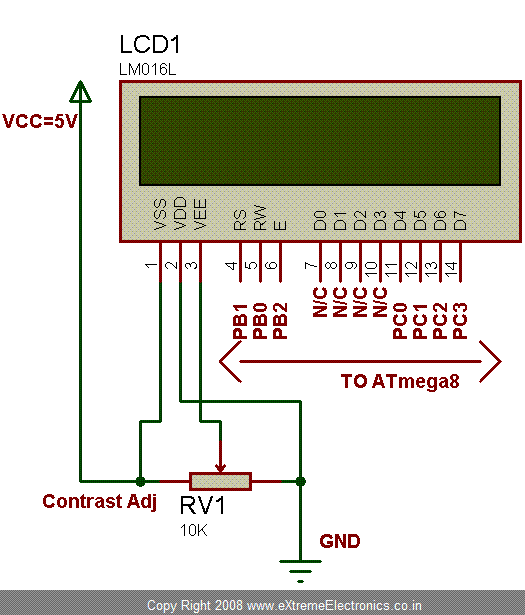 |
Fig – LCD module connection for ATmega8 |
|
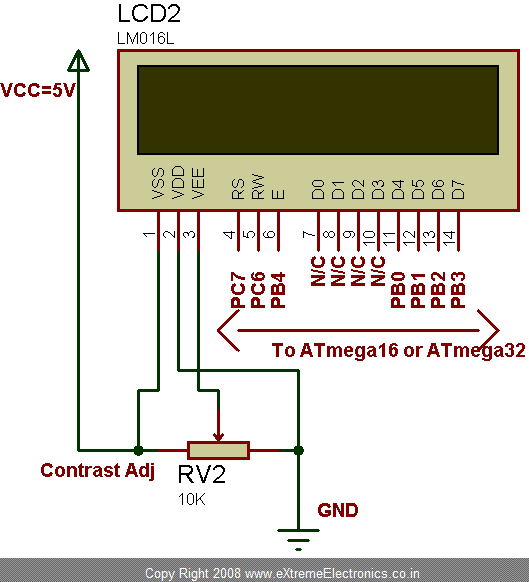 |
Fig – LCD module connection for ATmega16 Or ATmega32 |
|
You can change the PINs that are used for interfacing the LCD with the MCU. For more information on how to do that see this. The N/C pins are not connected anywhere. The PIN names are printed on the back side of the LCD module. The project can be prototyped with any development board. Some easy to use development boards are.
Software Setup
To make the library usable with different AVR MCU’s efficiently I have two different version of the library one for ATmega8 and other for ATmega16 or 32. The library requires some accurate timing and thus cannot be used with any random clock frequency. But I have done my best to make it work with common clock frequency by using some c preprocessor tricks and conditional compilation. The supported frequencies are 8MHz,12Mhz and 16MHz. So before compiling don’t forget to supply the F_CPU in either the makefile or AVR Studio Project. In AVR Studio go to Project->Configuration option and set the frequency.
To be continued …
Subscribe to my feed powered by Feed Burner to get all latest AVR updates on you inbox!

Pingback: Using IR remote with AVR MCUs - Part II | eXtreme Electronics
hi, thank u for ur information, let me say about me.iam try to make my own remote for my fan and room control where as it switchs one by one . but the increse asd decresed of speed was not possible , i like to try your code, and can u help me more in sending some information regarding this control option using AVR, please mail me @ sri3di@gmail.com or sri3i@yahoo.com …. i’m working on 89c51. and i know about AVR micro controllers as of tiany 26, atmega 8515. is this code is sutable for this ic,
Hello Avanish
Iam only a beginner in the field of MCU coding and i am making progress, thanks to all contributors to AVR forum and publishers of related articles like you.i read your article on IR remote control and it is quite interesting, but i would very much pleased if you can share the codes and libraries with me.
My regards.
is it possible to do it with 89s51\2 as this is the low cost ic say 30\-Rs where as AVR are starting from 50\-
hi, even i’m trying to interface usb flash drive with AVR microcontroller to send the video information to the USB drive, do u have any information on this , where as i’m very new to this.
Hi Sridhar,
The code can run on ATmega8515 but not on TINY26.
The 89S52 can’t be used as it is not AVR but 8051 derivative.
You can use ATmega8/16/32 they are low cost and provide advance functionality than 89s51/52
I don’t have any info about USB drive right now.
hi, i tried but there are errors like avrintrept is not avalable such as…..
can u send all the lib, files we need for this
Hi,
The remote control libraries are written for AVR-GCC (WinAVR) only and you may have problem compiling it with Code Vision. Please Download and USE GCC for compilation the steps for using GCC+AVRStudio is given here.
https://extremeelectronics.co.in/avr-tutorials/part-iv-the-hello-world-project/
I have also sent u a GTalk Invitation from my avinash.elec@gmail.com ID
Regards
Avinash Gupta.
eXtreme Electronics
please specify the actual voltage required for the IR Module.
@JAYDIP
Voltage required by IR module is 5v.
Send me the software setup for the same tsop-1738
hi avinash
can i set some random frequency in makefile like 9.27 Mhz
if external oscillator frequency 16 Mhz
@Sanjay
NO
Why u wanna do that ???
i want to generate 38000 pwm by timer 1 with prescaler 1
hi guy’s……..
i am asking for your help guy’s….i have this project…the doctor asked me for a project to write alphabetic’s on lcd using avr and bascom programing lang….the idea is not that hard..but i can’t figure how to recognize different buttons on remote control using the avr…i mean this is how i imagine it…button 1 on remote is assembled by 5 0/1 digital signal’s …button2 by 6 and …etc.
plzzzzzzz help me with the hole concept…and how can i read a single 0/1 using avr …
my email is : nour88n@hotmail.com
Hello Sir,
I want’s some documentation about RC6 code can u help me?
my email id is phykkb@gmail.com
frnds,
can u please please please mail me the circit of 555 timer ic to be used for generating 38khz for using it with tsop??its urgent and i need it..
my email id is chandantiwary2005@gmail.com
Hi there,
In your wiring diagram you have VSS and VDD connected the wrong way. VSS should connect to GND and VDD to VCC.
Regards
@Bob
Thanks for pointing out! 🙂
I think the diagram above is wrong …VSS must be grounded and VDD to 5V …Am I right?
wonderful concept dude,am doing project using ir sensors and atmega 8515,il ask u ,if any help ineed frm u,coz u hav a great brain
hi.. great work. but i don’t see all the tutorial organised( say all tutorials on avr) in a particular place. bcoz when i searched in avr tutorial category i did not get any topics on IR. when when i searched trough search option at right top, i got some article. plz make the topics more comfortable to search.pardon me if i am wrong..
keep it up.. good work
HELLO SIR,
I need to make a dual frequency remote control for my roborace.
I am unable to get its related information.The reciever and transmitter circuit diagram and code for atmega8l or 16l…..could you please provide me this.
Hi,
i have a problem, taht all the time it shows me a constant number: 159. What might be a reason?
Everything works fine., just forgot to set fuses.
sir, great job……..do keep going!!!!
Hello Sir,
Thanks for such a nice article.
It would be of much help to me if you can send me ur library in the following email address.
sethy.bipin@gmail.com
Thanks ,
Bipin
@Bipin
I don’t know Why will I waste my time emailing you ???
Can’t you download it from the website ???
Please don’t put silly requests
oops!!!
I got the link in the subsequent article.
Bipin.
Pingback: DS1307 I2C RTCC Interface using SoftI2C lib | eXtreme Electronics
Please tell me, how to connect the IR receiver to “28 PIN AVR Development Board”. I brought this board from your we site.
Thanks in advance,
Suresh.
Sorry for spamming…
but I compile it by reading this..
“In AVR Studio go to Project->Configuration option and set the frequency.”
Now testing on hardware..
Thanks a lot!
hi, do you have source code for RC5 signal decoding?
Hi Avinash,
I am using HL 538AA51 instead of TSOP 1738. But its not working 🙁
i want to know how to display ( 2.4+ 5.3=7.7)using winavr c.send me the program
Can I use SM0038 instead of tsop1738???
Avinas jee,
I am impressed by your helping nature in field of avr programming. i am learning avr programming. i have learned much by you. i think all the hobbyist are benefited by you. carry on your job. god bless you.
Thanking you on behalf of all the hobbyist
Kumar Satyam (Indian Young Scientist)
Dr. B. C. Roy Engineering College, Durgapur
Hey is your diagram of atmega8 given above correct.
everytime i connect it the lcd shows only black boxes.
pls reply fast.
okay I did everything you said, using atmega 32A and 8mhz crystal and I get key code : 119 right when it starts irrespective of remote input. Remote input doesn’t have any effect. I tested the sensor and the remote with an arduino and they are fine. Any ideas?
Hi avinash,
Grrttt work…
I jst want to ask one question, if I replace tsop with 433mhz rf rx and in remote with tx, will it work??
@Rock,
baby please try it ! like Edison did 2000 experiments to make the filament of electric bulb!
Coz blogs on those day didn’t had a comment feature which came after Web 2.0
ohhhhh sorry the poor guy was born before computers came!
Hi avinash,
is it possible to view and note down the values from the button something using software, rather than connecting external lcd module to it. Like, serial monitor in arduino..?
thanx for the information.
I want to connect LCD display on port A of atmega 8. please suggest me what i need to do. at port B i have connected motors.
thanks in advance
@Anoop, ok will tell you that. But please tell us from how long you are reading our site?
i am sorry for asking about PORT A of atmega 8. i want to connect LCD in robomart robo board to perform robo project.
i am reading this blog from last 2 days.
Thanks
@anoop
So do you like eXtreme Electronics on Facebook?
https://www.facebook.com/eXtremeElectronics
If not then please go, like and follow it. And also like top 5 posts. Then we will help you port this code to for your development board.
Pingback: IR Receiver for NEC protocal
Hey Avinash,
Great work..
I have a small request, if you have the library files for RC5 decoding please send it to the following email.
bharath_13kb@gmail.com
hey can you please help me .. evrytym the LCD is showing 255 value .. its not getting changed when i press the remote button plzz help me
“…In AVR Studio go to Project->Configuration option and set the frequency.”
how to do that in Atmel Studio 6?
I’m stuck on these errors:
Error 3 #error “IR Remote Lib : Unsupported CPU frequency”
Error 4 #error “IR remote Lib : Pls use F_CPU = 8MHz,12Mhz or 16MHz”
Error 6 ‘TIMER_COMP_VAL’ undeclared (first use in this function)
Pingback: IR HX1838-VS1838 – Atmega8 – Nokia 5110 »